> For the complete documentation index, see [llms.txt](https://docs.vectra.ai/llms.txt). Markdown versions of documentation pages are available by appending `.md` to page URLs; this page is available as [Markdown](https://docs.vectra.ai/deployment/appliance-operations/monitoring-appliance-health.md).
# Monitoring appliance health
Monitor the health of physical and virtual Vectra Brain and Sensor appliances.
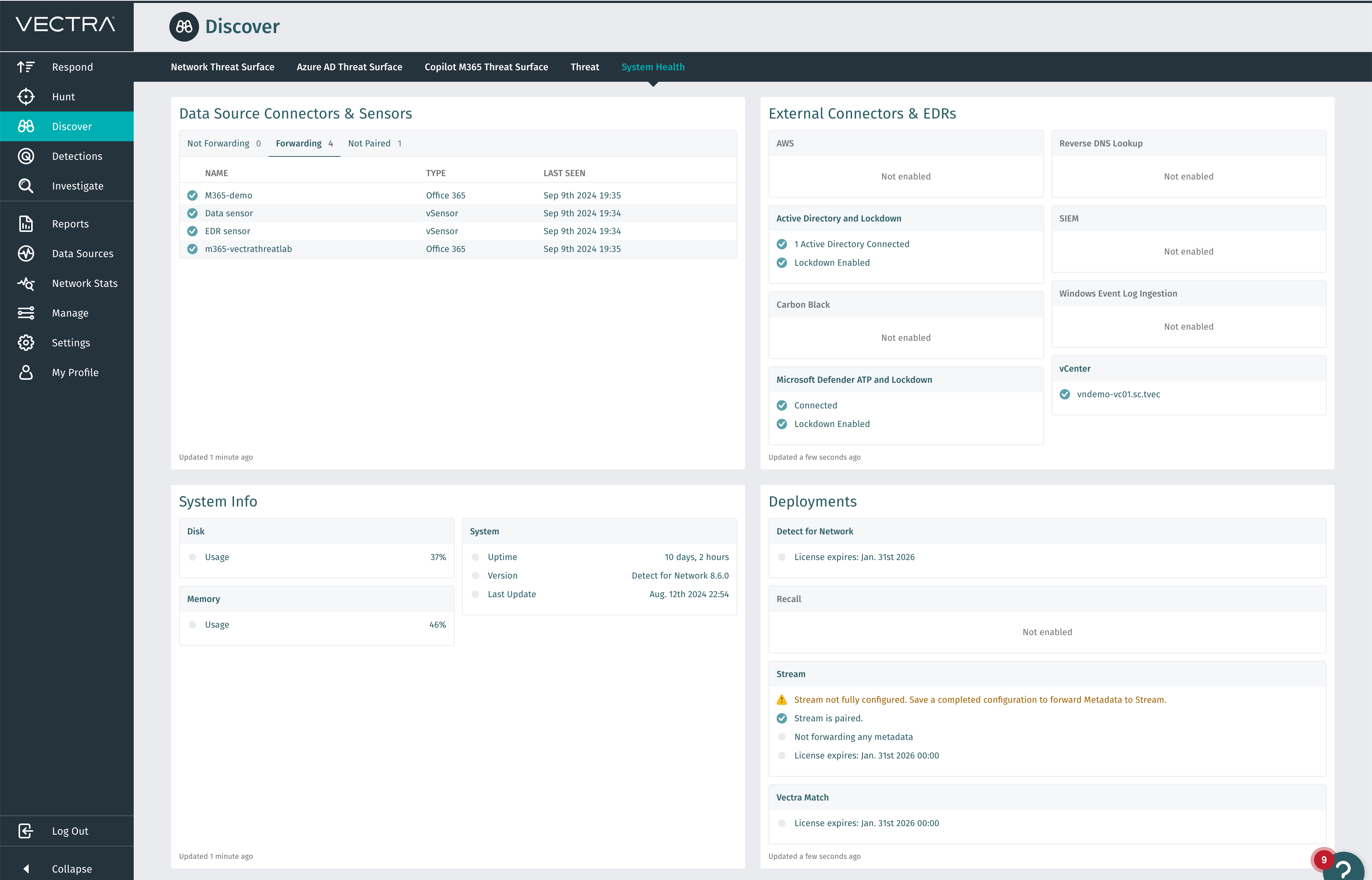
## System Health Section in the Vectra UI
* It is available under: *Vectra UI -> Discover -> System Health.*
\
The information displayed in this section includes:
* Data Source Connectors & Sensors
* Shows all sensors, grouped by status (Not Forwarding, Forwarding, Not Paired)
* External Connectors & EDRs
* Show the status of External connectors and EDRs enabled on the appliance.
* System Info
* Displays health information about the hardware and system.
* Deployments
* Shows health, license, connectivity, etc for the various products in your deployment.
This screen auto-refresh itself every 5 minutes. Most of the alerts reported here can be fixed from your side (for instance, by adjusting the credentials or firewall rules etc.). The only exception to this are hardware issues, which may require a device replacement. Such hardware issues, however, are too important to neglect so please contact our support team.
## System Health Report Obtained from Vectra CLI
Additional system health information is available from the Vectra CLI by connecting to the device using SSH as the **vectra** user. Once connected, you could run the below command to get the health details. For details around connecting to the CLI of your appliance, see: [Console access on Vectra appliances](/deployment/appliance-operations/console-access-on-appliances.md).
**Example:**
```language-markup
vscli > show system-health
======= Ran 10 check(s). 10 Passed, 0 Failed, 0 No Result =======
```
**Example with Verbose Output:**
Please note that depending on the type of system (i.e. Brain vs Sensor) the specific checks output may not match exactly what you see in the example.
```
```
```language-markup
vscli > show system-health --verbose
[ OK ] Available Virtual Storage Space
[ OK ] Disk Writable
[ OK ] Match health checks
[ OK ] NTP Connectivity
[ OK ] Vectra User Password
[ OK ] Valid license
[ OK ] Sensor Link Utilization
[ OK ] Sensor Tunnel [V564dca038e5d3b7471a1e5ead689ada6]
[ OK ] Hypervisor CPU Supported (VHE)
[ OK ] VM Specifications
```
```
```
This command prints out the health checks that have failed (or information about all of the health checks if the "-v" parameter is added) and exposes some of the internals of the device and checks performed. Many of the alerts surface this way cannot be fixed without intervention from Vectra Support. Vectra Support may ask you to run this report as part of a support interaction to gain additional information. The specific checks may vary depending on the model of appliance (physical, virtual, etc) and can change over time as Vectra continues to develop or expose new checks.
As of v8.9 there are new disk space checks that will warn if disk space is from 80-90% full and fail if disk space is 90% or more full:
```language-markup
[ WARN ] Available Disk Space [05394ffe-2d48-11e8-a116-83bb47ff6a8f]
boot disk is getting full (88.9%).
[ WARN ] Available Disk Space [3db4b390-2bb9-11e8-8b73-3b21106510a6]
rootfs disk is getting full (85.6%).
[FAILED] Available Disk Space [f4cad97e-2b87-11e8-bc31-3f2a968a8346]
logs disk is getting full (90.5%).
[FAILED] Available Disk Space [f5393df6-2b87-11e8-8e0c-036b1652269d]
databases, home, data disk is getting full (90.6%).
```
As of version 8.8 of Vectra software, system-health can be checked for paired Sensors or Stream appliances from the Brain CLI. Previously, this was only able to be run at the CLI of each individual appliance.
**Showing "Sensors" Example (includes any Stream appliance)**
```language-markup
vscli > show sensors
Name |Ip |Pairing|Location|Version |Last Seen |Luid |Serial Number
V564dca038e5d3b7471a1e5ead689ada6 172.16.12.11 paired None 8.7.0-19-26 2024-09-09 18:51:50 081eln8k V564dca038e5d3b7471a1e5ead689ada6
```
**Attempting to Show System Health for an Appliance that isn't Paired:**
```language-markup
vscli > show system-health -s E221A20100130098
Serial number E221A20100130098 not found in paired sensor list.
```
**Showing System Health from a Paired Sensor:**
```language-markup
vscli > show system-health --sensor_serial U25010000001883
Waiting up to 120 seconds until system health check is done.
======== Ran 9 check(s). 9 Passed, 0 Failed, 0 No Result ========
vscli > show system-health --sensor_serial U25010000001883 -v
Waiting up to 120 seconds until system health check is done.
[ OK ] capture_bandwidth_usage
[ OK ] Packet Processing Engine
[ OK ] Disk Writable
[ OK ] NIC Detection
[ OK ] SFP detection
[ OK ] Capture Interface Link Stability
[ OK ] Capture Interface Receiving Traffic
[ OK ] Check for interface traffic drop
```
### Querying health information using REST API
You can also extract system health information programmatically using RUX or QUX APIs. There is an endpoint exposed in both to gather system health information.
Vectra provides separate APIs for use with Respond UX or Quadrant UX deployments. The Respond UX offers a unified view with AI-driven Prioritization and a single urgency score for all entities (hosts, accounts, etc) across all data sources (network, public cloud, SaaS, etc). The Quadrant UX is the classic experience that existing Vectra NDR (formerly Detect for Network) customers are familiar with. It offers separate threat and certainty scores with separate host and account prioritization.
* Respond UX
* [v3.4 API guide (RUX)](/configuration/access/api-rux/v34-api-guide-rux.md)
* Quadrant UX
* [How to query Vectra REST API using Postman platform](/configuration/access/api-qux/v25-postman-quick-start-guide-using-token-auth.md)
* [REST API Guide v2.5](/configuration/access/api-qux/v25-api-guide-qux.md)
* [Vectra v2.5 Public Postman Collection](https://www.postman.com/vectra-internal/workspace/vectra-ai/collection/7429442-509c593b-8de4-4aa3-ac05-e07934eb9f17)
See [Vectra Analyst User Experiences (Respond vs Quadrant)](/deployment/getting-started/analyst-ux-options-rux-vs-qux.md) if you are unsure of which UX you are using.
### System alerts
You may also utilize [system alerts](/configuration/response/notifications/system-alerts.md) to be notified of the system health state change and be informed of issues with the device.
### Proactive monitoring
Vectra provides additional monitoring for the appliances as part of [Proactive Monitoring](https://support.vectra.ai/s/article/KB-VS-1238). When the [firewall requirements](/deployment/getting-started/firewall-requirements.md) rules allow communication with Vectra, additional health information is reported to Vectra as part of the telemetry. The information retrieved is then reviewed to confirm the impact and scope of the issue, as some of the health check failures do not immediately indicate any issue and even those causing an issue can sometimes be fixed by Vectra without your intervention.
In case of any concerns, Vectra Support will get in touch with additional information and recommendations, in effort to resolve the problem.
---
# Agent Instructions
This documentation is published with GitBook. GitBook is the documentation platform designed so that both humans and AI agents can read, navigate, and reason over technical content effectively. Learn more at gitbook.com.
## Querying This Documentation
If you need additional information that is not directly available in this page, you can query the documentation dynamically by asking a question.
Perform an HTTP GET request on the current page URL with the `ask` query parameter, and the optional `goal` query parameter:
```
GET https://docs.vectra.ai/deployment/appliance-operations/monitoring-appliance-health.md?ask=&goal=
```
`ask` is the immediate question: it should be specific, self-contained, and written in natural language.
`goal` is optional and describes the broader end goal you are ultimately trying to accomplish on behalf of the user. GitBook uses it to tailor the answer towards what is most useful for that goal.
The response will contain a direct answer to the question and relevant excerpts and sources from the documentation.
Use this mechanism when the answer is not explicitly present in the current page, you need clarification or additional context, or you want to retrieve related documentation sections.