> For the complete documentation index, see [llms.txt](https://docs.vectra.ai/llms.txt). Markdown versions of documentation pages are available by appending `.md` to page URLs; this page is available as [Markdown](https://docs.vectra.ai/release-notes/quadrant-ux-qux/2026-qux-release-notes.md).
# 2026 QUX Release Notes
{% updates format="full" %}
{% update date="2026-09-10" tags="observe,9.14" %}
## v9.14 - Observe
### Rapid Release Improvements
The following improvements have been made to algorithms since the last software release cycle. Customers that are connected to Vectra’s update service with Remote Support enabled have received these improvements. All other customers will be receiving the following improvements as part of this release:
***Expanded Detection Coverage for Remote Access and C2 Activity***
Expanded Suspect Protocol Activity coverage with new detections for Microsoft Quick Assist and Tailscale discovery traffic, helping security teams identify potentially unauthorized remote-support and overlay-network activity. This release also adds coverage for commonly used command-and-control frameworks and web-scanning behavior.
### Post-Quantum Cryptography (PQC) Metadata Enhancements
Vectra AI now provides greater visibility into the cryptographic methods used across network communications. This helps users identify where modern & post-quantum cryptography is being adopted and better prepare for evolving security requirements. Visit [Network Metadata Attributes](https://docs.vectra.ai/reference/metadata-attributes/vectra-ai-platform-network-metadata-attributes) for details.
### Traffic Visibility Drop Alerting
The rollout of Traffic Visibility Drop Alerting, first introduced in 9.11, is now complete and available to all customers. These health notifications alert on significant drops in observed IPs, traffic bandwidth, and packet volume that may impact detection coverage. Using machine learning, the alerts adapt to each customer’s unique network patterns and identify meaningful deviations without relying on static thresholds. Alert notifications can be delivered via email, webhook integrations, API, or Syslog on QUX.
This enhancement provides earlier awareness of visibility gaps, helping security teams quickly identify and address potential blind spots. With the phased rollout now complete, Traffic Visibility Drop Alerting is fully available to help customers monitor and maintain network visibility.
For more information on the alerts, [read the documentation](https://docs.vectra.ai/deployment/traffic-engineering-and-validation/traffic-visibility-drop-alerting).
{% endupdate %}
{% update date="2026-09-10" tags="signal,9.14" %}
## v9.14 - Signal
### Host ID User Agent Enrichment
Vectra AI has enhanced Host ID with observed HTTP user agent information, giving users additional context for asset identification and investigation. This enrichment helps maintain more consistent host context as sessions change.
### EDR Process Context for Microsoft Defender
Vectra AI has released Microsoft Defender EDR process correlation for all customers. This capability streamlines investigations by automatically finding the probable process related to a NDR detection and presenting it alongside the detection in the platform and when the event is collected via API.
This result is a more powerful detection and response, less manual work, and better outcomes for security teams. It eliminates the need for custom SIEM or SOAR correlation logic and can save up to 30 minutes per detection. What was the process driving C2 a browser or a PowerShell script, is it expected, or does it stand out, these are questions analysts must answer immediately, and this capability makes that instant. Review how to update your existing integration’s permissions here [Microsoft Defender Integration FAQ](https://docs.vectra.ai/configuration/setup/edr-integrations/microsoft-defender-for-endpoint?ask=defender+process\&q=qux+rux#finding-defender-tenant-id-application-id-and-application-secret) and enable this integration today.
{% endupdate %}
{% update date="2026-09-10" tags="control,9.14" %}
## v9.14 - Control
### APIv2.5 Improvements
Vectra AI has improved API performance in Quadrant UX and expanded API support for Traffic Lockdown. These updates help users retrieve host information more efficiently and automate a broader range of response actions.
{% endupdate %}
{% update date="2026-09-10" tags="platform,9.14" %}
## v9.14 - Platform
### Generic KVM Deployment Support
Vectra AI now supports a wider range of virtual deployment environments. Users can deploy Brain, Sensor, and Stream more flexibly across KVM-based environments, including Proxmox. For deployment information see the documents for KVM [Brain](https://docs.vectra.ai/deployment/ndr-virtual-cloud-appliances/kvm-brain), [Sensor](https://docs.vectra.ai/deployment/ndr-virtual-cloud-appliances/kvm-vsensor), [Stream](https://docs.vectra.ai/deployment/stream/deployment/kvm-stream-deployment).
### Microsoft Defender Integration Improvements
Vectra AI has expanded Microsoft Defender for Endpoint support across Commercial, GCC, GCC High/DoD, and custom Microsoft environments, giving users more flexibility to match their deployment. For implementation details, see [Microsoft Defender for Endpoint](https://docs.vectra.ai/configuration/setup/edr-integrations/microsoft-defender-for-endpoint).
{% endupdate %}
{% update date="2026-07-23" tags="observe,9.13" %}
## v9.13 - Observe
### Rapid Release Improvements
The following improvements have been made to algorithms since the last software release cycle. Customers that are connected to Vectra’s update service with Remote Support enabled have received these improvements. All other customers will be receiving the following improvements as part of this release:
***Windows Post-Exploitation Detection Enhancements***
Vectra AI has expanded coverage for common Windows post-compromise techniques, including SMB-based lateral movement, malicious named pipe activity, and Cobalt Strike SMB beaconing. These enhancements improve visibility into remote execution, command-and-control, and attacker movement across Windows environments while maintaining high-confidence detection fidelity.
***HTTP Attack Tool Activity Detection***
Vectra AI has expanded HTTP-based detection coverage for attacker tooling and suspicious file transfer activity. New behavioral signatures improve visibility into malicious downloads, uploads, and certificate-related abuse commonly leveraged during post-exploitation, helping identify adversary activity using trusted Windows utilities and offensive frameworks.
***Tunneling and Covert Channel Detection***
Vectra AI has introduced expanded detection coverage for tunneling frameworks and covert communication channels, including web-based tunnels, public tunneling services, and custom BackConnect protocols. These enhancements improve visibility into techniques commonly used to bypass network controls, establish persistent access, and evade traditional perimeter defenses.
***Credential Access and Data Exfiltration Detection***
Vectra AI has expanded detection coverage for techniques associated with credential theft and data exfiltration. New detections improve visibility into Active Directory Certificate Services abuse, suspicious transfers of Active Directory database files, and cloud storage exfiltration using common synchronization tools, helping identify attacker activity targeting sensitive identity and directory data.
{% endupdate %}
{% update date="2026-07-23" tags="platform,9.13" %}
## v9.13 - Platform
### ERSPAN Improvements
Since the GA release of ERSPAN support in v9.12, Vectra AI has continued to improve deployment flexibility, scalability, and operational performance for ERSPAN-based monitoring environments. Enhancements in 9.13 include:
* support for 8-core and higher virtual Sensors
* support for 16 IPs per capture interface
* performance optimizations that increase processing efficiency for encapsulated traffic workloads
Together, these updates simplify deployment and improve reliability across a broader range of virtual and physical Sensor environments.
Read the documentation
{% endupdate %}
{% update date="2026-06-08" tags="observe,9.12" %}
## v9.12 - Observe
### Rapid Release Improvements
The following improvements have been made to algorithms since the last software release cycle. Customers that are connected to Vectra’s update service with Remote Support enabled have received these improvements. All other customers will be receiving the following improvements as part of this release:
***GhostLock SMB Detection***
Vectra AI has introduced new coverage for GhostLock activity over SMB by detecting file-level locking behavior associated with the tool’s default authorization artifact. This enhancement improves visibility into attempted disruption of files on SMB shares while maintaining focused, high-confidence detection coverage for observed GhostLock file-locking workflows.
***Expanded Command-and-Control Coverage***
Vectra AI has expanded command-and-control detection coverage across several adversary tools and frameworks, including Empire, Merlin, Caldera Sandcat, and interactive beaconing activity. These enhancements improve visibility into C2 communications over HTTP and other network channels, including encoded or tool-specific traffic patterns used by modern offensive frameworks.
***Credential Access and Attack Tool Detection***
Vectra AI has improved coverage for credential acquisition and attack tool activity, including detection of Ncrack-based RDP activity and Responder NTLM behavior. These updates help identify attempts to capture, reuse, or validate credentials across common enterprise protocols while preserving precise, low-noise detection outcomes.
### Command & Control Detection Enhancements
Vectra AI has expanded its Unified Beacon detection to identify interactive Command & Control (C2) activity over HTTP and HTTPS. Interactive C2 channels are often configured to make attacker-controlled sessions more responsive, generating high rates of repeated connection activity even before the channel is actively used to conduct an attack.
With this update, Vectra delivers stronger visibility into noisy, interactive C2 behavior by detecting sustained connection patterns to uncommon external domains.
### JA4DHCP Fingerprint: Recall and Stream
Vectra AI now includes JA4DHCP fingerprints in Recall metadata, bringing next-gen fingerprinting to DHCP traffic analysis. This added context helps analysts identify and compare DHCP client behavior, improving visibility into device activity across the network.
JA4DHCP fingerprints are now supported in Recall, with Stream and Advanced Investigations support coming in a later release.
### NTLM Metadata Improvements: Recall and Stream
Vectra AI has expanded NTLM metadata visibility across both LDAP and HTTP authentication workflows, providing analysts with deeper context into NTLM authentication activity and potential relay, brute-force, or credential abuse techniques.
* For **NTLM over LDAP**, Vectra now captures and publishes NTLM authentication exchanges observed in LDAP SASL binds, including direct NTLM and SPNEGO/Sicily-wrapped authentication flows. This adds richer visibility into NTLM authentication behavior within Active Directory and LDAP environments.
* For **NTLM over HTTP**, Vectra now captures NTLM authentication metadata carried in HTTP authentication exchanges, including direct NTLM and SPNEGO/Negotiate-wrapped flows. Analysts can now investigate NTLM authentication behavior across web-based authentication activity alongside existing LDAP and SMB visibility.
These enhancements improve visibility into NTLM-based authentication activity while maintaining privacy-safe handling for sensitive NTLM values. NTLM metadata for LDAP and HTTP is now supported in Recall and Stream.
{% endupdate %}
{% update date="2026-06-08" tags="platform,9.12" %}
## v9.12 - Platform
### ERSPAN Support now GA
Vectra AI now supports ERSPAN decapsulation for encapsulated network traffic on physical and virtual Sensors. This simplifies deployment in environments using ERSPAN traffic and improves network visibility without changing standard passive capture behavior.
ERSPAN support is GA in 9.12 for appliances with bandwidth below 50 Gbps, with support for 50 Gbps and higher planned for 9.13. To learn more, visit the [Encapsulation Endpoints Documentation Guide](https://docs.vectra.ai/configuration/coverage/encapsulation-endpoints-gre-erspan-geneve-vxlan).
### IP Support on Capture Interfaces
Administrators can now add an IP address to Sensor capture interfaces, allowing Vectra to serve as a destination for ERSPAN, GRE, GENEVE, and VXLAN tunneled traffic.
This update gives teams more flexibility when configuring encapsulated traffic sources and helps simplify deployments where tunneled traffic must be directed to a specific Sensor interface. To learn more, visit the [Encapsulation Endpoints Documentation Guide](https://docs.vectra.ai/configuration/coverage/encapsulation-endpoints-gre-erspan-geneve-vxlan).
### Microsoft Defender for Endpoint Custom URL Support
Vectra AI has expanded Microsoft Defender for Endpoint integration support to allow custom API URLs. This gives customers more flexibility when connecting Defender environments that use non-default Microsoft API endpoints, including specialized cloud environments. For configuration guidance, visit the [Microsoft Defender for Endpoint Integration Page.](https://docs.vectra.ai/configuration/setup/edr-integrations/microsoft-defender-for-endpoint)
### Traffic Visibility Drop Alerting
Vectra AI is continuing the phased rollout of Traffic Visibility Drop Alerting, first introduced in 9.11. These health notifications alert on significant drops in observed IPs, traffic bandwidth, and packet volume that may impact detection coverage. Using machine learning, the alerts adapt to each customer’s unique network patterns and identify meaningful deviations without relying on static thresholds. Alert notifications can be delivered via email, webhook integrations, API, or Syslog on QUX.
This enhancement provides earlier awareness of visibility gaps, helping security teams quickly identify and address potential blind spots. Availability began in 9.11, with phased rollout continuing in 9.12 to ensure optimal signal quality and customer experience.
Read the documentation
### Introducing the Vectra S17 Sensor
We're excited to announce the newest member of the Vectra appliance family — the S17, available for order today! The S17 is the direct successor to the S11 sensor platform, delivering increased performance and capacity in the same compact 1RU form factor. The S17 supports up to 9 Gbps of Sensor Mode performance and 2.5 Gbps of Match-enabled performance, while adding integrated 1Gbps/10Gbps copper networking and management interfaces.
For more information about appliance specifications, please see the [Appliance and Sensor Specifications](https://docs.vectra.ai/deployment/getting-started/appliance-specifications).
For deployment instructions, please see the [S17 Quick Start Guide.](https://docs.vectra.ai/deployment/ndr-physical-appliances/s-series/s17)
### Appendix
#### S11 Platform End of Sale Notice
The S11 sensor platform has reached its End of Sale (EOS) milestone on May 18, 2026. As part of this milestone, Vectra is transitioning customers to the new S17 sensor platform, which is available for order immediately and serves as the direct successor to the S11.
While the S11 reached End of Sale on May 18, 2026, Vectra will continue to provide full platform support through May 18, 2031. This includes support for new software releases, Vectra Customer Support, and hardware warranty coverage based on the warranty terms in effect at the time of purchase.
For more information about Vectra EOS/EOL policies, please visit the [End of Sale/End of Life Policy page](https://docs.vectra.ai/reference/appliance-eos-eol-policy?utm_source=sfdc).
#### Will this upgrade perform a reboot of the Brain or Sensors?
No, a reboot is not required as part of the 9.12 update.
{% endupdate %}
{% update date="2026-05-05" tags="observe,9.11" %}
## v9.11 - Observe
### Rapid Release Improvements
The following improvements have been made to algorithms since the last software release cycle. Customers that are connected to Vectra’s update service with Remote Support enabled have received these improvements. All other customers will be receiving the following improvements as part of this release:
* **SASE Smash-and-Grab Exfiltration Detection:** New coverage extends Smash-and-Grab exfiltration detection to SASE (Zscaler and Netskope) traffic.
* **XWorm C2 Detection:** New coverage identifies encrypted check-in traffic patterns over TCP, improving detection of modern XWorm variants communicating with attacker infrastructure.
* **Beaconless C2 (Unknown + TLS):** Behavioral models now detect long-lived, non-beaconing C2 sessions across both unknown and TLS protocols, including HTTPS and TLS-wrapped channels. This improves visibility into encrypted and interactive hands-on-keyboard activity while maintaining low detection noise.
* **Sliver & PoshC2 Enhancements:** Updated coverage improves detection of evolving Sliver HTTP encoder variants and introduces new visibility into PoshC2 activity over HTTP and HTTPS, strengthening detection of PowerShell-based C2 frameworks.
{% endupdate %}
{% update date="2026-05-05" tags="platform,9.11" %}
## v9.11 - Platform
### Traffic Visibility Drop Alerting
Vectra AI is introducing new health notifications to alert significant drops in observed IPs, traffic bandwidth, and packet volume that may impact detection coverage. Using machine learning, these alerts adapt to each customer’s unique network patterns and identify meaningful deviations without relying on static thresholds. Alert notifications can be delivered via email, webhook integrations, API, or Syslog on QUX.
This enhancement provides earlier awareness of visibility gaps, helping security teams quickly identify and address potential blind spots. Availability begins in 9.11, with rollout planned in phases to ensure optimal signal quality and customer experience.
Read the documentation
### User Interface Update – Account Profile Placement
Vectra AI has updated the user interface to introduce a top bar to the site which stores in-app help and account menu in the top-right corner of the page. This centralized location provides quick access to user settings, theme preferences, and logout options, improving overall navigation and usability.
### 📎 Appendix
#### Match Customers: Curated Ruleset Update
Vectra has updated the Curated Ruleset to align with the latest ETPRO ruleset, which introduces new rule categories and enhanced detection capabilities based on Suricata 7.0.3.
What this means for you:
* If you manage your ruleset within the Vectra UI: no action is required.
* If you manage your ruleset externally and filter by category: please review your configuration to ensure compatibility with the updated categories. Additional details about the updated categories can be found in [Suricata’s announcement.](https://forum.suricata.io/t/emerging-threats-pro-open-ruleset-for-suricata-7-0-3-now-available/4714/1)
If you do not filter by category, no action is needed.
Vectra launched the updated Curated Ruleset on April 30th, 2026.
#### S101 Platform End of Sale Notice
The S101 platform has reach its End of Sale milestone on Feb 13th, 2026. As part of this milestone, Vectra has been transitioning to the new S127 system.
While the S101 reached End of Sale on Feb 13th, 2026, we are going to continue to provide full platform support until Feb 13th 2031. This includes support for new software releases, Vectra Customer Support, and hardware warranty based upon warranty terms at time of purchase.
For more information about Vectra EOS/EOL, please see [End of Sale/End of Life Policy Page.](https://support.vectra.ai/vectra/article/KB-VS-1268)
#### Will this upgrade perform a reboot of the Brain or Sensors?
No, a reboot is not required as part of the 9.11 update.
{% endupdate %}
{% update date="2026-04-08" tags="observe,9.10" %}
## v9.10 - Observe
### Sliver Command and Control Enhancements
Vectra AI has enhanced its detection coverage for Sliver Command & Control (C2) activity by incorporating the latest advances in LLM and AI-driven modeling. Sliver’s flexible beaconing—characterized by variable sleep intervals and jitter—allows attackers to evade traditional defenses, particularly in longer, low-frequency communication patterns.
With this update, Vectra leverages attention-based techniques and enriched behavioral data to better capture these complex patterns, improving detection across previously evasive scenarios. This enhancement strengthens our beaconing C2 analytics, delivering more consistent visibility into sophisticated Sliver activity and enabling earlier, more accurate threat detection.
### Hidden Tunnel Enhancements
Vectra AI has expanded its Hidden Tunnel detection to identify stealthy, non-beaconing Command & Control (C2) activity over previously uncovered protocols. This type of attacker behavior uses long-lived, low-noise connections that can evade traditional detection methods while enabling direct, hands-on control of compromised systems.
With this update, Vectra delivers stronger visibility into these evasive attack techniques, providing new behavioral coverage for previously undetected activity and helping security teams identify and respond to sophisticated threats earlier.
### Rapid Release Improvements
The following improvements have been made to algorithms since the last software release cycle. Customers that are connected to Vectra’s update service with Remote Support enabled have received these improvements. All other customers will be receiving the following improvements as part of this release:
* Vectra AI continues its transition of detections previously delivered through the Suricata engine into native detections running directly on the Vectra flow engine. This ongoing effort ensures advanced attacker behavior coverage is available to all customers, without requiring Suspect Protocol Activity (SPA) or reliance on signature-based detection logic. This release includes a number of new native detections covering **Cobalt Strike, Meterpreter, Mythic C2,** and **DNScat** activity, as well as a new rule to detect SSH on other reserved ports.
* Vectra AI has introduced new visibility into generative AI application usage by detecting DeepSeek activity within network traffic. This enhancement helps security teams better understand and monitor emerging AI tool usage in their environments, supporting improved governance and risk awareness.
* Vectra AI has expanded LDAP reconnaissance detection coverage to better identify attacker attempts to enumerate privileged accounts, delegation settings, and trust relationships within Active Directory. This enhancement improves visibility into early-stage discovery activity while reducing noise through more contextual and precise detection logic.
### Improved NTLM Authentication Visibility
We enhanced how NTLM authentication metadata is captured and reported to provide deeper visibility into legacy authentication activity across the network.
The platform now surfaces additional NTLM authentication context in Stream and Recall, including:
* The NTLM server challenge used during authentication
* The NTLM protocol version observed in the exchange
For specific field names and descriptions, visit [Metadata Attributes](https://docs.vectra.ai/reference/metadata-attributes/vectra-ai-platform-network-metadata-attributes).
### Expanded DHCP Metadata Visibility
We expanded DHCP telemetry to provide a richer device and network configuration context for hosts joining the network.
Additional DHCP metadata fields are now captured and available in Stream and Recall, including:
* Vendor and user class identifiers used for device fingerprinting
* Client system architecture and vendor-specific device metadata
* Network configuration attributes such as router information and parameter request lists
* Device provisioning and configuration metadata including TFTP server names, WPAD URLs, and MUD URLs
{% endupdate %}
{% update date="2026-04-08" tags="signal,9.10" %}
## v9.10 - Signal
#### EDR Process Context now GA
Vectra AI has released CrowdStrike EDR process correlation for all customers. This capability streamlines investigations by automatically finding the probable process related to a NDR detection and presenting it alongside the detection in the platform and when the event is collected via API.
This result is a more powerful detection and response, less manual work, and better outcomes for security teams. It eliminates the need for custom SIEM or SOAR correlation logic and can save up to 30 minutes per detection. What was the process driving C2 a browser or a PowerShell script, is it expected, or does it stand out, these are questions analysts must answer immediately, and this capability makes that instant. Contact your Vectra AI account team to join the private preview and visit [Crowdstrike EDR Integration FAQ](https://support.vectra.ai/vectra/article/KB-VS-1143) for instructions on how to support this integration.
Learn more about how Vectra AI works with CrowdStrike in this podcast.
{% embed url="" %}
{% endupdate %}
{% update date="2026-04-08" tags="platform,9.10" %}
## v9.10 - Platform
These enhancements improve device identification, asset fingerprinting, and network visibility by exposing additional configuration signals present during DHCP negotiations. For specific field names and descriptions, visit [Metadata Attributes](https://docs.vectra.ai/reference/metadata-attributes/vectra-ai-platform-network-metadata-attributes).
### Dark Mode in Public Preview
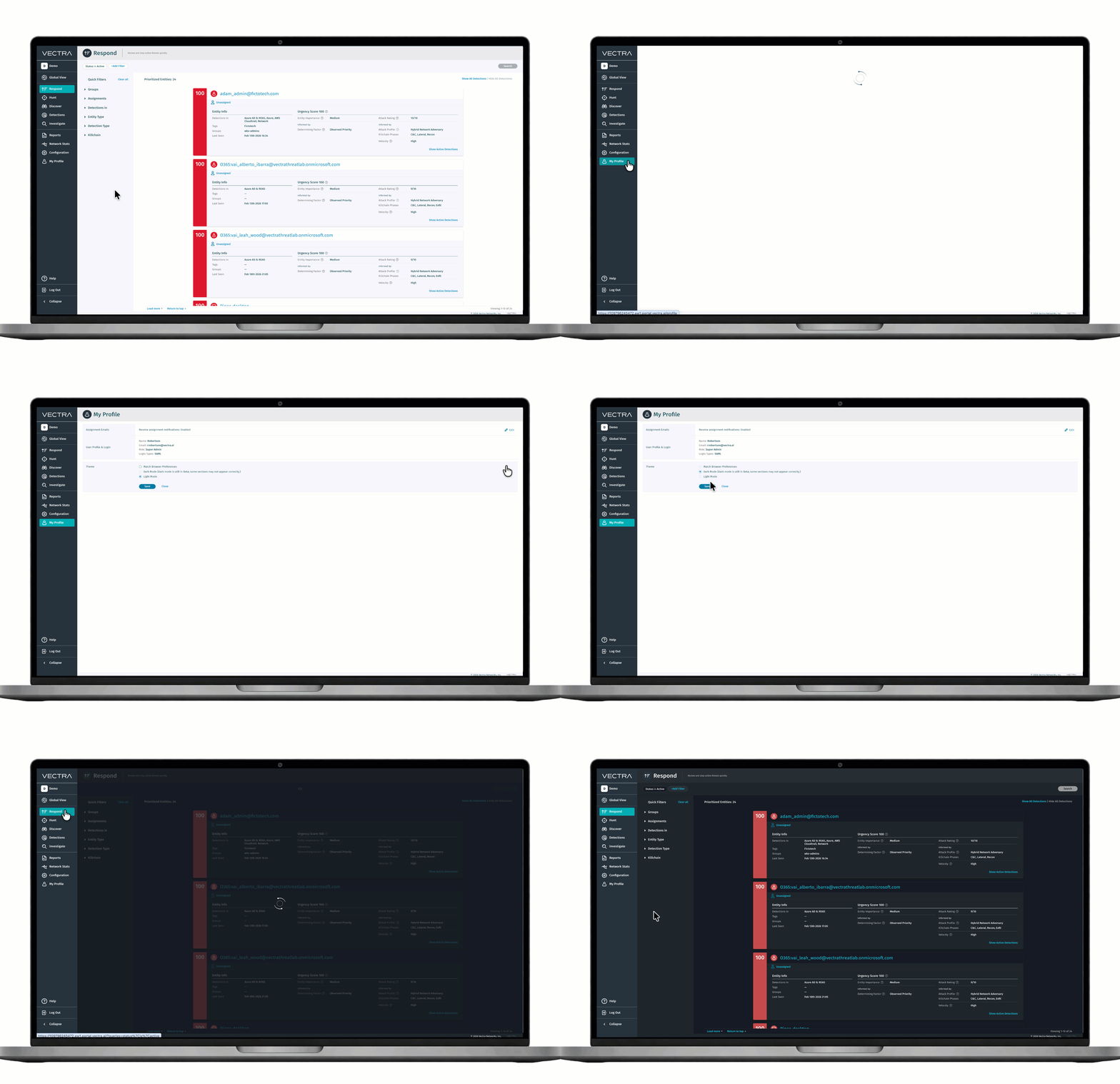
Welcome to the dark side...of the Vectra AI Platform! Customers can now toggle to dark mode under My Profile > Theme. [Some pages](https://support.vectra.ai/s/article/KB-VS-3217) are still being migrated to support Dark mode over the coming releases.
### Traffic Validation (ENTV) Alerts
Traffic Validation now delivers clear, actionable notifications when network traffic quality risks detection coverage. Customers are alerted on critical, aggregate events—such as asymmetric flows or dropped packets—that impact visibility. [Traffic Validation Sys\_check Alerts](https://docs.vectra.ai/deployment/traffic-engineering-and-validation/entv-syscheck-descriptions) provides clear explanations and recommended solutions, helping teams resolve problems faster and maintain reliable, high-confidence detections.
### SSH Login to Vectra Appliances now GA
Vectra AI has simplified and clarified how administrators access appliances over SSH. Now authorized UI users can log in using their own SSH credentials, rather than relying on the shared vectra account. Administrators can manage personal SSH keys and CLI passwords directly from the Web UI. These updates make it easier for teams to follow best practices, reduce reliance on default credentials, and maintain secure administrative access. To learn more, visit [SSH Login to Vectra Appliances Documentation Guide](https://support.vectra.ai/vectra/article/KB-VS-1704).
### New Close Workflow Enabled by Default
In 9.10, customers will be moved by default to our new close workflow. The New Close workflow offers better workflows for customers, and also will power our new operational SOC overflow report. Customers can opt out at any time from their configuration section. Learn more about [the workflow here.](https://docs.vectra.ai/operations/analyst-guidance/new-close-workflow?utm_source=sfdc)
### Multi-SAML Support now GA
The Quadrant UX platform currently supports single sign-on (SSO) through integration with a customer’s identity provider (IDP) using a configured SAML profile. Until now, only a single SAML profile can be defined, which restricts integration to one IDP at a time.
To tackle this, we are introducing support for multiple SAML profiles. This enhancement will enable customers and MSSPs to configure and manage integrations with multiple IDPs simultaneously, providing greater flexibility and alignment with complex identity environments. Multi-SAML enablement is supported through the UI ([documentation](https://docs.vectra.ai/configuration/access/saml-sso-qux/any-idp-saml-qux)) and API ([documentation](https://docs.vectra.ai/configuration/access/api-qux/v25-api-guide-qux?utm_source=sfdc)).
### 📎 Appendix
#### S101 Platform End of Sale Notice
The S101 platform has reach its End of Sale milestone on Feb 13th, 2026. As part of this milestone, Vectra has been transitioning to the new S127 system.
While the S101 reached End of Sale on Feb 13th, 2026, we are going to continue to provide full platform support until Feb 13th 2031. This includes support for new software releases, Vectra Customer Support, and hardware warranty based upon warranty terms at time of purchase.
For more information about Vectra EOS/EOL, please see [End of Sale/End of Life Policy Page.](https://support.vectra.ai/vectra/article/KB-VS-1268)
#### Will this upgrade perform a reboot of the Brain or Sensors?
No, a reboot is not required as part of the 9.10 update.
{% endupdate %}
{% update date="2026-03-02" tags="observe,9.9" %}
## v9.9 - Observe
### New Detection: Azure Suspicious Token Usage - User Principal
Vectra AI has introduced a new detection that surfaces suspicious behaviors associated with usage of user principal access tokens. The new Azure Suspicious Token Usage - User Principal detection is designed to highlight instances of a token being stolen by evaluating characteristics of the ASNs used and the operation types observed in relation to the principal's behavioral profile. Stolen tokens may allow threat attackers to access Azure resources without needing the user’s password or MFA.
### New Detection: Azure Suspicious Token Usage - Service Principal
Vectra AI has introduced a new detection that surfaces suspicious behaviors associated with usage of service principal access tokens. The new Azure Suspicious Token Usage - Service Principal detection is designed to highlight instances of a token being misused by evaluating characteristics of the ASNs in relation to the principal's behavioral profile. This detection applies to both managed identities and application service principals.
### Detection Enhancement: Azure AD Successful Brute-Force
Enhancements have been introduced to the Azure AD Successful Brute Force detection model to expand coverage for new brute forcing techniques. Vectra has rearchitected the model to significantly reduce time to detect for brute force use-cases, broadened coverage for techniques by casting a wider net across sign-in attempts, included autonomous system numbers (ASNs) within the model parameters as well as introduced special treatment for trusted devices. Customers may observe a minor increase in alert volumes as a result of these enhancements.
### Rapid Release Improvements
The following improvements have been made to algorithms since the last software release cycle. Customers that are connected to Vectra’s update service with Remote Support enabled have received these improvements. All other customers will be receiving the following improvements as part of this release:
* Vectra AI continues its transition of detections previously delivered through the Suricata engine into native detections running directly on the Vectra flow engine. This ongoing effort ensures advanced attacker behavior coverage is available to all customers, without requiring Suspect Protocol Activity (SPA) or reliance on signature-based detection logic.
This release introduces a number of new native detections covering Cobalt Strike, Meterpreter, and Ursnif activity.
* Vectra AI has resolved an issue where Suspicious Remote Execution detections did not correctly display mapped function names due to a missing function map file in container images. The update ensures the required mapping file is properly packaged and loaded, restoring accurate function name visibility and improving detection clarity for remote execution activity.
{% endupdate %}
{% update date="2026-03-02" tags="platform,9.9" %}
## v9.9 - Platform
### Multi-SAML Support
The Quadrant UX platform currently supports single sign-on (SSO) through integration with a customer’s identity provider (IDP) using a configured SAML profile. Until now, only a single SAML profile can be defined, which restricts integration to one IDP at a time.
To tackle this, we are introducing support for multiple SAML profiles. This enhancement will enable customers and MSSPs to configure and manage integrations with multiple IDPs simultaneously, providing greater flexibility and alignment with complex identity environments.
{% endupdate %}
{% update date="2026-01-27" tags="observe,9.8" %}
## v9.8 - Observe
### Rapid Release Improvements
The following improvements have been made to algorithms since the last software release cycle. Customers that are connected to Vectra’s update service with Remote Support enabled have received these improvements. All other customers will be receiving the following improvements as part of this release:
* Vectra AI continues its transition of detections previously delivered through the Suricata engine into native detections running directly on the Vectra flow engine. This ongoing effort ensures advanced attacker behavior coverage is available to all customers, without requiring Suspect Protocol Activity (SPA) or reliance on signature-based detection logic.
* This release introduces additional detections for Cobalt Strike, Brute Ratel, and PowerShell Empire.
* Vectra AI has improved the Smash and Grab detection accuracy by ensuring destination domain names update correctly when observed later in a session. This enhancement allows whitelist logic to function as intended, reducing unnecessary alerts and improving the fidelity of Smash and Grab detections.
* Vectra AI has improved information-level detections for Remote Management and Monitoring (RMM) tools by correctly populating application protocol details in detection metadata. This enhancement provides clearer context on Host pages when RMM activity is observed, improving investigative clarity while maintaining a low-noise, non-scoring alerting experience.
* Vectra AI has refined its **Mythic C2 detection** logic to reduce false positives by tightening how server certificate fields are evaluated. This update narrows overly broad pattern matching, preventing benign domains containing similar terms from triggering alerts and improving overall detection fidelity.
### New Detection: Azure Suspect Operation - DNS Security Policy Modification
Vectra AI has introduced a new detection that surfaces suspicious behaviors associated with modifications network flow logging. The new Azure Suspect Operation - DNS Security Policy Modification detection is designed to surface actions where an entity was observed deleting or modifying a resource associated with a DNS Security Policy. This could disable the logging of DNS queries or otherwise tamper with DNS resolution within the Azure environment. Threat actors use this technique to impair logging and evade detection.
### New Detection: Azure Suspect Operation - Flow Logs Disabled
Vectra AI has introduced a new detection that surfaces suspicious behaviors associated with modifications network flow logging. The new Azure Suspect Operation - Flow Logs Disabled detection is designed to surface actions where an entity was observed deleting an Azure flow log resource. This indicates removal of flow logging for a VNet, subnet or NIC and is a well-known cloud defense evasion technique leveraged by attacked to impair visibility and auditability of actions.
### New Detection: Azure Suspect Operation - Network Security Config Change
Vectra AI has introduced a new detection that surfaces suspicious behaviors associated with modifications of network security configurations. The new Azure Suspect Operation - Network Security Config Change detection is designed to surface actions where an entity is unexpectedly creating or modifying an Azure network security group (NSG) or modifying an Azure firewall resource. This may indicate lateral movement within the network or an attempt to impair defenses.
### New Detection: Azure Suspect Operation - High-Risk Deletion
Vectra AI has introduced a new detection that surfaces suspicious behaviors associated with high-risk deletions in an Azure environment. The new Azure Suspect Operation - High-Risk Deletion detection is designed to surface actions such as removal of sensitive backups and immutability policies that threat actors may use to blind defenses and cause impact. This detection strengthens coverage against cloud threat actors like Storm-0501 that have leveraged these techniques in documented attacks.
### Detection Enhancement: Azure TOR Activity
Enhancements have been introduced to the Azure TOR activity detection model to improve prioritization of the entities associated with this behavior. Moving forward, Vectra AI is adding impetus to the entities that showcase this behavior so that they are promptly surfaced in the Respond page. Customers may observe a minor increase in prioritized entities as a result of this change.
### New Detection: Azure AD Suspect Operation: Guest User Added
Vectra AI has introduced a new detection that surfaces suspicious behaviors associated with initial access. The new Azure AD Suspect Operation: Guese User Added detection is designed to surface behaviors where a principal is observed inviting an external guest user into the environment which is inconsistent with the observed principal's behavioral profile. This method is used by threat actors in a social engineering campaign to establish access and maintain persistence into a victim's environment.
### New Detection: Azure AD Suspect Operation: Unusual Sign-On from a Proxy
Vectra AI has introduced a new detection that surfaces suspicious behaviors associated with initial access. The new Azure AD Suspect Operation: Unusual Sign-On from a Proxy detection is designed to surface actions where a principal is observed signing in using a proxy or a VPN that is inconsistent with its normal behavior. This is a method used by threat actors to mask their true location. This detection is the first to leverage Vectra AI's new Threat Intelligence engine - a collection of private and licensed threat feeds designed to provide rich contextual and reputational information for the highest possible signal clarity.
{% endupdate %}
{% update date="2026-01-27" tags="control,9.8" %}
## v9.8 - Control
### Traffic Lockdown: Automated Network Defense via Firewall Integration
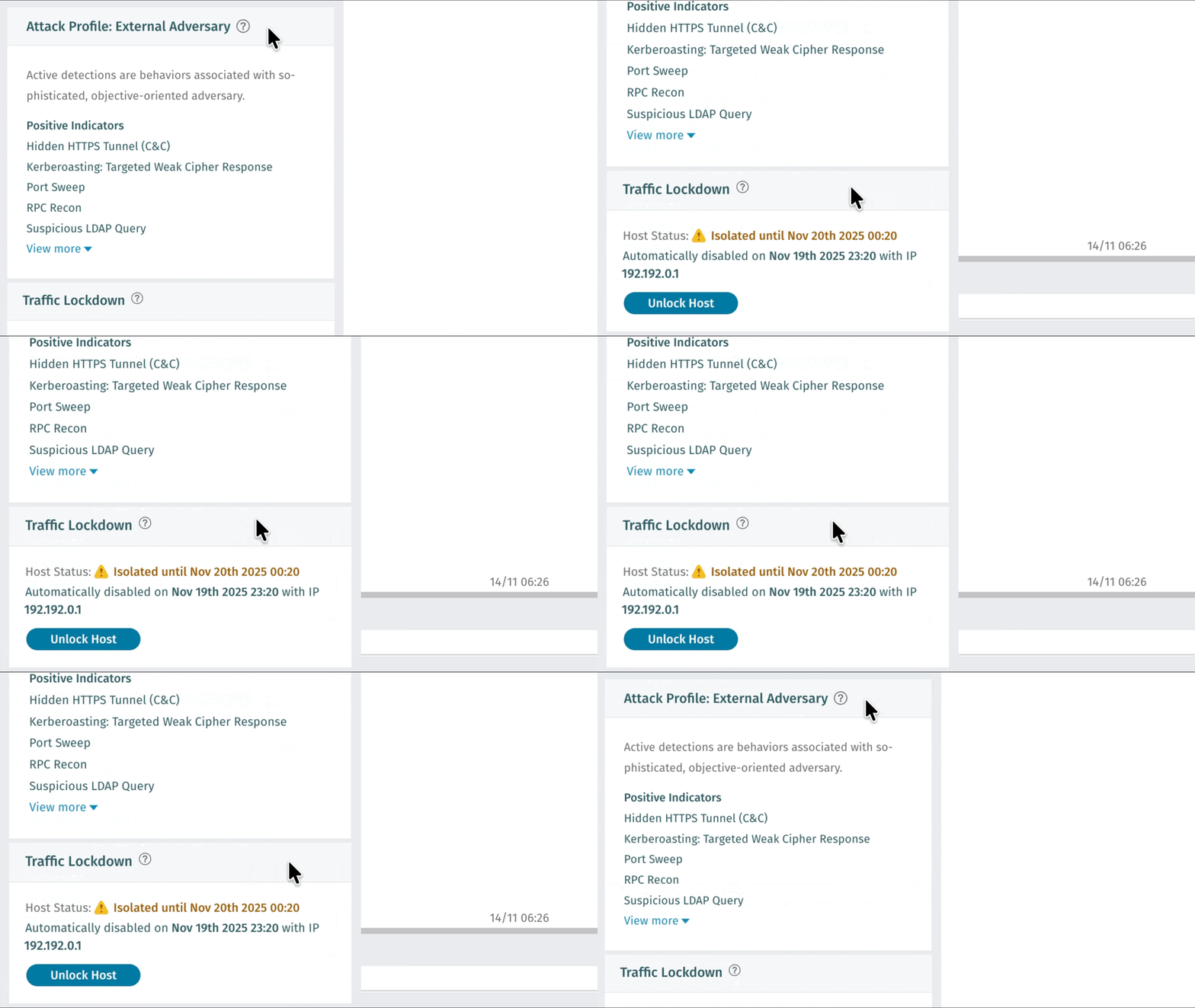
Vectra AI now empowers customers to take instant action on detected threats with Traffic Lockdown, a new capability that automatically blocks malicious hosts at the firewall level. By integrating directly with supported firewalls, Vectra AI dynamically publishes threat feed IPs for immediate enforcement with no manual rules or complex setup required. Security teams gain faster containment, cleaner workflows, and stronger protection where it matters most: at the network edge. Visit [Traffic Lockdown](/configuration/response/lockdown/traffic-lockdown.md) for configuration instructions.
To hear more about Vectra's Response capabilities, watch this podcast:
{% embed url="" %}
### Operational Overview Report
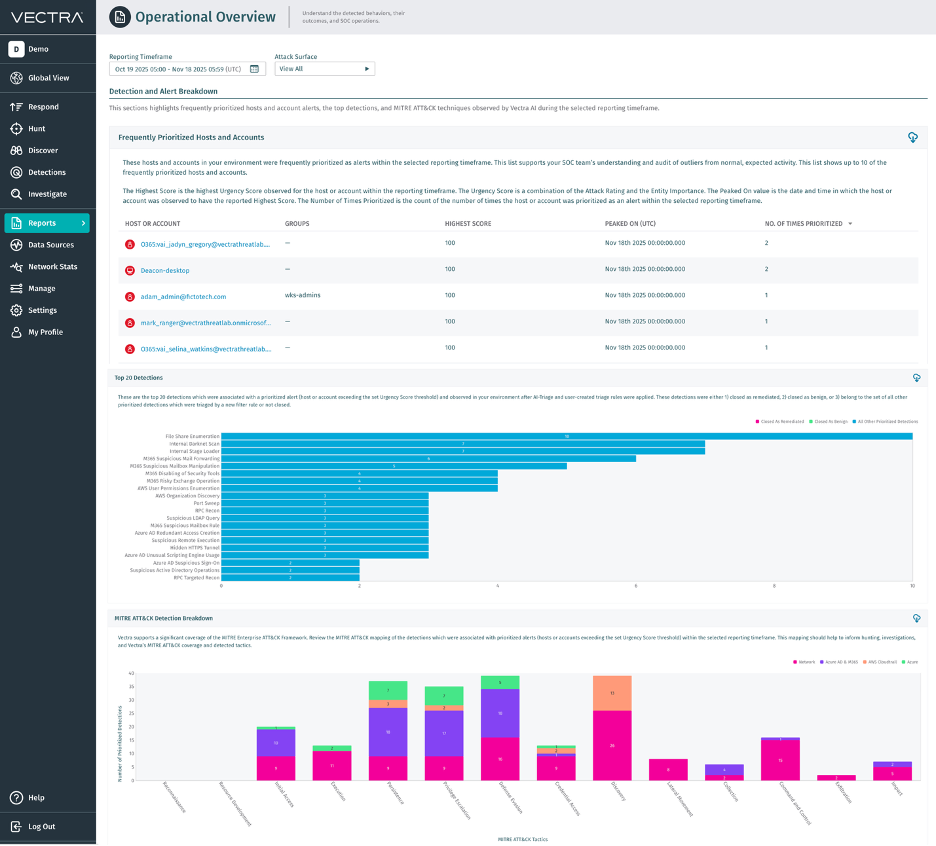
Introducing the Operational Overview Report — your SOC’s new command view for performance and impact. This report brings together key metrics like Mean Time to Assignment, Mean Time to Investigate, and Mean Time to Resolve, alongside top detections, MITRE ATT\&CK mappings, and prioritized entities in one clear, visual dashboard. It quantifies how Vectra AI drives faster investigations, sharper triage, and measurable efficiency gains. With powerful insights for business reviews, executive reporting, and daily operations, it turns performance data into proof of value.
For more information about reporting, watch this podcast:
{% embed url="" %}
####
{% endupdate %}
{% update date="2026-01-27" tags="platform,9.8" %}
## v9.8 - Platform
### Navigational Change: Configuration
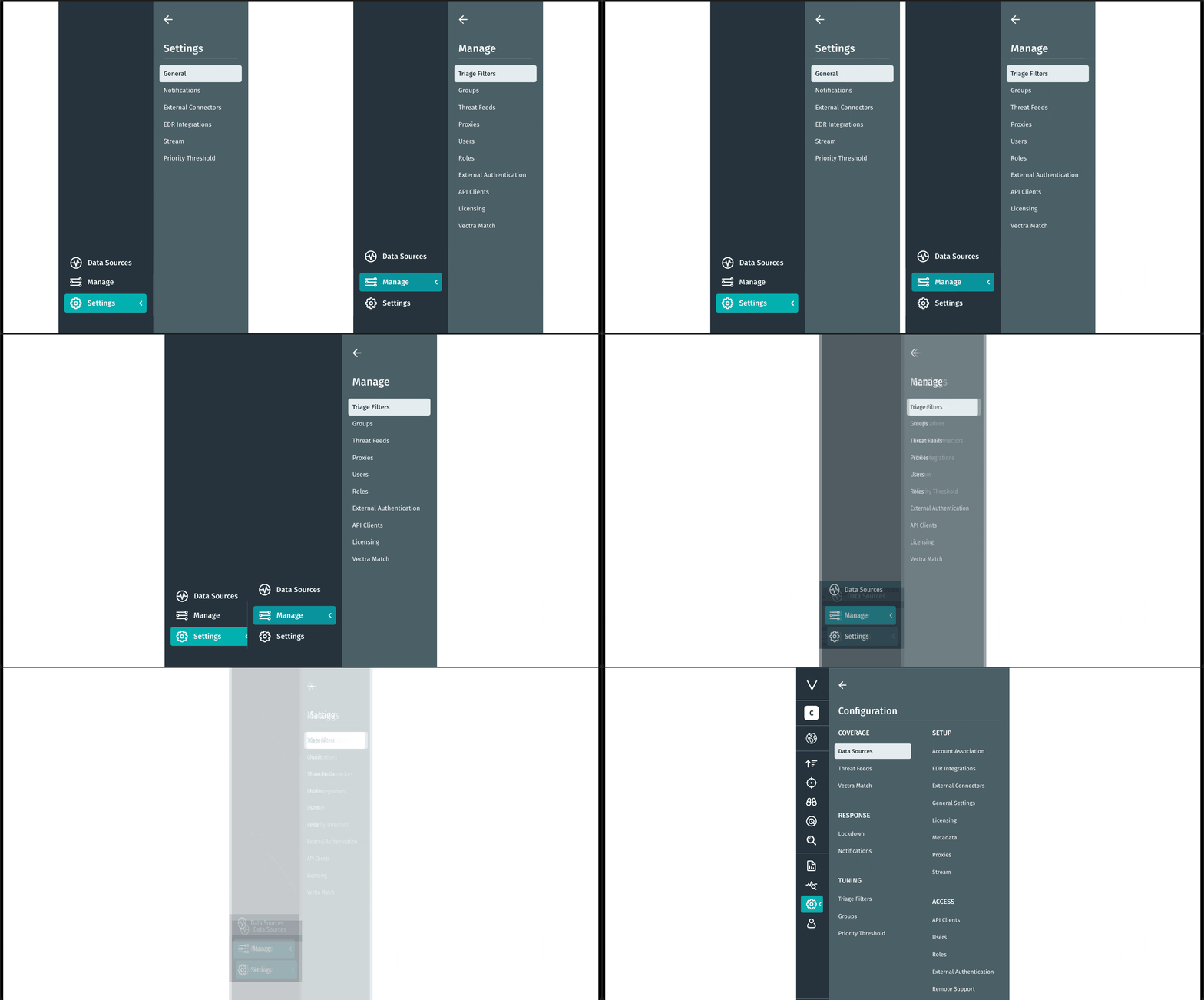
We’ve streamlined how you manage your environment in the Vectra AI Platform. The new Configuration tab unifies the Manage & Settings options to bring all configuration and control settings into one clear, intuitive view, so you can find what you need faster and act with confidence. This update eliminates friction and simplifies navigation. Less searching. More doing.
### Syslog Certificate Validation
Vectra 9.8 adds support for validating server certificates for Syslog destinations using TLS. Validation is controlled by a checkbox in the Syslog configuration, allowing customers to confirm their certificates before enabling validation. Follow the Configuration Steps on [Vectra’s Syslog Guide](/configuration/response/notifications/syslog-guide-qux.md) for guidance.
{% hint style="warning" %}
Note: During this update, we also identified a prior issue that could result in a missing Server CA certificate in certain configurations. Customers should review their Syslog settings under *Configuration > Response > Notifications* to confirm all required certificates are present.
{% endhint %}
### SSH Login to Vectra Appliances (Private Preview)
Vectra AI has simplified and clarified how administrators access appliances over SSH. Now authorized UI users can log in using their own SSH credentials, rather than relying on the shared `vectra` account. Administrators can manage personal SSH keys and CLI passwords directly from the Web UI. These updates make it easier for teams to follow best practices, reduce reliance on default credentials, and maintain secure administrative access. To learn more, visit [SSH Login to Vectra Appliances Documentation Guide](https://support.vectra.ai/vectra/article/KB-VS-1704).
### GCP Deployments Transition to Infrastructure Manager
GCP deployments now use Infrastructure Manager, which replaces Deployment Manager, ensuring continued support and a more reliable deployment experience. This update simplifies how Vectra brains and sensors are deployed on GCP, [replacing deprecated tooling](https://docs.cloud.google.com/deployment-manager/docs/deprecations).
* Deployment guides will be updated with the Infrastructure Manager process: [GCP vSensor Deployment Guide](/deployment/ndr-virtual-cloud-appliances/gcp-vsensor.md), [GCP Brain Deployment Guide](/deployment/ndr-virtual-cloud-appliances/gcp-brain.md), [Stream Deployment Guide](/deployment/stream.md)
### Introducing the Vectra S127 System
We’re excited to announce the newest member of the Vectra appliance family — the S127, available for order today! The S127 is the direct successor to our workhorse S101 platform, delivering the same trusted performance with modernized hardware and room to grow. The S127 supports 58 Gbps aggregate Sensor capacity, and 30Gbps performance with Match Enabled. For more information about the appliance specs, please see the [Appliance and Sensor Specifications](/deployment/getting-started/appliance-specifications.md).
* For the deployment guide, please see the [S127 Quick Start Guide](/deployment/ndr-physical-appliances/s-series/s127.md).
### 📎 Appendix
#### Coming Soon: Traffic Validation Notifications
Traffic Validation now delivers clear, actionable notifications when network traffic quality risks detection coverage. Customers can quickly see whether sensors are capturing the right traffic and pinpoint specific issues—such as asymmetric flows or dropped packets—that impact visibility. [Traffic Validation Sys\_check Descriptions](/deployment/traffic-engineering-and-validation/traffic-validation-entv-alerting.md) provides clear explanations and recommended solutions, helping teams resolve problems faster and maintain reliable, high-confidence detections.
#### B101 Platform End of Sale Notice
The B101 platform has reach its End of Sale milestone on Nov 25th, 2025. As part of this milestone, Vectra has been transitioning to the new B127 system.
While the B101 reached End of Sale on Nov 25th, 2025, we are going to continue to provide full platform support until Nov 25th 2030. This includes support for new software releases, Vectra Customer Support, and hardware warranty based upon warranty terms at time of purchase.
For more information about Vectra EOS/EOL, please see [End of Sale/End of Life Policy Page.](broken://spaces/HJ1ltuWFvsArFWtevnRn/pages/lqSSMcLDWTrIqB6PZj7o)
#### Will this upgrade perform a reboot of the Brain or Sensors?
No, a reboot is not required as part of the 9.8 update.
{% endupdate %}
{% endupdates %}
---
# Agent Instructions
This documentation is published with GitBook. GitBook is the documentation platform designed so that both humans and AI agents can read, navigate, and reason over technical content effectively. Learn more at gitbook.com.
## Querying This Documentation
If you need additional information that is not directly available in this page, you can query the documentation by asking a question.
Perform an HTTP GET request on the following URL with the `ask` and `goal` query parameters:
```
GET https://docs.vectra.ai/release-notes/quadrant-ux-qux/2026-qux-release-notes.md?ask=&goal=
```
`ask` is the immediate question: it should be specific, self-contained, and written in natural language.
`goal` is what the user is ultimately trying to achieve, the reason they need the answer. Sharing it helps GitBook give you a better, more relevant answer. A goal is most helpful when it describes the outcome the user wants rather than restating the question. For example, with `ask=how do I create an API token`, a goal like `automate deployments from our CI pipeline` lets GitBook tailor the answer to that use case.
The response will contain a direct answer to the question and relevant excerpts and sources from the documentation.
Use this mechanism when the answer is not explicitly present in the current page, you need clarification or additional context, or you want to retrieve related documentation sections.

 This result is a more powerful detection and response, less manual work, and better outcomes for security teams. It eliminates the need for custom SIEM or SOAR correlation logic and can save up to 30 minutes per detection. What was the process driving C2 a browser or a PowerShell script, is it expected, or does it stand out, these are questions analysts must answer immediately, and this capability makes that instant. Review how to update your existing integration’s permissions here [Microsoft Defender Integration FAQ](https://docs.vectra.ai/configuration/setup/edr-integrations/microsoft-defender-for-endpoint?ask=defender+process\&q=qux+rux#finding-defender-tenant-id-application-id-and-application-secret) and enable this integration today.
{% endupdate %}
{% update date="2026-09-10" tags="control,9.14" %}
## v9.14 - Control
### APIv2.5 Improvements
Vectra AI has improved API performance in Quadrant UX and expanded API support for Traffic Lockdown. These updates help users retrieve host information more efficiently and automate a broader range of response actions.
{% endupdate %}
{% update date="2026-09-10" tags="platform,9.14" %}
## v9.14 - Platform
### Generic KVM Deployment Support
Vectra AI now supports a wider range of virtual deployment environments. Users can deploy Brain, Sensor, and Stream more flexibly across KVM-based environments, including Proxmox. For deployment information see the documents for KVM [Brain](https://docs.vectra.ai/deployment/ndr-virtual-cloud-appliances/kvm-brain), [Sensor](https://docs.vectra.ai/deployment/ndr-virtual-cloud-appliances/kvm-vsensor), [Stream](https://docs.vectra.ai/deployment/stream/deployment/kvm-stream-deployment).
### Microsoft Defender Integration Improvements
Vectra AI has expanded Microsoft Defender for Endpoint support across Commercial, GCC, GCC High/DoD, and custom Microsoft environments, giving users more flexibility to match their deployment. For implementation details, see [Microsoft Defender for Endpoint](https://docs.vectra.ai/configuration/setup/edr-integrations/microsoft-defender-for-endpoint).
{% endupdate %}
{% update date="2026-07-23" tags="observe,9.13" %}
## v9.13 - Observe
### Rapid Release Improvements
The following improvements have been made to algorithms since the last software release cycle. Customers that are connected to Vectra’s update service with Remote Support enabled have received these improvements. All other customers will be receiving the following improvements as part of this release:
***Windows Post-Exploitation Detection Enhancements***
Vectra AI has expanded coverage for common Windows post-compromise techniques, including SMB-based lateral movement, malicious named pipe activity, and Cobalt Strike SMB beaconing. These enhancements improve visibility into remote execution, command-and-control, and attacker movement across Windows environments while maintaining high-confidence detection fidelity.
***HTTP Attack Tool Activity Detection***
Vectra AI has expanded HTTP-based detection coverage for attacker tooling and suspicious file transfer activity. New behavioral signatures improve visibility into malicious downloads, uploads, and certificate-related abuse commonly leveraged during post-exploitation, helping identify adversary activity using trusted Windows utilities and offensive frameworks.
***Tunneling and Covert Channel Detection***
Vectra AI has introduced expanded detection coverage for tunneling frameworks and covert communication channels, including web-based tunnels, public tunneling services, and custom BackConnect protocols. These enhancements improve visibility into techniques commonly used to bypass network controls, establish persistent access, and evade traditional perimeter defenses.
***Credential Access and Data Exfiltration Detection***
Vectra AI has expanded detection coverage for techniques associated with credential theft and data exfiltration. New detections improve visibility into Active Directory Certificate Services abuse, suspicious transfers of Active Directory database files, and cloud storage exfiltration using common synchronization tools, helping identify attacker activity targeting sensitive identity and directory data.
{% endupdate %}
{% update date="2026-07-23" tags="platform,9.13" %}
## v9.13 - Platform
### ERSPAN Improvements
Since the GA release of ERSPAN support in v9.12, Vectra AI has continued to improve deployment flexibility, scalability, and operational performance for ERSPAN-based monitoring environments. Enhancements in 9.13 include:
* support for 8-core and higher virtual Sensors
* support for 16 IPs per capture interface
* performance optimizations that increase processing efficiency for encapsulated traffic workloads
Together, these updates simplify deployment and improve reliability across a broader range of virtual and physical Sensor environments.
Read the documentation
{% endupdate %}
{% update date="2026-06-08" tags="observe,9.12" %}
## v9.12 - Observe
### Rapid Release Improvements
The following improvements have been made to algorithms since the last software release cycle. Customers that are connected to Vectra’s update service with Remote Support enabled have received these improvements. All other customers will be receiving the following improvements as part of this release:
***GhostLock SMB Detection***
Vectra AI has introduced new coverage for GhostLock activity over SMB by detecting file-level locking behavior associated with the tool’s default authorization artifact. This enhancement improves visibility into attempted disruption of files on SMB shares while maintaining focused, high-confidence detection coverage for observed GhostLock file-locking workflows.
***Expanded Command-and-Control Coverage***
Vectra AI has expanded command-and-control detection coverage across several adversary tools and frameworks, including Empire, Merlin, Caldera Sandcat, and interactive beaconing activity. These enhancements improve visibility into C2 communications over HTTP and other network channels, including encoded or tool-specific traffic patterns used by modern offensive frameworks.
***Credential Access and Attack Tool Detection***
Vectra AI has improved coverage for credential acquisition and attack tool activity, including detection of Ncrack-based RDP activity and Responder NTLM behavior. These updates help identify attempts to capture, reuse, or validate credentials across common enterprise protocols while preserving precise, low-noise detection outcomes.
### Command & Control Detection Enhancements
Vectra AI has expanded its Unified Beacon detection to identify interactive Command & Control (C2) activity over HTTP and HTTPS. Interactive C2 channels are often configured to make attacker-controlled sessions more responsive, generating high rates of repeated connection activity even before the channel is actively used to conduct an attack.
With this update, Vectra delivers stronger visibility into noisy, interactive C2 behavior by detecting sustained connection patterns to uncommon external domains.
### JA4DHCP Fingerprint: Recall and Stream
Vectra AI now includes JA4DHCP fingerprints in Recall metadata, bringing next-gen fingerprinting to DHCP traffic analysis. This added context helps analysts identify and compare DHCP client behavior, improving visibility into device activity across the network.
JA4DHCP fingerprints are now supported in Recall, with Stream and Advanced Investigations support coming in a later release.
### NTLM Metadata Improvements: Recall and Stream
Vectra AI has expanded NTLM metadata visibility across both LDAP and HTTP authentication workflows, providing analysts with deeper context into NTLM authentication activity and potential relay, brute-force, or credential abuse techniques.
* For **NTLM over LDAP**, Vectra now captures and publishes NTLM authentication exchanges observed in LDAP SASL binds, including direct NTLM and SPNEGO/Sicily-wrapped authentication flows. This adds richer visibility into NTLM authentication behavior within Active Directory and LDAP environments.
* For **NTLM over HTTP**, Vectra now captures NTLM authentication metadata carried in HTTP authentication exchanges, including direct NTLM and SPNEGO/Negotiate-wrapped flows. Analysts can now investigate NTLM authentication behavior across web-based authentication activity alongside existing LDAP and SMB visibility.
These enhancements improve visibility into NTLM-based authentication activity while maintaining privacy-safe handling for sensitive NTLM values. NTLM metadata for LDAP and HTTP is now supported in Recall and Stream.
{% endupdate %}
{% update date="2026-06-08" tags="platform,9.12" %}
## v9.12 - Platform
### ERSPAN Support now GA
Vectra AI now supports ERSPAN decapsulation for encapsulated network traffic on physical and virtual Sensors. This simplifies deployment in environments using ERSPAN traffic and improves network visibility without changing standard passive capture behavior.
ERSPAN support is GA in 9.12 for appliances with bandwidth below 50 Gbps, with support for 50 Gbps and higher planned for 9.13. To learn more, visit the [Encapsulation Endpoints Documentation Guide](https://docs.vectra.ai/configuration/coverage/encapsulation-endpoints-gre-erspan-geneve-vxlan).
### IP Support on Capture Interfaces
Administrators can now add an IP address to Sensor capture interfaces, allowing Vectra to serve as a destination for ERSPAN, GRE, GENEVE, and VXLAN tunneled traffic.
This update gives teams more flexibility when configuring encapsulated traffic sources and helps simplify deployments where tunneled traffic must be directed to a specific Sensor interface. To learn more, visit the [Encapsulation Endpoints Documentation Guide](https://docs.vectra.ai/configuration/coverage/encapsulation-endpoints-gre-erspan-geneve-vxlan).
This result is a more powerful detection and response, less manual work, and better outcomes for security teams. It eliminates the need for custom SIEM or SOAR correlation logic and can save up to 30 minutes per detection. What was the process driving C2 a browser or a PowerShell script, is it expected, or does it stand out, these are questions analysts must answer immediately, and this capability makes that instant. Review how to update your existing integration’s permissions here [Microsoft Defender Integration FAQ](https://docs.vectra.ai/configuration/setup/edr-integrations/microsoft-defender-for-endpoint?ask=defender+process\&q=qux+rux#finding-defender-tenant-id-application-id-and-application-secret) and enable this integration today.
{% endupdate %}
{% update date="2026-09-10" tags="control,9.14" %}
## v9.14 - Control
### APIv2.5 Improvements
Vectra AI has improved API performance in Quadrant UX and expanded API support for Traffic Lockdown. These updates help users retrieve host information more efficiently and automate a broader range of response actions.
{% endupdate %}
{% update date="2026-09-10" tags="platform,9.14" %}
## v9.14 - Platform
### Generic KVM Deployment Support
Vectra AI now supports a wider range of virtual deployment environments. Users can deploy Brain, Sensor, and Stream more flexibly across KVM-based environments, including Proxmox. For deployment information see the documents for KVM [Brain](https://docs.vectra.ai/deployment/ndr-virtual-cloud-appliances/kvm-brain), [Sensor](https://docs.vectra.ai/deployment/ndr-virtual-cloud-appliances/kvm-vsensor), [Stream](https://docs.vectra.ai/deployment/stream/deployment/kvm-stream-deployment).
### Microsoft Defender Integration Improvements
Vectra AI has expanded Microsoft Defender for Endpoint support across Commercial, GCC, GCC High/DoD, and custom Microsoft environments, giving users more flexibility to match their deployment. For implementation details, see [Microsoft Defender for Endpoint](https://docs.vectra.ai/configuration/setup/edr-integrations/microsoft-defender-for-endpoint).
{% endupdate %}
{% update date="2026-07-23" tags="observe,9.13" %}
## v9.13 - Observe
### Rapid Release Improvements
The following improvements have been made to algorithms since the last software release cycle. Customers that are connected to Vectra’s update service with Remote Support enabled have received these improvements. All other customers will be receiving the following improvements as part of this release:
***Windows Post-Exploitation Detection Enhancements***
Vectra AI has expanded coverage for common Windows post-compromise techniques, including SMB-based lateral movement, malicious named pipe activity, and Cobalt Strike SMB beaconing. These enhancements improve visibility into remote execution, command-and-control, and attacker movement across Windows environments while maintaining high-confidence detection fidelity.
***HTTP Attack Tool Activity Detection***
Vectra AI has expanded HTTP-based detection coverage for attacker tooling and suspicious file transfer activity. New behavioral signatures improve visibility into malicious downloads, uploads, and certificate-related abuse commonly leveraged during post-exploitation, helping identify adversary activity using trusted Windows utilities and offensive frameworks.
***Tunneling and Covert Channel Detection***
Vectra AI has introduced expanded detection coverage for tunneling frameworks and covert communication channels, including web-based tunnels, public tunneling services, and custom BackConnect protocols. These enhancements improve visibility into techniques commonly used to bypass network controls, establish persistent access, and evade traditional perimeter defenses.
***Credential Access and Data Exfiltration Detection***
Vectra AI has expanded detection coverage for techniques associated with credential theft and data exfiltration. New detections improve visibility into Active Directory Certificate Services abuse, suspicious transfers of Active Directory database files, and cloud storage exfiltration using common synchronization tools, helping identify attacker activity targeting sensitive identity and directory data.
{% endupdate %}
{% update date="2026-07-23" tags="platform,9.13" %}
## v9.13 - Platform
### ERSPAN Improvements
Since the GA release of ERSPAN support in v9.12, Vectra AI has continued to improve deployment flexibility, scalability, and operational performance for ERSPAN-based monitoring environments. Enhancements in 9.13 include:
* support for 8-core and higher virtual Sensors
* support for 16 IPs per capture interface
* performance optimizations that increase processing efficiency for encapsulated traffic workloads
Together, these updates simplify deployment and improve reliability across a broader range of virtual and physical Sensor environments.
Read the documentation
{% endupdate %}
{% update date="2026-06-08" tags="observe,9.12" %}
## v9.12 - Observe
### Rapid Release Improvements
The following improvements have been made to algorithms since the last software release cycle. Customers that are connected to Vectra’s update service with Remote Support enabled have received these improvements. All other customers will be receiving the following improvements as part of this release:
***GhostLock SMB Detection***
Vectra AI has introduced new coverage for GhostLock activity over SMB by detecting file-level locking behavior associated with the tool’s default authorization artifact. This enhancement improves visibility into attempted disruption of files on SMB shares while maintaining focused, high-confidence detection coverage for observed GhostLock file-locking workflows.
***Expanded Command-and-Control Coverage***
Vectra AI has expanded command-and-control detection coverage across several adversary tools and frameworks, including Empire, Merlin, Caldera Sandcat, and interactive beaconing activity. These enhancements improve visibility into C2 communications over HTTP and other network channels, including encoded or tool-specific traffic patterns used by modern offensive frameworks.
***Credential Access and Attack Tool Detection***
Vectra AI has improved coverage for credential acquisition and attack tool activity, including detection of Ncrack-based RDP activity and Responder NTLM behavior. These updates help identify attempts to capture, reuse, or validate credentials across common enterprise protocols while preserving precise, low-noise detection outcomes.
### Command & Control Detection Enhancements
Vectra AI has expanded its Unified Beacon detection to identify interactive Command & Control (C2) activity over HTTP and HTTPS. Interactive C2 channels are often configured to make attacker-controlled sessions more responsive, generating high rates of repeated connection activity even before the channel is actively used to conduct an attack.
With this update, Vectra delivers stronger visibility into noisy, interactive C2 behavior by detecting sustained connection patterns to uncommon external domains.
### JA4DHCP Fingerprint: Recall and Stream
Vectra AI now includes JA4DHCP fingerprints in Recall metadata, bringing next-gen fingerprinting to DHCP traffic analysis. This added context helps analysts identify and compare DHCP client behavior, improving visibility into device activity across the network.
JA4DHCP fingerprints are now supported in Recall, with Stream and Advanced Investigations support coming in a later release.
### NTLM Metadata Improvements: Recall and Stream
Vectra AI has expanded NTLM metadata visibility across both LDAP and HTTP authentication workflows, providing analysts with deeper context into NTLM authentication activity and potential relay, brute-force, or credential abuse techniques.
* For **NTLM over LDAP**, Vectra now captures and publishes NTLM authentication exchanges observed in LDAP SASL binds, including direct NTLM and SPNEGO/Sicily-wrapped authentication flows. This adds richer visibility into NTLM authentication behavior within Active Directory and LDAP environments.
* For **NTLM over HTTP**, Vectra now captures NTLM authentication metadata carried in HTTP authentication exchanges, including direct NTLM and SPNEGO/Negotiate-wrapped flows. Analysts can now investigate NTLM authentication behavior across web-based authentication activity alongside existing LDAP and SMB visibility.
These enhancements improve visibility into NTLM-based authentication activity while maintaining privacy-safe handling for sensitive NTLM values. NTLM metadata for LDAP and HTTP is now supported in Recall and Stream.
{% endupdate %}
{% update date="2026-06-08" tags="platform,9.12" %}
## v9.12 - Platform
### ERSPAN Support now GA
Vectra AI now supports ERSPAN decapsulation for encapsulated network traffic on physical and virtual Sensors. This simplifies deployment in environments using ERSPAN traffic and improves network visibility without changing standard passive capture behavior.
ERSPAN support is GA in 9.12 for appliances with bandwidth below 50 Gbps, with support for 50 Gbps and higher planned for 9.13. To learn more, visit the [Encapsulation Endpoints Documentation Guide](https://docs.vectra.ai/configuration/coverage/encapsulation-endpoints-gre-erspan-geneve-vxlan).
### IP Support on Capture Interfaces
Administrators can now add an IP address to Sensor capture interfaces, allowing Vectra to serve as a destination for ERSPAN, GRE, GENEVE, and VXLAN tunneled traffic.
This update gives teams more flexibility when configuring encapsulated traffic sources and helps simplify deployments where tunneled traffic must be directed to a specific Sensor interface. To learn more, visit the [Encapsulation Endpoints Documentation Guide](https://docs.vectra.ai/configuration/coverage/encapsulation-endpoints-gre-erspan-geneve-vxlan).