> For the complete documentation index, see [llms.txt](https://docs.vectra.ai/llms.txt). Markdown versions of documentation pages are available by appending `.md` to page URLs; this page is available as [Markdown](https://docs.vectra.ai/release-notes/quadrant-ux-qux/2025-qux-release-notes.md).
# 2025 QUX Release Notes
{% updates format="full" %}
{% update date="2025-12-04" tags="coverage,9.4" %}
## v9.7 - Coverage
### Rapid Release Improvements
The following improvements have been made to algorithms since the last software release cycle. Customers that are connected to Vectra’s update service with Remote Support enabled have received these improvements. All other customers will be receiving the following improvements as part of this release:
* Vectra AI has begun transitioning many Suricata-based detections—previously available only when Suspect Protocol Activity (SPA) was enabled—into native detections running directly on the Vectra flow engine. This upgrade allows all customers to benefit from broader activity coverage across multiple tools and behaviors without needing to enable the Suricata engine or rely on signature-based logic. This is the start of ongoing work that will deliver highly targeted detections with rapid turnaround and without requiring any additional features to be turned on. The first transitioned detections include coverage for malicious Cobalt Strike activity.
* Vectra AI has refined its Kali Repo Usage detection to improve accuracy and reduce false positives by tightening how Kali-related user agents are identified. This enhancement focuses the match criteria on true Kali Linux activity, ensuring higher-fidelity alerts and more reliable insights when investigating potential attacker tooling.
* Vectra AI has introduced new information-level detections for Remote Management and Monitoring (RMM) tools observed within customer environments. As RMM utilities are increasingly leveraged in cyberattacks, these alerts provide visibility into their usage without generating noise or affecting scoring. The notifications appear on individual Host pages—one per host session—while remaining hidden from the main Detections page unless filters are adjusted. This update gives customers clearer insight into potentially sensitive administrative activity while maintaining a low-impact alerting experience.
{% endupdate %}
{% update date="2025-12-04" tags="clarity,9.7" %}
## v9.7 - Clarity
#### Groups Based on Active Directory Membership on Quadrant UX
Seamlessly bring your existing AD groups into Vectra and keep them perfectly in sync—no more manual recreations or tedious upkeep. Bulk import eliminates repetitive admin work, so your teams can focus on threat hunting, not group management. By streamlining triage rules and reducing noise, you’ll act faster on the alerts that truly matter. This is efficiency and signal clarity, built right in. Visit [Active Directory (AD) Groups](/configuration/tuning/active-directory-ad-groups.md) for more information.
#### AI Scoring Prioritization Agent
The AI Prioritization Agent now detects when attackers deploy new systems - from rogue laptops to Raspberry Pis - and factors that into threat scoring.
It also learns from historical trends to flag key rare detect types across your environment, delivering faster, more accurate prioritization with less noise.
Customer may see a small number of host with updated scores. For more information watch this podcast:
{% embed url="" %}
{% endupdate %}
{% update date="2025-12-04" tags="platform,9.7" %}
## v9.7 - Platform
### HTTPS-Only Access for iDRAC and Embryo Status Page
As part of our ongoing commitment to platform security, version 9.7 disables port 80 (HTTP) access for both the iDRAC out-of-band management interface and the Embryo status page (used during pre-VHE decryption and provisioning).
With this update, these components are now accessible exclusively over HTTPS (port 443), eliminating the risk of unencrypted HTTP traffic. Customers will no longer see port 80 open on Vectra appliances, ensuring all communications are encrypted by default. This change requires no action from users and keeps all systems aligned with modern security best practices.
### Appendix
#### B101 Platform End of Sale Notice
The B101 platform will reach its End of Sale milestone on Nov 25th, 2025. As part of this milestone, Vectra has been transitioning to the new B127 system.
While the B101 will be End of Sale on Nov 25th, 2025, we are going to continue to provide full platform support until Nov 25th, 2030. This includes support for new software releases, Vectra Customer Support, and hardware warranty based upon warranty terms at time of purchase.
For more information about Vectra EOS/EOL, please see the [End of Sale/End of Life Policy Page.](broken://spaces/HJ1ltuWFvsArFWtevnRn/pages/lqSSMcLDWTrIqB6PZj7o)
#### Will this upgrade perform a reboot of the Brain or Sensors?
No, a reboot is not required as part of the 9.7 update.
{% endupdate %}
{% update date="2025-11-03" tags="coverage,9.6" %}
## v9.6 - Coverage
### Rapid Release Improvements
The following improvements have been made to algorithms since the last software release cycle. Customers that are connected to Vectra’s update service with Remote Support enabled have received these improvements. All other customers will be receiving the following improvements as part of this release:
* Vectra AI now detects LDAP queries targeting Active Directory accounts that lack Kerberos pre-authentication — a common step in AS-REP roasting attacks. This enhancement delivers earlier visibility into credential reconnaissance, helping security teams stop attackers before credential abuse begins
* Vectra AI has updated the description of its RDP brute-force and password-spray detection to better align with its detection behavior. While the underlying logic remains unchanged, the revised description clarifies how password-spray activity is represented in the UI, helping analysts interpret alerts with greater precision.
* Vectra AI has improved LDAP analytics to identify reconnaissance of AD users with servicePrincipalNames (SPNs) — a precursor to Kerberoasting. This update provides faster detection of credential-targeted attacks, giving customers deeper visibility into stealthy Active Directory threats
{% endupdate %}
{% update date="2025-11-03" tags="platform,9.6" %}
## v9.6 - Platform
### Netskope SASE Integration in Public Preview
As users and applications move beyond the corporate perimeter, defenders lose visibility into critical traffic flowing directly to the cloud. This creates blind spots where advanced command-and-control (C2) and data exfiltration can hide—leaving organizations exposed.
Vectra AI’s new integration with Netskope CloudTAP closes this gap. By receiving GENEVE traffic from the Netskope Stitcher, Vectra delivers the same deep threat detection and metadata visibility for remote and cloud-based users as it does on-prem—eliminating blind spots across modern SASE environments.
Please contact your Vectra account team if you are interested in enabling Vectra’s Netskope integration. See [Netskope SASE Integration and Optimization](/configuration/coverage/remote-users/netskope-cloud-tap.md) for implementation details.
### Introduction of the Vectra Virtual Brain for Nutanix
Vectra now offers a fully virtualized Brain appliance for Nutanix environments. Available with 10 Gbps throughput, this virtual Brain provides the same advanced capabilities as physical appliances—optimized for scalability, rapid deployment, and operational efficiency. For detailed specifications and supported configurations, refer to the [Appliance and Sensor Specifications](/deployment/getting-started/appliance-specifications.md) guide. See the [Nutanix Deployment Guide](/deployment/ndr-virtual-cloud-appliances/nutanix-brain.md) for deployment instructions.
### JA4T/JA4TS Fingerprints: Recall and Stream
Vectra AI now includes JA4T (TCP Client) and JA4TS (TCP Server) fingerprints in metadata—bringing next-gen fingerprinting to encrypted traffic analysis. This powerful framework reduces collisions, links related sessions, and makes it easier to spot attacker infrastructure hiding behind common protocols. Analysts get clearer, faster insights with less noise and better context across detections. JA4T/JA4TS fingerprints are now supported in Stream, and Recall, with JA4T/JA4TS being added to Advanced Investigate (RUX) later this year. Read more about the [new attributes here](https://support.vectra.ai/vectra/article/KB-VS-1245).
### Attack Graph: Focused View
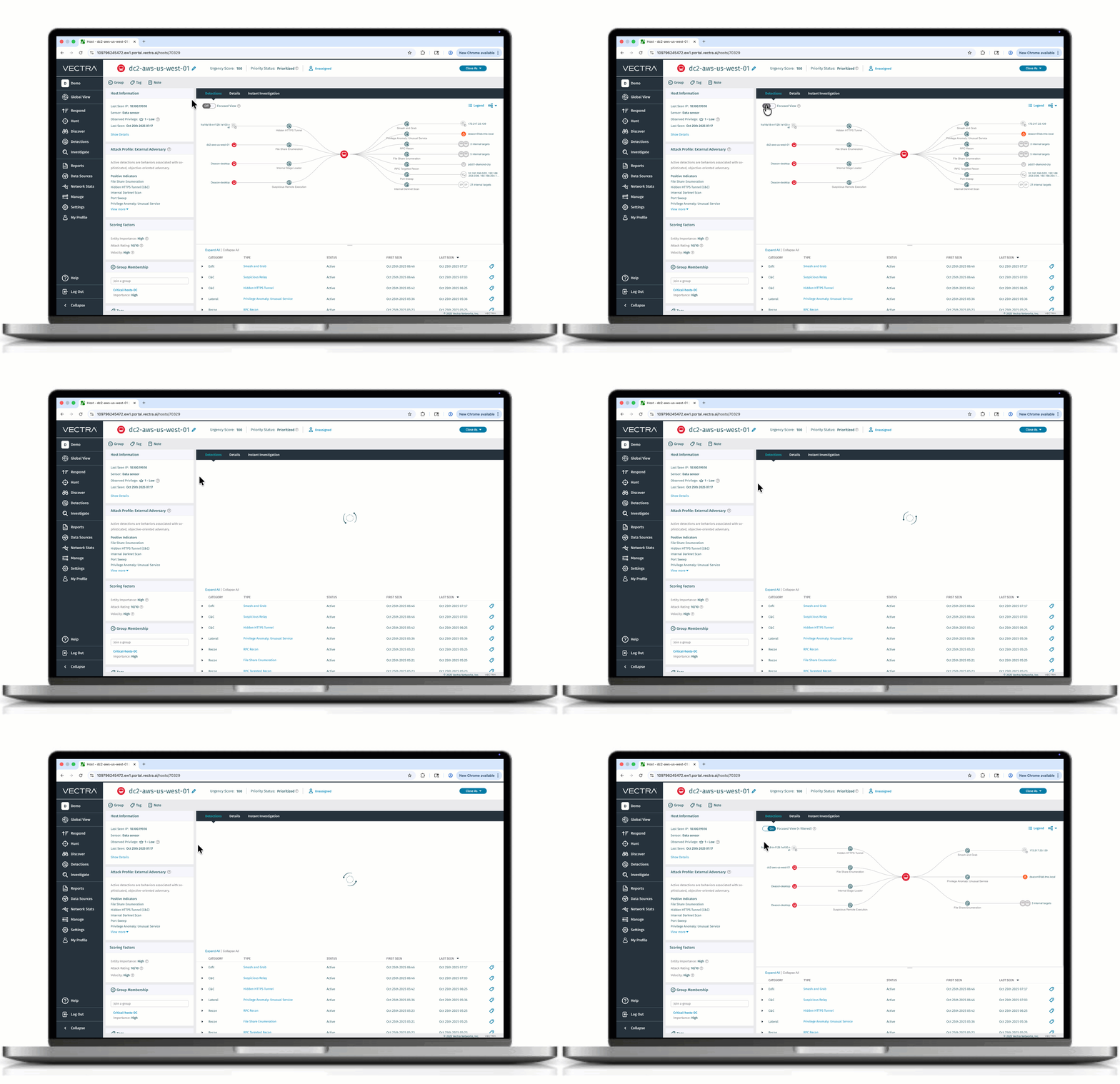
Introducing Focused View, a new way to cut through the noise in complex attack graphs. Instead of overwhelming analysts with every node and edge, Focused View filters out low-priority detections and surfaces only the most critical links and progression paths. The result: less clutter, less confusion, and a clear perspective on how an attack unfolded. With clarity instead of clutter, security teams can accelerate investigations while still toggling to the full graph when needed. Visit [Attack Graph FAQ](https://support.vectra.ai/vectra/article/KB-VS-2662) for more information on Attack Graph.
### Enhanced Security: HTTPS-Only Access to Vectra UI
To strengthen platform security, the Vectra UI now blocks external access over port 80 (HTTP) instead of automatically redirecting to port 443 (HTTPS) as it did previously. With this update, the Vectra UI will now be accessible exclusively via HTTPS, further strengthening platform security and ensuring all connections are encrypted by default. This update only applies to the Vectra Brain and requires no action from users and keeps your environment aligned with modern security best practices.
### Appendix
#### Will this upgrade perform a reboot of the Brain or Sensors?
No, a reboot is not required as part of the 9.6 update.
{% endupdate %}
{% update date="2025-10-08" tags="coverage,9.5" %}
## v9.5 - Coverage
### Sliver Command and Control Coverage
Vectra AI has introduced new detection coverage for Sliver Command & Control (C2) activity, an advanced framework used by red teams and threat actors to evade traditional defenses. Sliver’s use of encryption, layered encoders, and variable timing and data patterns allows it to disguise malicious beaconing within normal encrypted traffic. Vectra’s deep learning model identifies these subtle patterns without relying on payload inspection, leveraging the industry’s largest dataset of network behavior. This update enhances our current beaconing C2 algorithms, delivering stronger visibility into evasive C2 channels and helping security teams detect sophisticated adversary activity earlier in the attack chain.
### New Detection: Azure Suspect VM Logging Change
Vectra AI has introduced a new detection that surfaces suspicious behaviors tied to modification of logging extensions for Window sand Linux VMs, Virtual Machine Scale Sets and Hybrid machines. This provides deeper visibility into suspicious activities that may indicate attempts to tamper with security monitoring (degraded vs fully disabled logs).
### Detection Enhancement: Azure Cryptomining
Enhancements have been introduced to the Azure Cryptomining detection to filter out behaviors tied to modification of existing compute instances. This improvement improves the fidelity of the alerting around creation of new compute instances. Customer should expect fewer alerts tied to this behavior in their environment.
### M365 Detection Enhancements
Enhancements have been introduced across the following detections to improve breadth of coverage:
* **M365 Suspicious mailbox Rule Creation** and **M365 Suspicious Mail Forwarding**: These detections have been enhanced to include coverage for behaviors surrounding *UpdateInboxRule*. As a result of this enhancement, customers may observe a mild increase in the volumes tied to these alerts.
### Rapid Release Improvements
The following improvements have been made to algorithms since the last software release cycle. Customers that are connected to Vectra’s update service with Remote Support enabled have received these improvements. All other customers will be receiving the following improvements as part of this release:
* **NDR-242**: Vectra AI has expanded its current beaconing Command & Control algorithms to detect advanced C2 beaconing techniques that use data and time jitter to evade traditional network monitoring. The result is improved visibility into stealthy C2 behavior and earlier detection of sophisticated threats attempting to hide within normal network activity.
* **NDR-302**: Vectra AI has enhanced detection coverage for plain-text TCP communications, identifying suspicious command activity hidden in unencrypted, text-based traffic. This update detects subtle behavioral patterns—such as abnormal packet flow and payload structure—to uncover covert command channels that evade traditional inspection. It expands visibility beyond encrypted traffic, strengthening detection across all communication types.
* **NDR-314**: Vectra AI has expanded coverage to include Sliver’s English HTTP Channel, which disguises command-and-control traffic as strings of random English words to appear legitimate. This enhancement improves detection of obfuscated Sliver activity within normal HTTP traffic, strengthening visibility into advanced C2 evasion techniques.
{% endupdate %}
{% update date="2025-10-08" tags="platform,9.5" %}
## v9.5 - Platform
### SHA256 File Verification for Support Portal
All current and future files in Additional Resources > Downloads on our Support Portal now include a SHA256 hash to validate the file downloaded is the same as what was served from the Support Portal. Today this applies to OVA and Vectra Match file downloads.
### Expanded TLS/SSL Cipher Recognition
Vectra AI has expanded its TLS/SSL cipher suite mapping to include the latest TLS 1.3 and modern cipher suites, ensuring encrypted sessions are accurately identified and displayed with clear, human-readable names. This update enhances visibility and accuracy in encrypted traffic analysis across Recall and Stream, with Advanced Investigations support planned for a future release.
### Reduced Alert Volume with Enhanced AI-Triage
Vectra’s AI-Triage now delivers expanded capabilities across the kill chain and modern networks, cutting detection volumes significantly. It automatically investigates and resolves benign alerts, reducing alert fatigue while preserving full visibility into real threats.
This custom-built, rigorously tested capability identifies low-risk patterns that consistently appear in your environment and resolves them automatically, keeping your team focused on meaningful risk.
Expect fewer benign detections across network C2, recon, Azure AD, M365, Copilot for M365, and AWS.
Visibility is never lost — resolved detections remain searchable, auditable, and fully traceable. No actions are taken on your behalf beyond resolution.
### Attack Graph Enhancements
Vectra AI’s Attack Graph just got smarter with two powerful updates. **C2 Blast Radius** instantly reveals all hosts communicating with the same command-and-control endpoint, eliminating manual cross-referencing and speeding triage. **Targeted Detections** trace the initial point of compromise and attacker movement, giving analysts a clear lineage of how each host or account was reached. Together, these enhancements deliver sharper visibility, faster investigations, and more precise responses. Explore the [Attack Graph FAQ](https://support.vectra.ai/vectra/article/KB-VS-2662) for more capabilities.
### API Improvements for CDR for Azure Alerts
Vectra AI has introduced API enhancements to include enriched Human Readable context (identity and application ID names) to the CDR for Azure alerts consumed via API. These support investigative workflows significantly reducing the time required by an analyst to gather key context. Previously, these enriched values were available only in the Vectra platform. The new enhancements ensure these values are now present in API-centric workflows that customers may have in place.
### Expansion of Resource Logging for Storage Account (CDR for Azure)
Vectra AI will now consume Azure resource logs tied to Storage Accounts in support of new and upcoming detection use-cases. These new logs will allow Vectra to detect against impact and exfiltration behaviors observed in the latter stages of the cloud kill-chain. All new CDR for Azure connectors will automatically accrue the logs as part of connector setup. For existing CDR for Azure customers, the automated deployment scripts associated with CDR for Azure will have to be re-run. Vectra account teams will be making contact to facilitate the expansion of logging for existing customers.
### Coming Soon: Expanded EDR Process Context
In November, Vectra will release Vectra AI Stitching with CrowdStrike EDR for all customers. This capability streamlines investigations by automatically finding the probable process related to a NDR detection and presenting it alongside the detection in the platform and when the event is collected via API.
This result is a more powerful NDR, less manual work, and better outcomes for security teams. What was the process driving C2 a browser or a PowerShell script, is it expected, or does it stand out, these are questions analysts must answer immediately, and this capability makes that instant.
To ensure smooth delivery of this capability we encourage all Crowdstrike customers to provide **NGSIEM Read / NGSIEM Write** permissions to support future collection of this information. Visit [Crowdstrike EDR Integration FAQ](https://support.vectra.ai/vectra/article/KB-VS-1143) for instructions on how to grant these permissions.
{% endupdate %}
{% update date="2025-09-08" tags="coverage,9.4" %}
## v9.4 - Coverage
### Azure AD Scripting Engine Usage
Vectra has introduced enhancements to improve both the breadth of behaviors and user agents covered by this detection. Updates to the parsing layer now filter user agents more accurately from logs, increasing fidelity and reducing false positives.
### UI Improvements to Entra ID and M365 Detections
Enhancements have been introduced across several detections to provide additional context and streamline investigative workflows:
* Azure AD Privilege Operation Anomaly: Now includes user agent details when available.
* Azure AD Suspicious Factor Registration: Updated to include the result\_reason field from logs.
* Azure AD Suspicious Sign In: Updated to display device status for improved context.
* M365 Spearphishing: Updated to display filenames, enabling faster triage.
### Azure Cloud Detection Model Enhancement
Enhancements to the Azure Diagnostic Logging Disabled detection expand coverage to include deletion of logging extensions for both Windows and Linux VMs. This provides broader visibility into suspicious activities that may indicate attempts to disable security monitoring.
### Rapid Release Improvements
The following improvements have been made to algorithms since the last software release cycle. Customers that are connected to Vectra’s update service with Remote Support enabled have received these improvements. All other customers will be receiving the following improvements as part of this release:
* NDR-251: Adds detection coverage for suspicious Mimikatz access over SMB traffic. This enhances our ability to spot potential credential theft techniques commonly used in attacks.
* NDR-117: Expands coverage for the Remote Desktop Protocol (RDP) admin activity algorithm for better security coverage.
* NDR-241: Adds detection coverage to identify NTLM authentication brute force attacks, helping stop attackers from breaking into accounts through repeated login attempts.
{% endupdate %}
{% update date="2025-09-08" tags="platform,9.4" %}
## v9.4 - Platform
### JA4+ Fingerprints
Vectra AI now includes JA4L, JA4X, and JA4H fingerprints in metadata—bringing next-gen fingerprinting to encrypted traffic analysis. This powerful framework reduces collisions, links related sessions, and makes it easier to spot attacker infrastructure hiding behind common protocols. Analysts get clearer, faster insights with less noise and better context across detections. JA4+ is supported in Investigate (RUX), Stream, and Recall. Read more about the [new attributes here](https://support.vectra.ai/vectra/article/KB-VS-1245).
### External App Alerts (Webhook Notifications)
With External App Alerts, Vectra AI delivers instant notifications to your team’s collaboration tools when critical security events occur, such as high-priority hosts or accounts and key system alerts. No more screen-watching or delayed responses — you get real-time intel that drives faster action. Available now with direct Microsoft Teams integration and Slack support coming soon. See [External App Alerts](/configuration/response/notifications/external-app-alerts-webhook.md) for implementation details.
{% endupdate %}
{% update date="2025-08-06" tags="coverage,9.3" %}
## v9.3 - Coverage
### New Detection Suite: AWS S3
Vectra AI has introduced three new detections to surface suspicious behaviors surrounding the use of AWS S3 in the impact and exfil stages of the cloud kill chain:
* AWS Suspicious S3 Batch Deletion: This detection surfaces behaviors associated with large-scale downloads and deletions associated with multiple files. This behavior may indicate the destructive manipulation phase of ransomware activity in the environment.
* AWS Suspicious S3 Object Deletion: Like the new S3 Batch Deletion detection, this detection highlights behaviors where individual objects were downloaded and then deleted from a S3 bucket in a way that may indicate the destructive manipulation phase of ransomware activity in the environment.
* AWS Suspicious S3 Encryption: This detection highlights unusual encryption activities that could indicate a ransomware encryption phase in progress. It is designed to surface encryption of many S3 objects using either an external KMS key (SSE-KMS) or a client-controlled key (SSE-C).
### Signal Enhancements to M365, Azure AD and Azure
Enhancements have been introduced to the following AAD, Microsoft 365 and Azure detections to better account for the risk of the underlying behaviors and surface them promptly for review. Introduction of these enhancements may result in changes to the number of entities prioritized within the Vectra platform:
* M365 Suspect Power Automate Activity: This detection alerts on potential exfiltration or C2 behaviors using Power Automate within the environment. The enhancements made to this detection result in significant improvements in the fidelity of this detection and reduction in the rate of false positives observed within this detection and similar detections (M365 Power Automate HTTP Flow Creation and M365 Suspicious Power Automate Flow Creation).
* Azure AD Privilege Operation Anomaly: This detection alerts on anomalous Azure AD operations potentially associated with privilege escalation. Vectra is enhancing this detection to sharpen the behaviors considered anomalous. The expected outcome is decreased noise surrounding this detection.
* Risky Exchange Operation: This detection alerts on privileged operations within Exchange that may be abused by an attacker. Vectra is enhancing the scope of behaviors under consideration for this alert and removing potentially benign actions in Exchange (such as setting up automated responses). Customers can expect a significant reduction in volume (over 30%) because of these enhancements.
* Azure Diagnostic Logging Disabled: This detection surfaces defense impairment behaviors surrounding deletion of Azure diagnostic logs settings. The detection has been enhanced for broader coverage around deletion of diagnostic logging on Virtual Machine (VMs). Customers may observe a minor increase in detection volumes associated with this enhancement.
### Rapid Release Improvements
The following improvements have been made to algorithms since the last software release cycle. Customers that are connected to Vectra’s update service with Remote Support enabled have received these improvements. All other customers will be receiving the following improvements as part of 9.3:
* NDR-222: Updates the title of a Suspect Protocol Activity detection for suspicious usage of Windows Remote Management (WinRM). The new title is "Possible Malicious WinRM Usage" to better reflect the nature of the behavior.
* CS-10426: Resolved an issue affecting some Suspect Protocol Activity detections where source and destination IP addresses were incorrectly attributed due to the client acting as a proxy. This fix has been applied across all relevant detection algorithms.
* NDR-251: Expands detection coverage against penetration techniques used by the Kali Linux Package Repository.
* NDR-251: Expands the Tor Activity detection by identifying destination IPs that match known Tor nodes.
{% endupdate %}
{% update date="2025-08-06" tags="platform,9.3" %}
## v9.3 - Platform
### Zscaler Internet Access SSE Integration in Public Preview
Vectra AI and Zscaler have teamed up to eliminate blind spots in encrypted and direct-to-cloud traffic. Through integration with Zscaler Internet Access (ZIA), Vectra replays user traffic from secure PCAPs for full-spectrum threat detection—uncovering advanced C2 and exfiltration that traditional tools miss. It’s a game-changer for securing remote and cloud-first environments. For information see Vectra’s [Press Release](https://www.vectra.ai/about/news/vectra-ai-and-zscaler-expand-their-alliance-to-unlock-unprecedented-visibility-into-sase-traffic) and [Podcast.](https://www.youtube.com/watch?v=YlwGoJQuVw4) Please contact your Vectra account team if you are interested in enabling Vectra’s ZIA integration. See [Zscaler ZIA Integration and Optimization](/configuration/coverage/remote-users/zscaler-zia.md) for implementation details.
### Vectra Match Integrated Ruleset Management
Vectra Match now makes it easier to detect known Indicators of Compromise (IOCs) with Suricata-compatible signatures—no external tools required. As of 9.3, you can manage, modify, enable, or disable rules directly in the platform, and your changes persist even after Emerging Threats updates. It’s faster to set up, simpler to maintain, and puts full control of detection logic in your hands. For more information visit [Managing Vectra Match Rulesets](/deployment/match/managing-rulesets.md).
{% hint style="warning" %}
Note: In version 9.3, there is a known issue when migrating from an existing ruleset to the Vectra Curated Ruleset. If an existing ruleset is present when you upload to the Vectra Curated Ruleset option, the file name will not update — it will retain the old name instead of showing curated.rules. This does not affect the actual functionality of the ruleset; only the display name is incorrect. As a workaround, before upgrading to 9.3, delete all existing rulesets. This prevents the misnaming from occurring. This issue will be fixed in the upcoming 9.4 release.
{% endhint %}
### Executive Overview Report
Vectra AI is introducing the Executive Overview Report—your boardroom-ready security snapshot. Purpose-built for CISOs and security leaders, it delivers clear, high-impact metrics like noise-to-signal trends and evolving attack patterns. In minutes, you’ll have the insights to showcase Vectra’s impact, steer strategic decisions, and prove how you’re reducing breach risk—no deep dives required.
### Attack Graphs Visualizations in Quadrant UX
The new Attack Graph brings instant clarity to active threats by visually mapping how attackers move across your network, cloud, and identity environments. Powered by Vectra’s AI-Prioritization, each threat is now displayed directly on the host or account page—giving you immediate insight into where the attack started, what systems it interacted with, and how its risk level evolved over time.
Security teams can choose from three intuitive views to investigate threats in the way that best suits their workflow:
* Attack Graph – See how different entities are linked during the attack.
* Attack Flow – See how sequence of attacker actions in a structured path.
* Attack Timeline – See how the threat risk changed and escalated.
This capability empowers SOC teams to act quickly and confidently by surfacing context and urgency in a single, actionable view. For more information visit the [Attack Graph FAQ](https://support.vectra.ai/vectra/article/KB-VS-2662).
### JA4/JA4S Fingerprints
Vectra AI now includes JA4 and JA4S fingerprints in metadata—bringing next-gen fingerprinting to encrypted traffic analysis. This powerful framework reduces collisions, links related sessions, and makes it easier to spot attacker infrastructure hiding behind common protocols. Analysts get clearer, faster insights with less noise and better context across detections. JA4 is supported in Investigate (RUX), Stream, and Recall, with more from the JA4+ suite coming soon. Read more about the [new attributes here](https://support.vectra.ai/vectra/article/KB-VS-1245).
### Network Traffic Validation UI in Quadrant UX
Starting in 9.3, Vectra AI has introduced new Traffic Validation pages. These pages transform the Traffic Validation JSON report into an intuitive dashboard— displaying insights faster and without the hassle of parsing raw data. Key stats are automatically checked against predefined health thresholds, with clear red or yellow indicators highlighting areas that may need attention. For more information [read the FAQ](/deployment/traffic-engineering-and-validation/traffic-validation-entv.md).
### AI-Triage Now Auto-Resolves More Benign Threats
Vectra AI’s proprietary agentic AI just got smarter. Our upgraded AI-Triage algorithm now automatically investigates and resolves 50% of benign C\&C and 25% of benign Recon detections—dramatically reducing benign events. It leverages both local patterns and global insights to deliver the clearest signal yet. For more details on AI-Triage, see the [AI-Triage KB](/operations/general/ai-triage-in-detail.md) and [our recent update video](https://www.youtube.com/watch?v=DvsvR57xCS8).
### Improved Threat Ranking with AI-Prioritization
Vectra AI’s AI-Prioritization has been enhanced to better surface threats that mirror recent changes in attacker behavior. Expect better separation of high and critical threats, smarter prioritization across your environment and faster prioritization of threats. Note that some host and account’s threat and certainty scores may shift based on the updated scoring logic once your system is updated.
### Triage Best Practices
Vectra AI is introducing a new Best Practices series designed to help users get the most out of key features in the Vectra platform. The first release in this series focuses on Triage. The Triage Best Practices guide includes common terminology, when and why to triage, how-to instructions, FAQs, and much more. Visit the [Triage Best Practices](https://support.vectra.ai/vectra/article/KB-VS-2681) article to hone your Triage workflow.
### VirusTotal Removal
Vectra AI has removed the VirusTotal integration from Quadrant UX due to licensing changes. The External Destination popup no longer displays VirusTotal data, and a full UI cleanup is coming in the next release to avoid confusion. For feedback or questions on this removal, contact your Vectra AI account team.
{% endupdate %}
{% update date="2025-06-26" tags="coverage,9.2" %}
## v9.2 - Coverage
### Suspect Protocol Activity: Internal Detections
Vectra is expanding the coverage of the Suspect Protocol Activity detections. Now, Suspect Protocol Activity includes detections covering Internal Lateral/Recon attacks and supports LDAP, Kerberos, NTLM, and SMB protocols. This feature is off by default but can be customer enabled and is included as part of the standard Detect product line. For more information on SPA, please see
### Suspect Protocol Activity: Brute Force
Vectra is expanding the coverage of the Suspect Protocol Activity detections. Now, SPA can detect brute force attempts over all protocols. This rule detects brute force attacks where an attacker attempts multiple authentication requests in a short period. Brute force attacks can target various protocols such as SMB, LDAP, FTP, RDP, SSH, and HTTP, and are often used by adversaries to gain unauthorized access to accounts.
### New Detection: NTLM Relay Activity
Vectra AI has introduced a new detection for NTLM Relay Activity. This enhances Vectra’s visibility into lateral movement techniques used by attackers. This detection identifies attempts to exploit NTLM authentication by observing when an attacker queries one host and relays the captured authentication to another host—often as part of privilege escalation or domain compromise efforts.
### New Detection: M365 Copilot Sensitive Data Discovery
Vectra AI has introduced a new detection for discovery behaviors surrounding M365 CoPilot. The new M365 CoPilot Sensitive Data Discovery detection where a CoPilot session was leveraged by an identity to access file(s) that may contain sensitive information. This detection aims to surface threat actors that use an account in the environment to discover sensitive information.
### New Detection Suite: AWS Bedrock Detections
Vectra AI has introduced four new detections to surface suspicious behaviors surrounding the use of AWS Bedrock, a fully managed service offered by AWS that simplifies building and deploying generative AI applications.
* AWS Bedrock Logging Configuration Disabled: This detection highlights instances where a principal was observed disabling prompt logging for AWS Bedrock at the regional level. Disabling prompt logging stops the capture of all prompt and response activity across AWS Bedrock models and may indicate an attempt to impair defenses or hide malicious usage.
* AWS Bedrock Novel Model Enabled: This detection identifies suspicious activity related to the enablement of an AWS Bedrock Model by an identity that has no prior history of performing such actions. It flags potential unauthorized access to generative AI services that may be security-sensitive and associated with high-cost.
* AWS Suspicious Bedrock Activity: This detection identifies suspicious activity related to the enablement and invocation of an AWS Bedrock Model by an identity that have no prior history of performing such actions. The combination of enablement followed by invocation of a model suggests an attacker is both testing and using the model, generating responses at the victim’s expense.
* AWS Bedrock Novel Enabled: It detects every instance when an AWS Bedrock foundational model is enabled, as this action is uncommon and may have cost or security implications. This is an informational detection and does not contribute to scoring or prioritization of the entity. It is meant to be a security relevant insight and may not be deemed immediately suspicious.
### Signal Enhancements
Significantly reduced benign prioritization alerts through improvements to Vectra’s AI prioritization algorithm and detection updates. In some cases, customers may see up to 50% fewer prioritized host and account alerts—without sacrificing coverage for real threats.
* Azure AD & M365: Prioritization alerts for accounts with specific detections have been refined, reducing benign alerts while maintaining detection of modern attacks. Affected detections include M365 Suspicious Download Activity, which now incorporates Autonomous System Number (ASN) context and Azure AD Suspicious Scripting Engine, with improved parsing for user agents.
### Rapid Release Improvements
The following improvements have been made to algorithms since the last software release cycle. Customers that are connected to Vectra’s update service with Remote Support enabled have received these improvements. All other customers will be receiving the following improvements as part of 9.2:
* NDR-166: This release enhances DNS Tunnel detection by expanding coverage across all DNS response types, providing broader and more accurate threat detection.
* NDR-144: Improves C2 detections against techniques used by the Covenant C2 Framework.
* NDR-202: This release enhances the performance of the algorithm powering our Exfiltration detections, enabling faster threat identification.
* NDR-195: Improves HTTP detections against penetration techniques used by the Kali Linux Package Repository.
* NDR-221: Improves HTTP detections against suspicious usage of Windows Remote Management (WinRM), strengthening visibility into potential abuse of this protocol.
* NDR-232: Enhances Suspect HTTP Activity detections to account for proxy usage, improving detection accuracy in proxied environments.
{% endupdate %}
{% update date="2025-06-26" tags="platform,9.2" %}
## v9.2 - Platform
### Expanding GCP Brain Offerings
Starting in 9.2, Vectra is introducing additional Brain offerings hosted in Google Cloud Platform, or GCP. The new GCP Brains are capable of handling 5Gb/s and 15Gb/s and support all the same features as other Cloud/Virtual/Hardware Brains. Please see the [GCP Brain Deployment Guide](/deployment/ndr-virtual-cloud-appliances/gcp-brain.md) for details.
### Added Group Support Added for v2.x. QUX API
Starting in 9.2, Vectra supports getting group members from the /groups endpoint. For more information see the [REST API Guide](https://support.vectra.ai/vectra/article/KB-VS-1638).
### AI-Triage for AWS Cloud and Azure Cloud Detections
Vectra AI has introduced AI Triage, its proprietary agentic AI solution to its AWS and Azure coverage portfolios. AI-Triage now auto-investigates AWS Cloud and Azure Cloud alerts based on factors such as prevalence and threat profiles to filter benign activities in customers' environments. The impact of AI-Triage is a reduction in prioritized entities and corresponding investigation workloads for SOC analysts.
{% endupdate %}
{% update date="2025-05-07" tags="coverage,9.1" %}
## v9.1 - Coverage
#### Hidden Tunnel Detection Improvement
The Hidden Tunnel detection has been improved to identify new beaconless connections which are contacting external systems. This enhancement provides new coverage for hidden tunnel command line based beaconless attack tools. For more information about the Hidden Tunnel detection in general, please see [Understanding Vectra AI Detections.](https://support.vectra.ai/vectra/article/KB-VS-1285)
#### RDP Recon Detection Enhancement
The RDP Recon detection has been enhanced to detect RDP Password Spray attacks which an attacker can attempt to test a small number of passwords against a large number of accounts. The previous version of RDP Recon focused on an attacker attempting to try a large number of passwords against an account, this enhancement extends the RDP Recon to cover scenarios where a very shallow brute force attack is conducted across many accounts.
#### AWS Detection Enhancements
Enhancements have been introduced to the following AWS detections to improve the fidelity associated with them. Introduction of these enhancements results in broader coverage of malicious behaviors and may be associated with minor increases in prioritized entities within customer environments.
* AWS Cryptomining: This detection alerts on behaviors around multiple high powered compute instances being started. It has been expanded to surface a broader range of cyptomining activity attributed to both human and non-human principals. Customers may observe a small increase in volume of detections.
* AWS Attack Tools: This detection alerts on known attack tools in an AWS environment. It has been improved for fidelity and a lower false positive rate.
#### Signal Enhancements
Significantly reduced benign prioritization alerts through improvements to Vectra’s AI prioritization algorithm and detection updates. In some cases, customers may see up to 50% fewer prioritized host and account alerts—without sacrificing coverage for real threats.
* Azure AD & M365: Prioritization alerts for accounts with specific detections have been refined, reducing benign alerts while maintaining detection of modern attacks. Affected detections include M365 DLL Hijacking Activity, Azure AD Suspicious Access from Cloud Provider, and Azure AD Suspicious Sign-on.
* Network: Prioritization alerts for hosts with specific detections have been refined, reducing benign alerts while maintaining detection of modern attacks. Affected detections include exhibiting patterns such as Suspicious Admin activity and co-occurrences of Port Scanning, Darknet Scanning, and Port Sweeps.
#### Online Improvements
The following improvements have been made to algorithms since the last software release cycle. Customers that are connected to Vectra’s Update service with Remote Support enabled have received these improvements. All other customers will be receiving the following improvements as part of 9.1:
* NDR-96: This release introduces an improvement to our RDP Recon algorithm, expanding coverage of RDP Sweep attacks where evasions are in place to limit the quantity of passwords attempted per account.
* NDR-106: Improves our C2 detections against techniques used by Mythic C2.
* NDR-104: This release introduces attack coverage for the Apache Camel Case exploit: CVE-2025–27636.
* NDR-73: This release introduces an attack signal improvement for External Remote Access to decrease benign true positive detections to popular destinations.
* NDR-108: This release introduces an improvement to increase the scale and health of Beacon Detector when under heavy load, by limiting beacon metadata for popular benign destinations in the environment.
{% endupdate %}
{% update date="2025-05-07" tags="platform,9.1" %}
## v9.1 - Platform
### Introduction of Vectra X4 7/M47 System
Starting in 9.1, Vectra is introducing the new X47 and M47 systems. Like other X-series systems, the X47 can be deployed as a Brain, Sensor, or in Mixed mode. The M47 supports Vectra Stream at up to 75 Gbps rates. The M47/X47 performance is in the below chart:
Brain Mode
Sensor Mode
Mixed Mode
Sensor (Match) Mode
Mixed (Match) Mode
M47 Stream Mode
30 Gbps
20 Gbps
15 Gbps
13 Gbps
6 Gbps
75 Gbps
The hardware features 4x1Gbps Copper and 2 x 10/25 Gbps SFP28. For more information about the appliance specs, please see the [Appliance and Sensor Specifications](https://support.vectra.ai/vectra/article/KB-VS-1550).
* For the deployment guides please see the [X47 Quick Start Guide](https://support.vectra.ai/vectra/article/KB-VS-2645) or [M47 Quick Start Guide.](https://support.vectra.ai/vectra/article/KB-VS-2646)
### Altering Group Type on Quadrant UX
Starting in 9.1, Vectra supports conversion between static and dynamic group types for QUX deployments. Existing triage filters that reference a static group, will continue to function without requiring any change after the group is redefined using a regex in the dynamic group configuration. This should allow for greater flexibility and ease of implementation as customers move to dynamic groups. For more information on dynamic groups see the [Dynamic Groups FAQ](https://support.vectra.ai/s/article/KB-VS-1839)
### SSL Key Handling Improvements
Starting in 9.1, Vectra now supports Elliptic Curve Cryptography (ECC) certificates. Customers can upload their own certificate via the existing commands
Additionally, the commands supporting Certificate Signing Request (CSR) have been updated. Use
* certificate replace-key to generate a new key and self-signed cert for the HTTPS server to use, essentially resetting it to default but allowing the customer to customize the key length.
* certificate info to print some information on the current HTTPS certificate for the user to see.
For full certificate installation details, please see: [SSL Certificate Installation (Quadrant UX only)](https://support.vectra.ai/s/article/KB-VS-1015)
### Vectra Match Suricata Version Upgrade
Vectra has upgraded the Suricata to support new features in the Suricata engine including JA4 and we have enabled protocol parsing for OT protocols. The suricata.yaml base configuration has also been upgraded to reflect the
latest Suricata features. For details on Vectra’s Suricata configuration please see: [Vectra Match Suricata Configuration](https://support.vectra.ai/vectra/article/KB-VS-1639).
### Oauth2 Support Added for v2.x. QUX APIs
Vectra has updated the QUX v2.x APIs to include support for OAuh2 authentication. Now, both the existing Personal Access Token (PAT) and Oauth2 flow are supported in v2.x. The Oauth2 access token will be valid for 6 hours after which it will expire, and a new token will need to be requested using the API client credentials. API client creation must be done in the Vectra UI only. Accessing v2.x APIs older than v2.5 works the same way it does for v2.5. The public postman collection has been updated for all v2.x versions.
For more information see: [REST API Quick Start Guide for Postman v2.5 using OAuth2 (QUX)](https://support.vectra.ai/s/article/KB-VS-2657)
{% endupdate %}
{% update date="2025-03-12" tags="coverage,9.0" %}
## v9.0 - Coverage
#### Enhancements to AWS Detections
Enhancements have been introduced to the following AWS detections to improve the fidelity associated with them. Introduction of these enhancements results in broader coverage of malicious behaviors and may be associated with minor increases in prioritized entities within customer environments.
* **AWS CloudTrail Logging Disabled:** This detection alerts on the defense evasion technique of turning off AWS logging. Enhancements have been introduced to the model to broaden the behavioral profile representing this malicious behavior.
* **AWS CloudTrail Logging Modified:** This detection alerts on the defense evasion technique of downgrading AWS logging. Enhancements have been introduced to the model to broaden the behavioral profile representing this malicious behavior.
* **AWS User Hijacking:** This detection alerts on persistence techniques surrounding creation of AWS access keys. Additional learning has been introduced in this model to account for repetitive occurrence of behaviors and subsequent impact on volume of alerts surfaced. This enhancement results in improved efficacy of alerting around this risky behavior.
#### Scoring Enhancements to M365 Detections
Enhancements have been introduced to the following Microsoft 365 detections to better account for the risk of the underlying behaviors and surface them promptly for review. Introduction of these enhancements may result in changes to the number of entities prioritized within the Vectra platform:
* **M365 Suspect Power Automate Activity:** This detection alerts on potential exfiltration or C2 behaviors using Power Automate within the environment. The enhancements made to this detection result in significant improvements in the fidelity of this detection and reduction in the rate of false positives observed within this detection and similar detections (M365 Power Automate HTTP Flow Creation and M365 Suspicious Power Automate Flow Creation).
{% endupdate %}
{% update date="2025-03-12" tags="platform,9.0" %}
## v9.0 - Platform
### Introduction of Dynamic Groups on Quadrant UX
Starting in 9.0, Vectra now supports Dynamic Groups on the Quadrant UX. Dynamic Groups is a feature on the Vectra AI Platform that allows customers to use Regex rules to define what hosts or accounts should belong to each triage group, resulting in entities being automatically sorted into groups as they are detected. This feature will reduce the amount of time customers spend managing and updating groups. Respond UX support for this feature was introduced in December 2024. For more information see:
### High Performance GCP Brains
Vectra has created a new 64 core variant of the GCP Brain and validated the existing 96 core Brain to support higher overall throughput than previously published. Please see the [GCP Brain Deployment Guide](https://support.vectra.ai/s/article/KB-VS-1803) for details. As of 9.0, Vectra supports the following configurations for GCP Brains:
VM Type
CPU Cores
Memory
Disk
Interfaces
Throughput
n2-highmem-64
64
512 GB
1.2 TB
1 (MGT)
~ 50 Gbps
n2-highmem-96
96
768 GB
4 TB
1 (MGT)
~ 85 Gbps
### Proxy Support for Suspect Protocol Activity and Match
Starting in 9.0, Vectra added automatic proxy support for Match and SPA. While no user action is required, additional variables for Match are available. Please see the Match FAQ for more details:
### Southside Proxy IPs via CLI
Starting in 9.0, Vectra added support to view the southside learned list proxy IPs via command line. Southside Proxies identify Proxies where Vectra sits between the Client and the Proxy. This differs from Northside proxies which are configured under Manage -> Proxies in the UI. Use show proxy --southside to display southside proxies that the system has learned from observing the network traffic.
### Improved Traffic Validation Report
Starting in 9.0, Vectra has added new fields to the Enhanced Network Traffic Validation report available on the Network Stats page. The new fields include statistics on NIC errors, packet truncation, and drops/holes in traffic. For more information see: [https://support.vectra.ais/article/KB-VS-1648](https://support.vectra.ai/s/article/KB-VS-1648)
### S1 SFP+ Interfaces Supported for MGT1 or Capture Use
Starting in 9.0, Vectra now supports the use of the S1’s two onboard SFP+ interfaces for capture or management. The command set management \ will alter the interface configuration for the MGT1 port. The command set capture \ will alter the interface assignment used for capture. This creates 4 total configurations for management or capture. All options with new interface assignment diagrams for each are detailed in the [S1 Quick Start Guide](https://support.vectra.ai/s/article/KB-VS-1786).
{% hint style="info" %}
**Please note:** The rated throughput of the S1 appliance does not change when using SFP+ ports. This only changes the physical interface assignments. Care should be taken to only forward a supported amount of traffic to the S1.
{% endhint %}
### X29/M29 Appliance – New syntax for using SFP+ for MGT
The X29/M29 appliances have an option to configure one of their SFP+ interfaces to be used as the MGT1 management port. The command has changed in version 9.0 to be consistent with the command syntax that is used now for all appliances that offer options to change similar interface options. The old command was set management speed <1G|10G> and the new command is set management \. Please see the [X29 Quick Start Guide](https://support.vectra.ai/s/article/KB-VS-1071) or the [M29 Quick Start Guide](https://support.vectra.ai/s/article/KB-VS-1072) for details.
{% endupdate %}
{% update date="2025-01-29" tags="coverage,8.10" %}
## v8.10 - Coverage
### Hidden DNS Tunnel NoReply Enhancement
As part of the 8.10 release, Vectra has improved our Hidden DNS Tunnel detection to detect scenarios where an attacker may attempt to exfiltrate data over DNS using techniques where the server does not respond (thus the tunnel is only a one sided tunnel where the attacker streams the data from In to Out.).
### Scoring Enhancements to Azure AD and M365 Detections
Enhancements have been introduced to the following Microsoft 365 and Azure AD detections to better account for the risk of the underlying behaviors and surface them promptly for review. Introduction of these enhancements may result in changes to the number of entities prioritized within the Vectra platform:
* **Azure AD/Entra ID**
* **Azure AD Domain Settings Modified**: This detection alerts when a new unverified or verified domain is suspiciously added to the environment.
* **Azure AD Cross-Tenant Access Change**: This detection alerts when a partner's cross tenant access settings are added or updated.
* **Azure AD New Certification Authority Registered**: This detection alerts when a new Certification Authority is registered to the tenant.
* **Azure AD Privilege Operation Anomaly**: This detection alerts on potential privilege escalation or account takeover behaviors within the environment. The enhancements made to this detection result in significant improvements in the fidelity of this detection and reduction in the rate of false positives.
* **Microsoft 365**
* **M365 Phishing Simulation Configuration Change**: This detection alerts when the configuration associated with a Phishing account is changed.
* M365 SecOps Mailbox Change: This detection alerts when the configuration associated with a SecOps account is changed.
Additional details on these detections can be found in the 'Understanding Vectra AI Detections' guide available on the Vectra support portal.
{% endupdate %}
{% update date="2025-01-29" tags="platform,8.10" %}
## v8.10 - Platform
### Backup Downtime Enhancements
Starting in 8.10, Vectra has improved the Backup downtime to take less than ten minutes to complete. The usability of the backup function remains the same, this solution introduces a drastically reduced completion time for backups.
### New VMWare vSensor
Starting in 8.10, Vectra is increasing the bandwidth capabilities of VMWare vSensors. The VMWare Sensors are capable of handling 20Gb/s of traffic and support all the same features as other Cloud/Virtual/Hardware Sensors. For more information, please see our deployment guide:
### Appendix:
#### Will this upgrade perform a reboot of the Brain or Sensors?
**FIPS Customers:** Yes, customers abiding by the Federal Information Processing Standard will have their systems automatically rebooted as part of the 8.10 update.
**Non-FIPS Customers:** FIPS is off by default, and thus no reboot is required for any customer not running FIPS in 8.10
Determining Mode: You can run the show security-mode command on the CLI of the Brain to determine if it is in FIPS mode or Default (non-FIPS). FIPS is off by default.
#### Reminder: X80 and S2 Platform End-of-Life
The X80 and S2 hardware platforms are now EOL as of January 7th, 2025. Please contact your Vectra account team to discuss options.
{% endupdate %}
{% update date="2026-06-05" %}
##
{% endupdate %}
{% endupdates %}
---
# Agent Instructions
This documentation is published with GitBook. GitBook is the documentation platform designed so that both humans and AI agents can read, navigate, and reason over technical content effectively. Learn more at gitbook.com.
## Querying This Documentation
If you need additional information that is not directly available in this page, you can query the documentation by asking a question.
Perform an HTTP GET request on the following URL with the `ask` and `goal` query parameters:
```
GET https://docs.vectra.ai/release-notes/quadrant-ux-qux/2025-qux-release-notes.md?ask=&goal=
```
`ask` is the immediate question: it should be specific, self-contained, and written in natural language.
`goal` is what the user is ultimately trying to achieve, the reason they need the answer. Sharing it helps GitBook give you a better, more relevant answer. A goal is most helpful when it describes the outcome the user wants rather than restating the question. For example, with `ask=how do I create an API token`, a goal like `automate deployments from our CI pipeline` lets GitBook tailor the answer to that use case.
The response will contain a direct answer to the question and relevant excerpts and sources from the documentation.
Use this mechanism when the answer is not explicitly present in the current page, you need clarification or additional context, or you want to retrieve related documentation sections.