> For the complete documentation index, see [llms.txt](https://docs.vectra.ai/llms.txt). Markdown versions of documentation pages are available by appending `.md` to page URLs; this page is available as [Markdown](https://docs.vectra.ai/operations/dashboards-and-reports/recall/recall-netlogon-exploit-visibility-dashboard.md).
# Recall Netlogon exploit visibility dashboard
Use the Recall Netlogon exploit visibility dashboard to investigate traffic related to the Netlogon vulnerability.
A serious CVE was recently reported which enables an attacker to gain Domain Admin privileges by exploiting a vulnerability in how Windows Server OS handles the NetLogon RPC protocol.
The attacker can forge their identity in a password reset event thereby enabling them to reset any password including those of Domain Controllers. It is not required that the attacker have any level of domain credential already - once they can emit traffic to the network, they can exploit this vulnerability. This enables an attacker to elevate permissions from anywhere within the network to Domain Admin quickly and easily.
Vectra’s Behavioral detections driven by strong Artificial Intelligence gives you cover even without any CVE announcement, but we wanted to offer a way for you to investigate this issue directly. We have created a simple dashboard which will show you only the specific hosts which have performed the activity associated with this exploit and will enable the user to quickly drill down on the activity of these hosts.
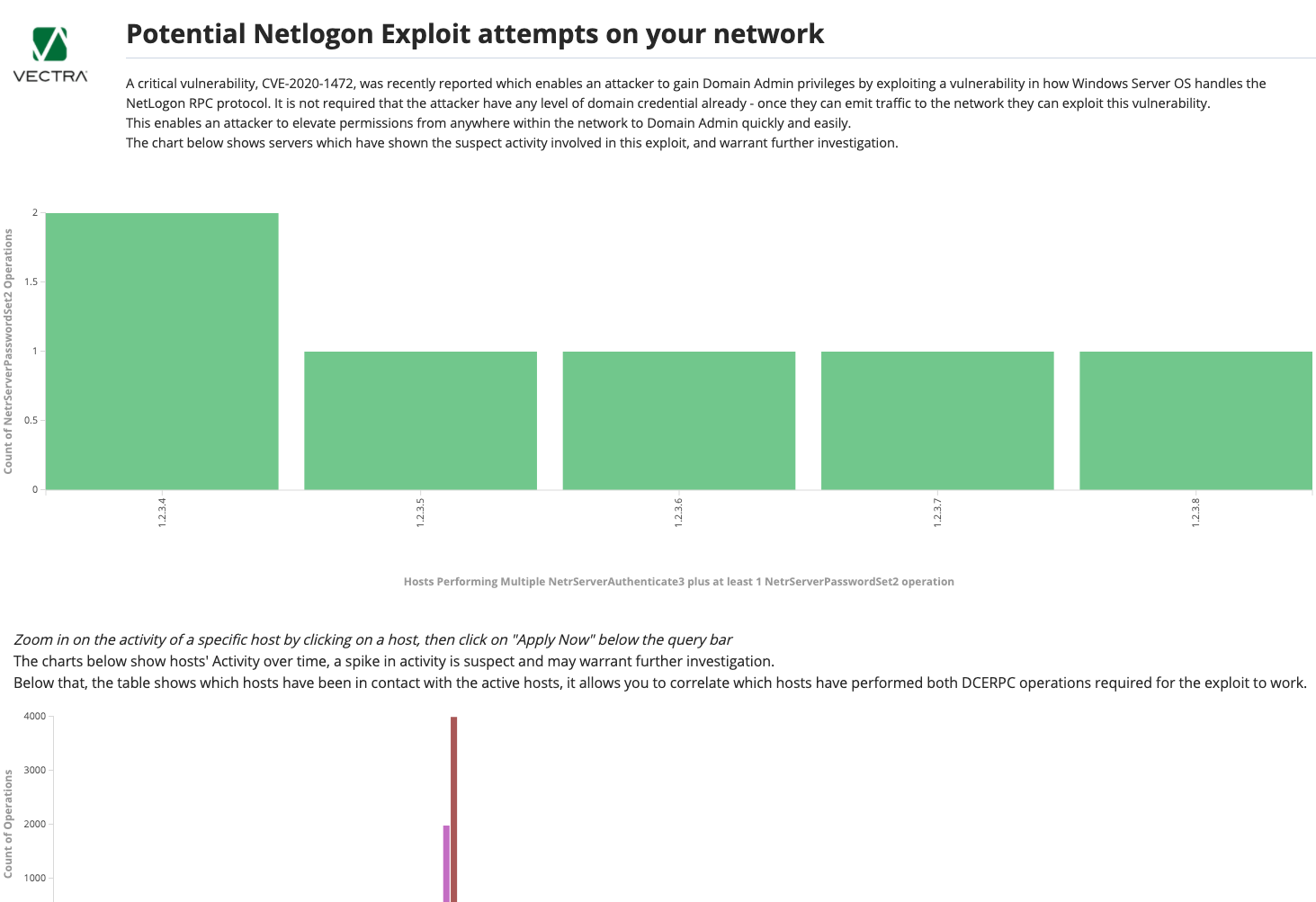
The dashboard contains a bar chart which shows any host which has performed the events involved in this exploit. Below this is a timeseries histogram which will highlight any spikes in traffic that will help track any suspicious host activity. At the bottom of the dashboard is a table listing activity using the suspect commands between hosts.
### Bar Chart
The logic in the Bar chart is that originating IPs will be listed which match the following criteria:
1. At least 10 requests have been made with an operation of either NetrServerAuthenticate3 OR NetrServerPasswordSet2
2. At least 1 request was made with a NetrServerPasswordSet2 operation
Each bar represents a unique host IP, and the vertical axis represents the count of NetrServerPasswordSet2 requests.
If a host is listed here, this means that this host has performed the 2 discrete operations which must occur for this CVE to be exploited.
### Timeseries graph
The timeseries graph shows relevant per hour per host over the time period searched over.
Only hosts which have performed at least 10 requests with an operation of either NetrServerAuthenticate3 OR NetrServerPasswordSet2 in an hour will be listed, and the intention here is to clearly expose hosts which warrant further investigation.
It is possible that a host has performed the actions required to exploit this CVE without showing up in the timeseries graph, by performing the actions over a long time period.
With both the timeseries graph and bar chart. We would recommend, for each suspcious host, zooming in on a host by clicking on its bar and then applying the filter for this IP exclusively at the top of the page.
Once this filter has been applied, the user can check the Data table at the bottom of the page to see exactly which hosts have been interacted with.
If any single server has had at least 10 requests with a NetrServerAuthenticate3 operation and at least 1 request with a NetrServerPasswordSet2 operation, then this may be an example of the zerologon exploit and further investigation may be warranted.
---
# Agent Instructions
This documentation is published with GitBook. GitBook is the documentation platform designed so that both humans and AI agents can read, navigate, and reason over technical content effectively. Learn more at gitbook.com.
## Querying This Documentation
If you need additional information that is not directly available in this page, you can query the documentation dynamically by asking a question.
Perform an HTTP GET request on the current page URL with the `ask` query parameter, and the optional `goal` query parameter:
```
GET https://docs.vectra.ai/operations/dashboards-and-reports/recall/recall-netlogon-exploit-visibility-dashboard.md?ask=&goal=
```
`ask` is the immediate question: it should be specific, self-contained, and written in natural language.
`goal` is optional and describes the broader end goal you are ultimately trying to accomplish on behalf of the user. GitBook uses it to tailor the answer towards what is most useful for that goal.
The response will contain a direct answer to the question and relevant excerpts and sources from the documentation.
Use this mechanism when the answer is not explicitly present in the current page, you need clarification or additional context, or you want to retrieve related documentation sections.