# Traffic validation (ENTV) alerting

## Overview

Traffic Validation allows customers to see information related to the network traffic observed by Sensors paired to the Brain. This information is used to determine if the network traffic being observed meets quality standards required for detection and further processing. Traffic Validation analyzes the network traffic Sensors are monitoring and reports statistics over a selectable time range in the past 24 hours. For more details please see [Traffic validation (ENTV)](https://docs.vectra.ai/deployment/traffic-engineering-and-validation/traffic-validation-entv).

Vectra has introduced customer facing alerts (notifications) for several of the aggregate metrics that are produced by the traffic validation feature. Alerts can be received by email, webhook, retrieved via API call, or received via Syslog (QUX deployments only).

## Alerting Configuration

Traffic validation alerts are essentially a sub category of system health alerts and if you are receiving system alerts by any sup

**Email notification:** Please see [System alerts](https://docs.vectra.ai/configuration/response/notifications/system-alerts)

**Webhook notification:** Please see [External app alerts (webhook)](https://docs.vectra.ai/configuration/response/notifications/external-app-alerts-webhook)

**API:**

* Perform a `GET` against the `/events/health` endpoint
  * Example URL: [https://VECTRA\_PORTAL\_URL/api/v3.4/events/health/](https://vectra_portal_url/api/v3.4/events/health/)
* RUX API details please see [https://apidocs.vectra.ai](https://apidocs.vectra.ai/)
  * Example URL: `https://VECTRA_PORTAL_URL/api/v3.4/events/health`
* QUX API details please see [v2.5 API guide (QUX)](https://docs.vectra.ai/configuration/access/api-qux/v25-api-guide-qux)
  * Example URL: `http://your_QUX_URL_or_IP//api/v2.5/events/health`&#x20;

**Syslog** (for QUX deployments only): Please see the [Syslog Guide (QUX)](https://docs.vectra.ai/configuration/response/notifications/syslog-guide-qux)

## Metrics Supported for Alerting

Traffic validation can be accessed in your UI at *Network Stats → TRAFFIC VALIDATION*.

**Aggregate Traffic**

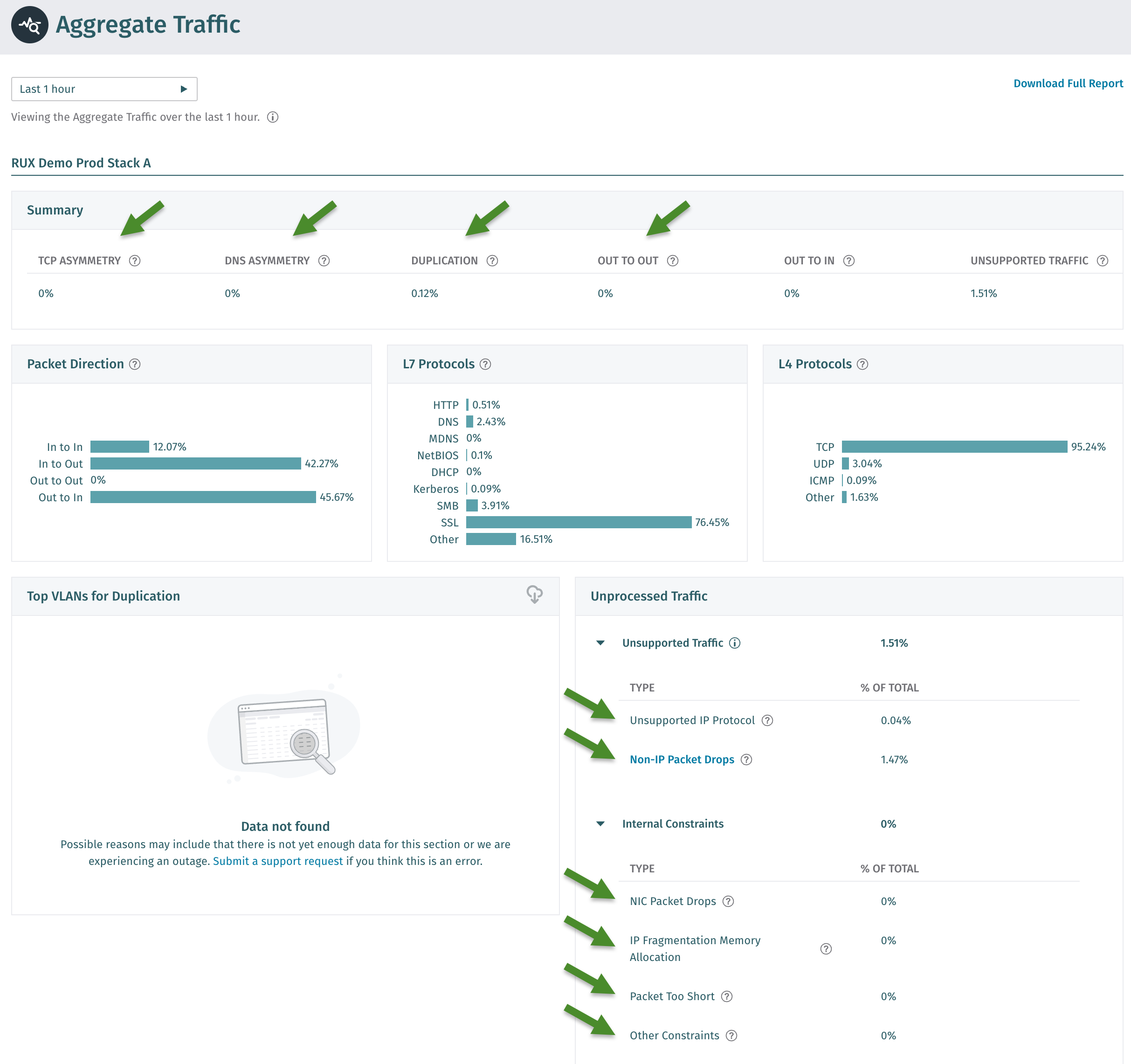
* Some metrics from this report are supported for alerting. See the screenshot below for the metrics that can be alerted on.

**Per Sensor Traffic**

* These metrics are not alerted on but can be used to help investigate issues.

**Per Subnet Traffic**

* These metrics are not alerted on but can be used to help investigate issues.

<figure><img src="https://4227135129-files.gitbook.io/~/files/v0/b/gitbook-x-prod.appspot.com/o/spaces%2FHJ1ltuWFvsArFWtevnRn%2Fuploads%2FaPWYwgnefqBoGLIE6kma%2Fimage.png?alt=media&#x26;token=e138339f-8018-44b2-9648-a4cf3cc4959e" alt=""><figcaption></figcaption></figure>

### UI to CLI Mapping

When using the `show traffic-validation` or `show system-health` commands the CLI of your Brain, some of the traffic validation (ENTV) terminology is abbreviated and is based on the underlying variable names.  Please see the table below for the mapping.

<table><thead><tr><th width="374">UI Terminology</th><th>CLI Terminology</th></tr></thead><tbody><tr><td>TCP ASYMMETRY</td><td><code>tcp_asymmetry</code></td></tr><tr><td>DNS ASYMMETRY</td><td><code>dns_asymmetry</code></td></tr><tr><td>DUPLICATION</td><td><code>dns_asymmetry</code></td></tr><tr><td>OUT TO OUT</td><td><code>out_to_out</code></td></tr><tr><td>Unsupported IP Protocol</td><td><code>unsupported_ip_proto_drops_pct</code></td></tr><tr><td>Non-IP Packet Drops</td><td><code>non_ip_drops_pct</code></td></tr><tr><td>NIC Packet Drops</td><td><code>fwdd_drops_pct</code></td></tr><tr><td>IP Fragmentation Memory Allocation</td><td><code>ip_fragmentation_mem_alloc_drops_pct</code></td></tr><tr><td>Packet Too Short</td><td><code>pkt_too_short_drops_pct</code></td></tr><tr><td>Other Constraints</td><td><code>internal_constraints_other_pct</code></td></tr></tbody></table>

## Metric Thresholds

Please keep in mind that Vectra may change the thresholds for normal, warn, or critical states in future updates. The table below represents the thresholds as of v9.10 of Vectra software.

<table><thead><tr><th width="374" align="center">Metric</th><th align="center">Critical Threshold</th></tr></thead><tbody><tr><td align="center">TCP Asymmetry</td><td align="center">5</td></tr><tr><td align="center">DNS Asymmetry</td><td align="center">25</td></tr><tr><td align="center">Duplication</td><td align="center">25</td></tr><tr><td align="center">Out to Out</td><td align="center">1</td></tr><tr><td align="center">Unsupported IP Protocols</td><td align="center">10</td></tr><tr><td align="center">Non-IP Packet Drops</td><td align="center">10</td></tr><tr><td align="center">NIC Packet Drops</td><td align="center">5</td></tr><tr><td align="center">IP Fragmentation Memory Allocation</td><td align="center">90</td></tr><tr><td align="center">Packet Too Short</td><td align="center">5</td></tr><tr><td align="center">Other Constraints</td><td align="center">10</td></tr></tbody></table>

## Metric Details and Recommendations

This section describes each metric and gives recommendations for actions to take when a metric has been alerted on.

### TCP Asymmetry

This metric is in the *Network Stats → TRAFFIC VALIDATION → Aggregate Traffic → Summary Table* and is known as `tcp_asymmetry` at the command line.

It indicates that TCP traffic is only observed in one direction. For accurate analysis, both directions of a session must be visible to the same Vectra Sensor. When TCP asymmetry is high, Vectra may miss portions of traffic, which can reduce the effectiveness of detection models. Maintaining symmetric visibility ensures optimal detection accuracy and overall product performance.

**Recommendation**: Inspect how traffic is captured to ensure that the packet source is healthy, and that Vectra is positioned to see both sides of the communication.

### DNS Asymmetry

This metric is in the *Network Stats → TRAFFIC VALIDATION → Aggregate Traffic → Summary Table* and is known as `dns_asymmetry` at the command line.

It indicates that DNS traffic is only observed in one direction. For accurate analysis, both directions of a session must be visible to the same Vectra Sensor. When DNS asymmetry is high, Vectra may miss portions of traffic, which can reduce the effectiveness of detection models. Maintaining symmetric visibility ensures optimal detection accuracy and overall product performance.

**Recommendation**: Inspect how traffic is captured to ensure that the packet source is healthy, and that Vectra is positioned to see both sides of the communication.

### Duplication

This metric is in the *Network Stats → TRAFFIC VALIDATION → Aggregate Traffic → Summary Table* and is known as `duplicate_pct` at the command line.

It indicates that packets have been seen more than once within the environment. When duplication is high, the system expends unnecessary resources processing identical packets. Reducing duplication improves overall system performance and decreases workload, allowing Vectra to operate more efficiently.

**Recommendation:** Review your network capture configuration to ensure that traffic is not being duplicated across multiple capture points. Specifically, verify that the same traffic (with an identical 5-tuple) isn’t being captured in multiple locations, such as when both transmit (TX) and receive (RX) streams are mirrored on SPAN ports. To optimize performance and processing efficiency, configure your capture setup so that each packet is captured only once.

### Out to Out

This metric is in the *Network Stats → TRAFFIC VALIDATION → Aggregate Traffic → Summary Table* and is known as `out_to_out` at the command line.

It indicates that network communications are observed between external IP addresses. This typically indicates that the Vectra Sensor is positioned outside of the internal network or that certain internal subnets are missing from the configuration. When internal subnets are incomplete, Vectra may misclassify traffic as Out-to-Out instead of In-to-Out or In-to-In, which can affect detection accuracy and algorithm performance.

**Recommendation:** Review and update the **Internal IPs** configuration for your Brain *IP Address Classification* settings to ensure all relevant internal IP ranges are included. For more details, please see either:

**RUX Deployment Guide:**

{% content-ref url="../../getting-started/respond-ux-deployment-guide/initial-configuration#data-sources-network-brain-setup" %}
[#data-sources-network-brain-setup](https://docs.vectra.ai/getting-started/respond-ux-deployment-guide/initial-configuration#data-sources-network-brain-setup)
{% endcontent-ref %}

**QUX Deployment Guide:**

{% content-ref url="../../getting-started/quadrant-ux-deployment/initial-configuration#data-sources-network-brain-setup" %}
[#data-sources-network-brain-setup](https://docs.vectra.ai/getting-started/quadrant-ux-deployment/initial-configuration#data-sources-network-brain-setup)
{% endcontent-ref %}

<details>

<summary><strong>Suggested metadata queries to reveal IP addresses considered as external to your deployment:</strong></summary>

Customers can query their metadata to see what IP addresses Vectra considers as external.

**SQL Search:** In Respond UX (RUX) deployments, navigate to *Investigate → SQL Search* and paste in the below.

{% code expandable="true" %}

```
SELECT id.orig_h AS external_source_ip, id.resp_h AS external_destination_ip, COUNT(\*) AS session_count
FROM network.isession.\_all
WHERE local_orig = false AND local_resp = false
AND timestamp BETWEEN date_add('day', -14, now()) AND now()
GROUP BY id.orig_h, id.resp_h
ORDER BY session_count DESC
LIMIT 100
```

{% endcode %}

**Recall or Stream:** Query for `local_resp:false` and `local_orig:false`

</details>

### Unsupported IP Protocols (unsupported\_ip\_proto\_drops\_pct)

This metric is located at *Network Stats → TRAFFIC VALIDATION → Aggregate Traffic → Unprocessed Traffic → Unsupported Traffic* and is known as `unsupported_ip_proto_drops_pct` at the command line.

It represents the percentage of traffic that IP traffic that Vectra doesn't analyze.

**Recommendation:** Use the [Vectra Packet Capture](https://docs.vectra.ai/deployment/traffic-engineering-and-validation/using-vectra-packet-capture-pcap) tool located at *Network Stats → Packet Capture* page to determine what the traffic looks like. This could indicate some encapsulation or configuration error on the mirror interface. Please see [Network Traffic Recommendations](https://docs.vectra.ai/deployment/traffic-engineering-and-validation/network-traffic-recommendations) for details and supported encapsulations.

### Non-IP Packet Drops

This metric is located at *Network Stats → TRAFFIC VALIDATION → Aggregate Traffic → Unprocessed Traffic → Unsupported Traffic* and is known as `non_ip_drops_pct` at the command line.

Percentage of traffic that has ethertypes or encapsulation that Vectra cannot process. Please consider a different encapsulation strategy for packets forwarded to the sensor.

**Recommendation:** Use the [Vectra Packet Capture](https://docs.vectra.ai/deployment/traffic-engineering-and-validation/using-vectra-packet-capture-pcap) tool located at *Network Stats → Packet Capture* to determine what the traffic looks like. This could indicate some encapsulation or configuration error on the mirror interface. Please see [Network Traffic Recommendations](https://docs.vectra.ai/deployment/traffic-engineering-and-validation/network-traffic-recommendations) for details and supported encapsulations.

### NIC Packet Drops

This metric is located at *Network Stats → TRAFFIC VALIDATION → Aggregate Traffic → Unprocessed Traffic → Internal Constraints* and is known as `fwdd_drops_pct` at the command line.

This indicates packets that were dropped due to hardware or software issues on the network interface card.

**Recommendation:** Please contact Vectra Support if this alert is firing.

### IP Fragmentation Memory Allocation

This metric is located at *Network Stats → TRAFFIC VALIDATION → Aggregate Traffic → Unprocessed Traffic → Internal Constraints* and is known as `ip_fragmentation_mem_alloc_drops_pct` at the command line.

This indicates that packets were dropped due to memory allocation errors and could indicated an overload of the system.

**Recommendation:** Please contact Vectra Support if this alert is firing.

### Packet Too Short

This metric is located at *Network Stats → TRAFFIC VALIDATION → Aggregate Traffic → Unprocessed Traffic → Internal Constraints* and is known as `pkt_too_short_drops_pct` at the command line.

This indicates that there are likely issues in the customer network environment causing packets to be truncated before they are received by the Sensor.

**Recommendation:** Work with your networking team to determine the source of the truncation and correct it if possible.

### Other Constraints

This metric is located at *Network Stats → TRAFFIC VALIDATION → Aggregate Traffic → Unprocessed Traffic → Internal Constraints* and is known as `internal_constraints_other_pct` at the command line.

This indicates any potential other internal constraints that may have more complex interpretations that may or may not be related to system load.

**Recommendation:** Please contact Vectra Support if this alert is firing.

## Example Alert Messages

Seen below are some example messages for the various alerts when a metric exceeds the defined critical thresholds.

There will be another message sent, such as `[internal_constraints_other_pct] Metric is under threshold limits` when the metric goes below the critical threshold limits:

**TCP Asymmetry**

Observed value of 12.2% exceeds the threshold of 5% for asymmetric TCP traffic, indicative of visibility gaps with routing, VLAN or sensor placement

**DNS Asymmetry**

Observed value of 30.1% exceeds the threshold of 25% for asymmetric DNS traffic, indicative of visibility gaps with routing, VLAN or sensor placement

**Duplication**

Observed value of 30.5% exceeds the threshold of 25% for duplicate sessions received by sensors, indicative of incorrect spans/tap implementation

**Out to Out**

Observed value of 1.2% exceeds the threshold of 0% for total flows (sessions of packets) of Out to Out traffic

**Unsupported IP Protocols**

Observed value of 22% exceeds the threshold of 10% for IP traffic that Vectra does not analyze

**Non-IP Packet Drops**

Observed value of 25.9% exceeds the threshold of 10% for Non-IP traffic that Vectra drops

**NIC Packet Drops**

Observed value of 22.71% exceeds the threshold of 5% for packets that were dropped due to hardware or software errors on the network interface card

**IP Fragmentation Memory Allocation**

Observed value of 98.29% exceeds the threshold of 90% for running out of memory during reassembly of fragmented IP packets, indicative of excessive IP fragmentation in the network

**Packet Too Short**

Observed value of 14.9% exceeds the threshold of 5% for corrupted packets, usually indicative of a hardware problem in the span

**Other Constraints**

Observed value of 20.2% exceeds the threshold of 10% for other constraints, indicative of limitations of the packet processing system
