> For the complete documentation index, see [llms.txt](https://docs.vectra.ai/llms.txt). Markdown versions of documentation pages are available by appending `.md` to page URLs; this page is available as [Markdown](https://docs.vectra.ai/configuration/setup/proxies.md).
# Proxies
This article is designed to assist in understanding how Vectra appliances interact with proxy systems.
**Proxy handling in Vectra**
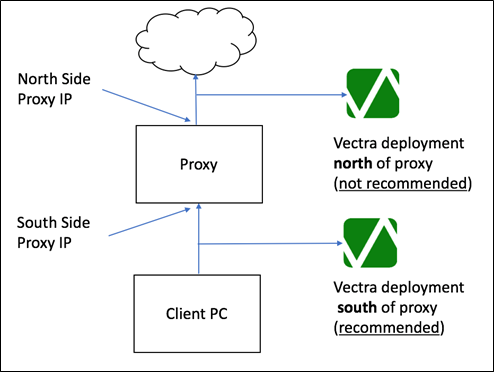
Vectra requires traffic from the client machines to the Internet to be captured south of any proxy or NAT devices.
**North of proxy/NAT placement – explicit proxy (not recommended, results in loss of efficacy)**\
If placed north of proxy, flows from multiple hosts will be mapped to the single proxy IP and would result in spurious detections being associated with the proxy IP. If Vectra determines that any IP is a northside proxy IP, it is designed to automatically turn off all detections originating from the proxy IP. This results in a loss of detection efficacy, which is why the south of proxy placement is highly recommended.
If spurious detections are being attributed to north-side proxy IPs, it is likely that the automatic proxy detection has failed or not yet occurred. Please manually add the proxy IPs in GUI by navigating to *Configuration → SETUP → Proxies*.
**South of proxy placement – explicit proxy**\
In case of an explicit proxy, the client machines in the enterprise are configured to send traffic to the explicit proxy IP (either through an explicit proxy configuration or using a PAC file). Based on traffic patterns, Vectra automatically detects the presence of explicit proxies when deployed south of the proxy. This south-side proxy detection is highly reliable. However, if you do see indications that it has not been detected – either failure to detect N-S detection types or presence of E-W detection types with the proxy IP as a target.
As of version 9.0, the south-side proxy list is viewable at the CLI of your Brain appliance with the command:
The 1sts example shows an empty set (there are no detected south-side proxies, while the 2nd example shows 3 detected south-side proxies.
```language-markup
show proxy --southside
[]
show proxy --southside
['10.200.0.40', '10.200.0.30', '10.201.0.139']
```
Explicit proxies can be deployed to proxy traffic to the internet (N-S proxy) or to proxy traffic between two parts of the organization (E-W proxy). To determine whether the explicit proxy is proxying N-S traffic or E-W traffic, Vectra uses the following logic for HTTP and HTTPS traffic:
1\. Pull the destination domain from the HTTP request (for HTTP) or the HTTP CONNECT request (for HTTPS traffic)\
2\. Look up the domain in the DNS cache\
3\. If matched:\
\- If the resolved address is internal, treat it as E-W\
\- If the resolved address is external, treat it as N-S\
4\. If there was no match in the DNS cache, treat it as N-S by default
Note that this means that Vectra must see the DNS traffic from the proxy to distinguish N-S from E-W flows. If DNS traffic is not visible, then domains will not match in the cache and all HTTP/HTTPS flows will thus be treated as N-S by default. Non-HTTP/HTTPS traffic destined to the explicit proxy IP is treated by the platform as an in-to-in traffic flow from the client to the proxy IP.
**Transparent proxy deployment**\
For a transparent proxy, there is no proxy IP visible to the rest of the network. Packets from the client are destined to the desired destination (internal or external) and the transparent proxy intercepts, inspects and forwards the traffic onto the destination. Thus, transparent proxy scenario is akin to a non-proxy deployment as far as Vectra is concerned.
---
# Agent Instructions
This documentation is published with GitBook. GitBook is the documentation platform designed so that both humans and AI agents can read, navigate, and reason over technical content effectively. Learn more at gitbook.com.
## Querying This Documentation
If you need additional information that is not directly available in this page, you can query the documentation dynamically by asking a question.
Perform an HTTP GET request on the current page URL with the `ask` query parameter, and the optional `goal` query parameter:
```
GET https://docs.vectra.ai/configuration/setup/proxies.md?ask=&goal=
```
`ask` is the immediate question: it should be specific, self-contained, and written in natural language.
`goal` is optional and describes the broader end goal you are ultimately trying to accomplish on behalf of the user. GitBook uses it to tailor the answer towards what is most useful for that goal.
The response will contain a direct answer to the question and relevant excerpts and sources from the documentation.
Use this mechanism when the answer is not explicitly present in the current page, you need clarification or additional context, or you want to retrieve related documentation sections.