> For the complete documentation index, see [llms.txt](https://docs.vectra.ai/llms.txt). Markdown versions of documentation pages are available by appending `.md` to page URLs; this page is available as [Markdown](https://docs.vectra.ai/configuration/response/siem/microsoft-sentinel-ndr-detect-integration-using-ama.md).
# Microsoft Sentinel NDR (Detect) integration using AMA
Deploy or migrate Vectra Detect syslog CEF ingestion to Microsoft Sentinel using Azure Monitor Agent (AMA), including Logstash transformation and troubleshooting.
{% hint style="warning" %}
**IMPORTANT: Microsoft OMS (Log Analytics Agent) reached end-of-life August 31, 2024.**
This guide has been updated to incorporate installation procedures for using Microsoft AMA (Azure Monitor Agent) as the supported replacement for OMS.
{% endhint %}
{% hint style="info" %}
Please scroll to the bottom of this document for the attachments
Please follow the attached document titled **QUX-Sentinel-AMA-Configuration-Guide.pdf** for detailed installation and configuration instructions
Please also see attached to this article (scroll to the bottom), an attachment that is a Best Practices document for operationalization of Detect data in Sentinel.
{% endhint %}
## Introduction
Vectra AI Detect for Microsoft Azure Sentinel v1.0 utilizes Microsoft OMS (Log Analytics) agent to collect event data from Vectra and send it to log analytics workspace. This agent is schedule for end-of-life August 31, 2024, and is replaced with the Azure Monitor Agent (AMA). This document explains how to configure Microsoft AMA to ingest Vectra event data into Microsoft Azure Sentinel Log Analytics.
## Applicability
This document applies to environments where pre-existing deployments must migrate from OMS to AMA as well as for new deployments starting with AMA.
## Architecture Summary
A data connector is deployed and configured to send Vectra data to log analytics. Once ingested into log analytics, Vectra data is stored in CEF format in the CommonSecurityLog. A workbook is included with the Vectra integration on the Content Hub and that workbook retrieves data from the CommonSecurityLog to provide the dashboards. Existing deployments will enable and configure AMA and data will be ingested into the existing CommonSecurityLog. When operational, this will allow the OMS agent to be deprovisioned and while there may be some duplicate records during the time both OMS and AMA are running there should be no impact on any saved queries. New deployments will need to enable and configure AMA and will need to install Vectra AI Detect from the content hub to obtain the Analytics Rules and Workbook but can simply ignore the OMS agent deployment instructions.

## Pre-requisites
Vectra provides syslog CEF data in a format that allows for backward compatibility with older syslog collectors (including OMS) but AMA doesn’t support this format. To provide Vectra data in a compatible format for AMA, Logstash must be installed on the Linux server to perform the necessary transformation before handing off to rsyslog or syslog-ng.In both scenarios, the following instructions require the log analytics workspace and associated resource groups are all configured and known. Microsoft Azure Monitor Agent (AMA) operates on an Azure Arc enabled Linux server. Vectra sends data in syslog CEF, so AMA requires rsyslog or syslog-ng on the Linux server.
## Deployment Details
Please follow the attached document titled QUX-Sentinel-AMA-Configuration-Guide.pdf for detailed installation and configuration instructions.
## Sample Queries
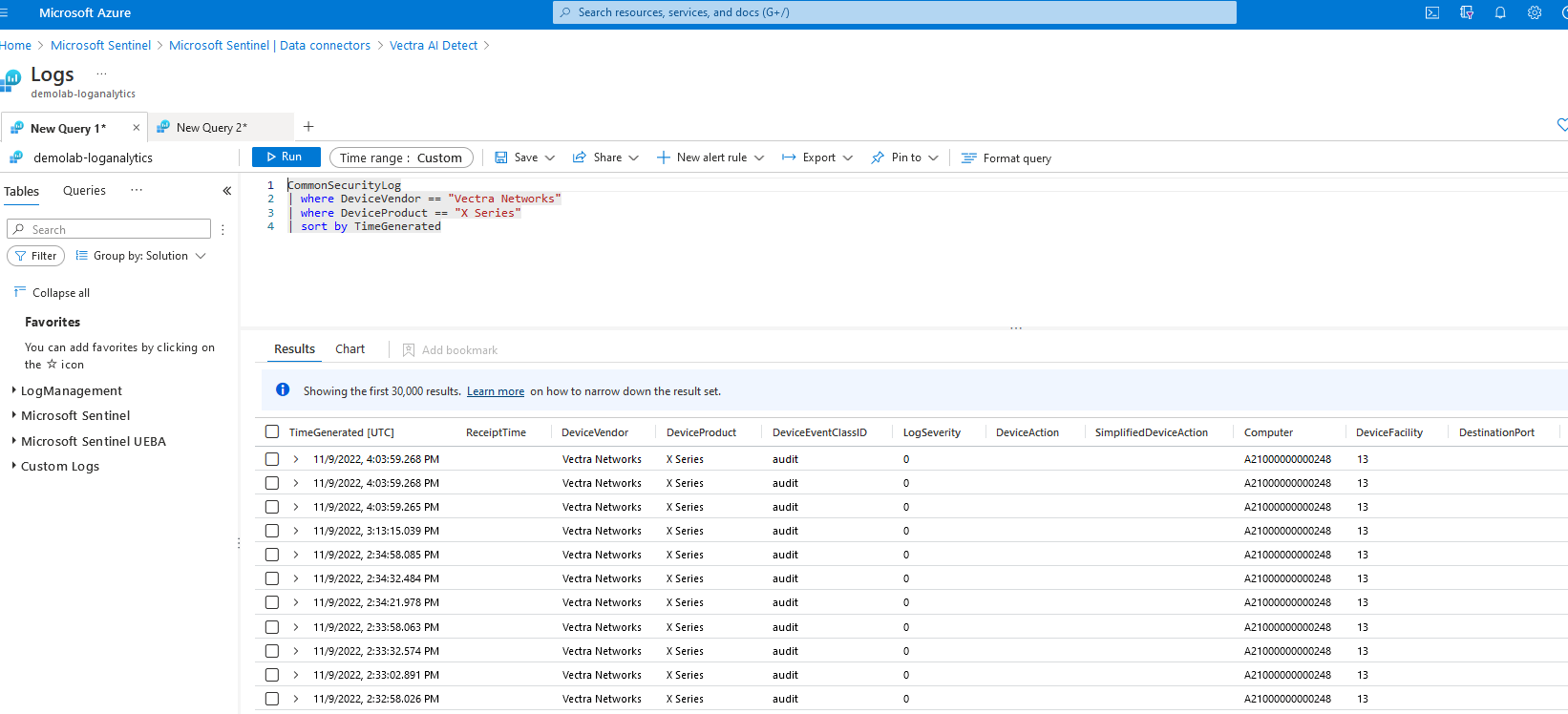
The following includes sample queries that can be used.
```ckeditor_codeblock
#all logs
CommonSecurityLog
| where DeviceVendor == "Vectra Networks"
| where DeviceProduct == "X Series"
| sort by TimeGenerated
#Host Count by Severity
CommonSecurityLog
| where DeviceVendor == "Vectra Networks" and DeviceEventClassID == "hsc"
| extend src = coalesce(SourceHostName, SourceIP)
| summarize arg_max(TimeGenerated, *) by src
| extend status = case(FlexNumber1>=50 and FlexNumber2<50, "High", FlexNumber1>=50 and FlexNumber2>=50, "Critical", FlexNumber1<50 and FlexNumber2>=50, "Medium", FlexNumber1>0 and FlexNumber1<50 and FlexNumber2>0 and FlexNumber2<50,"Low", "Other")
| where status != "Other"
| summarize Count = count() by status
#List of worst offenders
CommonSecurityLog
| where DeviceVendor == "Vectra Networks" and DeviceEventClassID == "hsc"
| extend src = coalesce(SourceHostName, SourceIP)
| summarize arg_max(TimeGenerated, *) by src
| sort by FlexNumber1 desc, FlexNumber2 desc
| limit 10
| project row_number(), src, SourceIP, FlexNumber1 , FlexNumber2, TimeGenerated
| project-rename Sr_No = Column1, Source = src, Source_IP = SourceIP, Threat = FlexNumber1, Certainty = FlexNumber2, Latest_Detection = TimeGenerated
#Top 10 Detection Types
CommonSecurityLog
| extend ExternalID = coalesce(column_ifexists("ExtID", ""), tostring(ExternalID), "")
| where DeviceVendor == "Vectra Networks" and DeviceEventClassID !in ("health", "audit", "campaigns", "hsc", "asc") and isnotnull(ExternalID)
| summarize Count = count() by DeviceEventClassID
| top 10 by Count desc
```
Example of output:
## Troubleshooting
In the Vectra Detect UI, there is a "test" button that you can use to send test messages and validate the setup.
1\. Check that the syslog server is running on port 514:
```ckeditor_codeblock
$netstat -an | grep 514
tcp 0 0 0.0.0.0:514 0.0.0.0:* LISTEN
tcp 0 0 192.168.49.67:514 192.168.55.213:56204 ESTABLISHED
tcp6 0 0 :::514 :::* LISTEN
udp 0 0 0.0.0.0:514 0.0.0.0:*
udp6 0 0 :::514 :::*
sudo lsof -ni :514
COMMAND PID USER FD TYPE DEVICE SIZE/OFF NODE NAME
rsyslogd 875 syslog 5u IPv4 25810 0t0 UDP *:syslog
rsyslogd 875 syslog 6u IPv6 25811 0t0 UDP *:syslog
```
2\. Use tcpdump to make that there is incoming data from Vectra Detect:
```ckeditor_codeblock
$sudo tcpdump -ni ens160 port 514
tcpdump: verbose output suppressed, use -v or -vv for full protocol decode
listening on ens160, link-type EN10MB (Ethernet), capture size 262144 bytes
19:21:54.620249 IP 192.168.55.213.56204 > 192.168.49.67.514: Flags [P.], seq 1851182649:1851183279, ack 3737925049, win 502, options [nop,nop,TS val 2389433788 ecr 2957241583], length 630
19:21:54.620293 IP 192.168.49.67.514 > 192.168.55.213.56204: Flags [.], ack 630, win 23747, options [nop,nop,TS val 2969116937 ecr 2389433788], length 0
19:21:54.620460 IP 192.168.55.213.56204 > 192.168.49.67.514: Flags [P.], seq 630:1575, ack 1, win 502, options [nop,nop,TS val 2389433789 ecr 2969116937], length 945
19:21:54.620468 IP 192.168.49.67.514 > 192.168.55.213.56204: Flags [.], ack 1575, win 23747, options [nop,nop,TS val 2969116938 ecr 2389433789], length 0
19:21:54.620640 IP 192.168.55.213.56204 > 192.168.49.67.514: Flags [P.], seq 1575:2151, ack 1, win 502, options [nop,nop,TS val 2389433789 ecr 2969116938], length 576
19:21:54.620648 IP 192.168.49.67.514 > 192.168.55.213.56204: Flags [.], ack 2151, win 23747, options [nop,nop,TS val 2969116938 ecr 2389433789], length 0
19:21:54.620814 IP 192.168.55.213.56204 > 192.168.49.67.514: Flags [P.], seq 2151:2970, ack 1, win 502, options [nop,nop,TS val 2389433789 ecr 2969116938], length 819
19:21:54.620822 IP 192.168.49.67.514 > 192.168.55.213.56204: Flags [.], ack 2970, win 23747, options [nop,nop,TS val 2969116938 ecr 2389433789], length 0
19:21:54.620912 IP 192.168.55.213.56204 > 192.168.49.67.514: Flags [P.], seq 2970:3259, ack 1, win 502, options [nop,nop,TS val 2389433789 ecr 2969116938], length 289
19:21:54.620922 IP 192.168.49.67.514 > 192.168.55.213.56204: Flags [.], ack 3259, win 23747, options [nop,nop,TS val 2969116938 ecr 2389433789], length 0
19:21:54.621045 IP 192.168.55.213.56204 > 192.168.49.67.514: Flags [P.], seq 3259:3520, ack 1, win 502, options [nop,nop,TS val 2389433789 ecr 2969116938], length 261
19:21:54.621052 IP 192.168.49.67.514 > 192.168.55.213.56204: Flags [.], ack 3520, win 23747, options [nop,nop,TS val 2969116938 ecr 2389433789], length 0
```
3\. Use the AMA CEF troubleshooting tool.
```ckeditor_codeblock
$sudo wget -O Sentinel_AMA_troubleshoot.py https://raw.githubusercontent.com/Azure/Azure-Sentinel/master/DataConnectors/Syslog/Sentinel_AMA_troubleshoot.py&&sudo python3 Sentinel_AMA_troubleshoot.py --cef
```
4\. Scenario:
**Issue:** It appears that multiple scoring events are showing up in Sentinel even though the score has not changed.
**Answer:** Any update to the entity scoring, other than a score decrease, might appear as a duplicate. However, this is unlikely and can be verified by making a Postman API query to the /events/entity\_scoring endpoint to validate there are multiple entries.
Also, by default data is not returned when the score decreases. The option to configure whether to ingest data when the entity score decreases is planned to be available in version 2 of Vectra AI Detect for Microsoft Azure Sentinel.
### Attachments
{% file src="/files/7dyij2kzhdrw1kzzgEs7" %}
{% file src="/files/9oA1te9Mv7h67RQ9GXPD" %}
---
# Agent Instructions
This documentation is published with GitBook. GitBook is the documentation platform designed so that both humans and AI agents can read, navigate, and reason over technical content effectively. Learn more at gitbook.com.
## Querying This Documentation
If you need additional information that is not directly available in this page, you can query the documentation dynamically by asking a question.
Perform an HTTP GET request on the current page URL with the `ask` query parameter, and the optional `goal` query parameter:
```
GET https://docs.vectra.ai/configuration/response/siem/microsoft-sentinel-ndr-detect-integration-using-ama.md?ask=&goal=
```
`ask` is the immediate question: it should be specific, self-contained, and written in natural language.
`goal` is optional and describes the broader end goal you are ultimately trying to accomplish on behalf of the user. GitBook uses it to tailor the answer towards what is most useful for that goal.
The response will contain a direct answer to the question and relevant excerpts and sources from the documentation.
Use this mechanism when the answer is not explicitly present in the current page, you need clarification or additional context, or you want to retrieve related documentation sections.