Syslog guide (QUX)

Overview

chevron-rightExpand/Collapse for Detailshashtag

Administrators can configure the Vectra to send host and Account scoring information, detection details, campaign details, and audit logs over syslog to external collectors for storage and analysis.

The Brain appliance can be configured to use a standard syslog, the HP ArcSight Common Event Format (CEF) syslog or JSON message format. Syslog messages include information displayed in the Vectra user interface, although in some cases the representations in the user interface may consist of derived values. Syslog messages can reflect a host scoring, account scoring, detection event, campaign event, audit log or system health alert.

Host scoring messages are generated when a host score is changed, which occurs upon initial threat detection, discovery of additional detections, and updates to any discovered detections. A host scoring message contains information on whether the host is marked as a key asset or has a detection that targets a key asset. The host score is also reduced over time if the underlying detection behavior subsides, either because of user intervention or because the host has left the network.

Account scoring messages are generated when an account score is changed, which occurs upon initial threat detection, discovery of additional detections, and updates to any discovered detections. The account score is reduced over time if the underlying detection behavior subsides, either because of user intervention or because the account has left the network.

Detection messages are created upon initial detection and for each update of the detection. Campaign messages are generated upon initial creation of a campaign, and on campaign closure.

Audit logs are generated for login events (both successful and failed), logout events, as well as other user actions that can impact the security posture of the product (such as creating a triage filter, marking detections as fixed, creating users, creating roles, etc).

System health logs are generated for specific events that can impact the health and operation of the product. These include changes to sensor connectivity, capture interface status and disk health status. Further, system health syslog includes periodic heartbeat messages that indicate the status of the Brain appliance.

Using the default sort order in the Vectra user interface, the first row of the Recent Activity table reflects the most recent update, while the last row reflects the oldest tracked detection.

An example of a network Detection alert.

Since the Vectra Brain limits the amount of data it maintains for individual detections, the last detection instance in the table may be the first instance of observed behavior or, for a very active detection, may simply be the oldest one currently tracked.

The Recent Activity table is fully sortable, so clicking on the Last Seen column heading will place the oldest detection at the top of the table.

Most detection messages contain event updates and summary fields (e.g. bytesSent, totalBytesSent). Event fields are displayed in the Recent Activity table while summary fields are displayed directly above the table in the Detection Summary portion of the user interface.

Customers can enable one or more log types for each syslog destination. If chosen, the relevant logs are sent to the syslog destination per the specified format.

Configuration Steps

chevron-rightExpand/Collapse for Detailshashtag

Maximum of three Syslog destinations can be configured from Vectra platform (Brain) web-UI. Here are the steps:

  1. Login to Vectra (Brain) web-UI with admin ID.

  2. Go to Settings » notification. In the notification page Scroll to Syslog section.

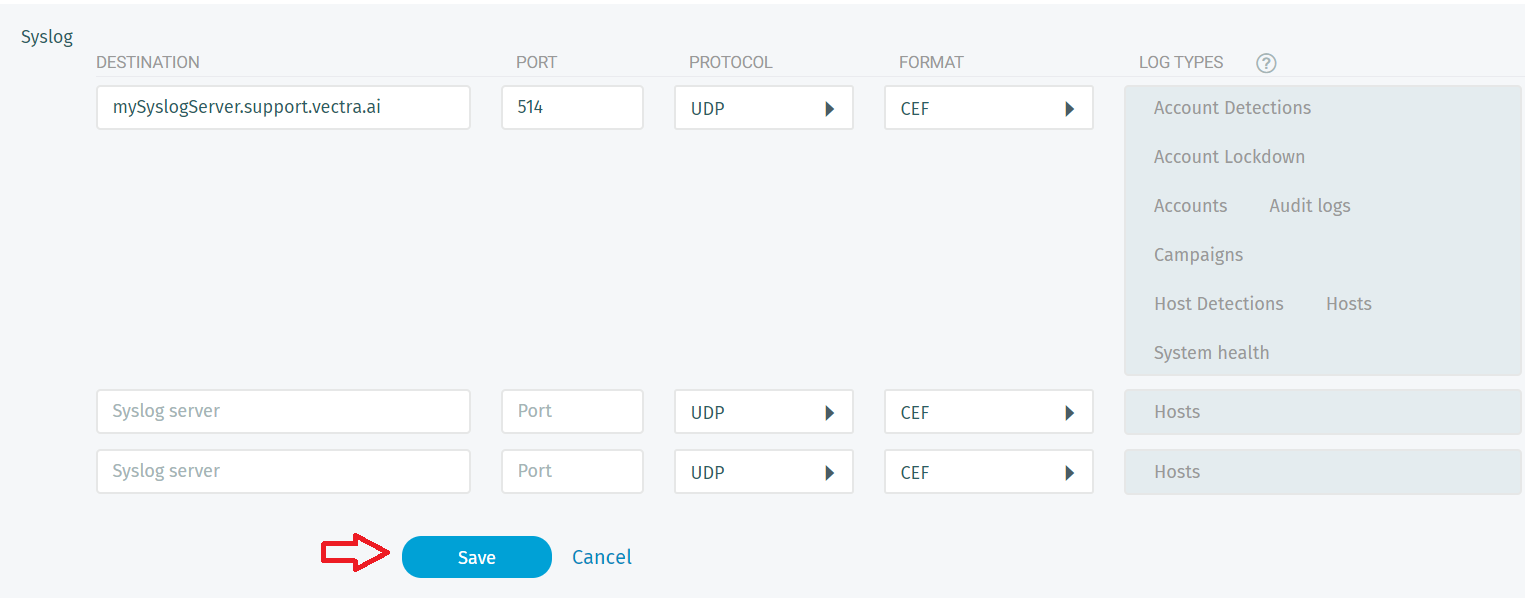
  3. Click on the "✎ Edit" option to add or edit Syslog destinations. Here the fields description:

    • Destination: Enter the <IP-adress or FQDN> of the remote Syslog server.

    • PORT: Enter the port number on which Syslog receiving server is listening.

    • PROTOCOL: Protocol being leveraged for the preferred type of Syslog service. Select one from the drop-down:

      UDP #Stateless
      TCP #Stateful
      SSL #Secure
    • FORMAT: The format in which Syslog messages are to be sent to the remote Syslog server. Select one from the drop-down:

      Standard
      CEF       #i.e. HP ArcSight CEF (i.e. Common Event Format) 
      JSON      # JavaScript Object Notation
    • LOG TYPES: Type of logs that are to be sent to the remote Syslog server. Select one or more from the following options:

      Host Scoring
      Account Scoring
      Host Detection
      Account Detection
      Account Lockdown
      Campaigns
      Audit
      Health
  4. Upon completing the configuration click on save:

  5. Click on "➤ Test": to verify Syslog configuration. Upon successful following message should appear at top of the web-page for few seconds :

Important Note:

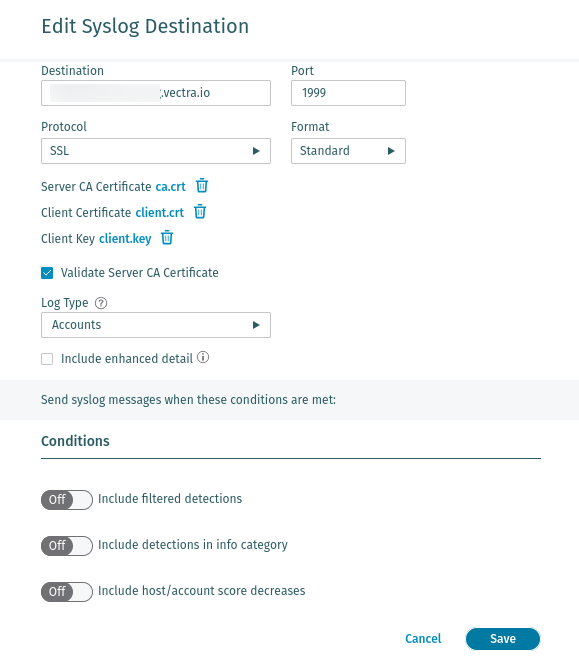
When the selected protocol is SSL, you are asked to upload the certificates:

Please Note!

  • The certificates must be in PEM format.

  • "Validate Server CA Certificate" is a new option in the v9.8 release.

    • This will default to on (checked) for new deployments as of the v9.8 release.

    • This will default to off (unchecked) for any prior deployments.

    • Please check this box if you would like the syslog server to enforce validation for certificates. Connections will work without this checkbox check, even with expired certificates.

  • Prior deployments may show a "Browse files" link for the Server CA Certificate if your prior deployment encountered a bug where the Server CA certificate was deleted by the system when only a client certificate was updated.

Host Scoring Log Events

chevron-rightExpand/Collapse for Detailshashtag

Host Scoring Standard Syslog Message Example

HOST [host@41261 category="$category" hostName="$host_name" currentIP="$host_ip" dvchost="$dvchost" threat="$threat" certainty="$certainty" privilege="$privilege" scoreDecreases="$score_decreases" URL="$href" UTCTime="$UTCTimeEnd" sourceKeyAsset="$src_key_asset" destKeyAsset="$dst_key_asset"]

Host Scoring Standard Syslog Message Detail

Key

Type

Description

$category

str

Always the string 'HOST SCORING'. Used internally to differentiate between account, host and detection messages.

$certainty

int

The certainty of the score assigned to this host

$dst_key_asset

bool

Whether there is a detection that is targeting this host and this host is a key asset

$dvchost

str

The hostname of the Brain

$host_ip

str

The IP of the host being scored

$host_name

str

The name of the host being scored

$href

str

A link to see this host in the UI

$privilege

int

The observed privilege level of the host.

$score_decreases

bool

Indicates whether both Threat and Certainty scores are decreasing.

$src_key_asset

bool

Whether the host being scored is marked as a key asset

$threat

int

Newly calculated host threat

$UTCTimeEnd

int

Seconds since epoch for event end

Host Scoring CEF Syslog Message Example

CEF:0|Vectra |X Series|$version|hsc|Host Score Change|3|externalId=$host_id cat=$category dvc=$headend_addr dvchost=$dvchost shost=$host_name src=$host_ip dst=$host_ip flexNumber1Label=threat flexNumber1=$threat flexNumber2Label=certainty flexNumber2=$certainty flexNumber3Label=privilege flexNumber3=$privilege cs3Label=scoreDecreases cs3=$score_decreases cs4Label=Vectra Event URL cs4=$href start=$UTCTimeStartCEF end=$UTCTimeEndCEF cs1Label=sourceKeyAsset cs1=$src_key_asset cs2Label=destKeyAsset cs2=$dst_key_asset

Host Scoring CEF Syslog Message Detail

Key

Type

Description

$category

str

Always the string 'HOST SCORING'. Used internally to differentiate between account, host and detection messages.

$certainty

int

The certainty of the score assigned to this host

$dst_key_asset

bool

Whether there is a detection that is targeting this host and this host is a key asset

$dvchost

str

The hostname of the Vectra Brain

$headend_addr

str

The IP of the Vectra Brain

$host_id

int

The ID of the host

$host_ip

str

The IP of the host being scored

$host_name

str

The name of the host being scored

$href

str

A link to see this host in the UI

$privilege

int

The observed privilege level of the host.

$score_decreases

bool

Indicates whether both Threat and Certainty scores are decreasing.

$src_key_asset

bool

Whether the host being scored is marked as a key asset

$threat

int

Newly calculated host threat

$UTCTimeEndCEF

int

Milliseconds since epoch for event end

$UTCTimeStartCEF

int

Milliseconds since epoch for event start

$version

str

The version of Vectra platform running the Vectra Brain

Host Scoring JSON Syslog Message Example

{"version": "$version", "dvchost": "$dvchost", "host_ip": "$host_ip", "href": "$href", "src_key_asset": $src_key_asset, "host_id": $host_id, "headend_addr": "$headend_addr", "category": "$category", "dst_key_asset": $dst_key_asset, "privilege": $privilege, "certainty": $certainty, "score_decreases": $score_decreases, "vectra_timestamp": "$timestamp", "host_name": "$host_name", "threat": $threat}

Host Scoring JSON Syslog Message Detail

Key

Type

Description

$category

str

Always the string 'HOST SCORING'. Used internally to differentiate between account, host and detection messages.

$certainty

int

The certainty of the score assigned to this host

$dst_key_asset

bool

Whether there is a detection that is targeting this host and this host is a key asset

$dvchost

str

The hostname of the Vectra Brain

$headend_addr

str

The IP of the Vectra Brain

$host_id

int

The ID of the host

$host_ip

str

The IP of the host being scored

$host_name

str

The name of the host being scored

$href

str

A link to see this host in the UI

$privilege

int

The observed privilege level of the host.

$score_decreases

bool

Indicates whether both Threat and Certainty scores are decreasing.

$src_key_asset

bool

Whether the host being scored is marked as a key asset

$threat

int

Newly calculated host threat

$timestamp

int

Timestamp in seconds since epoch

$version

str

The version of Vectra software running on the Vectra Brain

Host Scoring Enhanced Details

Enhanced details are available for host system logs in each of three formats: Standard, CEF, and JSON. In the case of Standard, the fields are appended to the end of the system log message.

vectra_standard_v2 -: HOST [host@41261 category=”$category” hostName="$hostName" currentIP="$currentIP" dvchost="$dvchost" threat="$threat" certainty="$certainty" privilege="$privilege" scoreDecreases="$scoreDecreases" URL="$url" UTCTime="$UTCTime" sourceKeyAsset="$sourceKeyAsset" destKeyAsset="$destKeyAsset" sensor="$sensor" detectionProfile="$detectionProfile" hostGroups=[$hostGroups] tags="$tags" accountAccessHistory="$accountAccessHistory"  serviceAccessHistory="$serviceAccessHistory" macAddress="$macAddress" macVendor="$macVendor" lastDetectionType="$lastDetectionType" quadrant="$quadrant"]

In the case of CEF, the new fields are represented as a JSON string inside the msg field.

vectra_cef_v2 -: CEF:0|Vectra |X Series|$version|hsc|Host Score Change|3|externalId=$host_id cat=$category dvc=$headend_addr dvchost=$dvchost shost=$host_name src=$host_ip dst=$host_ip flexNumber1Label=threat flexNumber1=$threat flexNumber2Label=certainty flexNumber2=$certainty flexNumber3Label=privilege flexNumber3=$privilege cs3Label=scoreDecreases cs3=$score_decreases cs4Label=Vectra Event URL cs4=$href start=$UTCTimeStartCEF end=$UTCTimeEndCEF cs1Label=sourceKeyAsset cs1=$src_key_asset cs2Label=destKeyAsset cs2=$dst_key_asset msg="{'sensor': $sensor, 'detectionProfile': $detectionProfile, 'hostGroups':[$hostGroups], 'tags':[$tags], 'accountAccessHistory':[$accountAccessHistory], 'serviceAccessHistory':[$serviceAccessHistory], 'macAddress': $macAddress, 'macVendor':
$macVendor, 'lastDetectionType': $lastDetectionType, 'quadrant': $quadrant}”

In the case of JSON, the new fields appear throughout the JSON object

vectra_json_v2 -: {"account_access_history": [$accountAccessHistory], "tags": [$tags], "service_access_history": [$serviceAccessHistory], "dvchost": "$dvchost", "host_ip": "$hostIP", "last_detection_type": "$lastDetectionType", "href": "$href", "src_key_asset":
$src_key_asset, "host_id": $host_id, "headend_addr": "$headend_addr", "category": "$category", "dst_key_asset": $dst_key_asset, "detection_profile": $detectionProfile, "score_decreases": $scoreDecreases, "host_groups": [$hostGroups], "mac_vendor":
$macVendor, "certainty": $certainty, "vectra_timestamp": "$vectra_timestamp", "threat":
$threat, "host_name": "$host_name", "version": "$version", "macAddress":$mac_address, "privilege": $privilege, "sensor": "$sensor", "quadrant": "$quadrant"}

Host Scoring Enhanced Fields Detail

Key

Type

Description

$sensor

str

The sensor associated with this host

$detectionProfile

obj

The detection profile associated with this host

$hostGroups

list

A list of the host groups that the host is a member of

$tags

list

A list of tags applied to the host

$accountAccessHistory

list

The account access history associated with this host

$serviceAccessHistory

list

The service access history associated with this host

$macAddress

str

The MAC address of this host

$macVendor

str

The vendor of the MAC address of this host

$lastDetectionType

str

The most recent type of detection associated with this host

$quadrant

str

The values for this field are Low, Medium, High, or Critical, and reflect the status of the given host in the UI

Account Scoring Log Events

chevron-rightExpand/Collapse for Detailshashtag

Account Scoring Standard Syslog Message Example

Account Scoring Standard Syslog Message Detail

Key

Type

Description

$category

str

Always the string 'ACCOUNT SCORING'. Used internally to differentiate between account, host and detection messages.

$certainty

int

The certainty of the score assigned to this account

$href

str

A link to see this account in the UI

$privilege

int

The observed privilege level of the account.

$score_decreases

bool

Indicates whether both Threat and Certainty scores are decreasing.

$threat

int

Newly calculated account threat

$UTCTimeEnd

int

Seconds since epoch for event end

Account Scoring CEF Syslog Message Example

Account Scoring CEF Syslog Message Detail

Key

Type

Description

$account_id

int

The ID of the account

$account_uid

str

The user account identifier.

$category

str

Always the string 'ACCOUNT SCORING'. Used internally to differentiate between account, host and detection messages.

$certainty

int

The certainty of the score assigned to this account

$headend_addr

str

The IP of the Vectra Brain

$href

str

A link to see this account in the UI

$privilege

int

The observed privilege level of the account.

$score_decreases

bool

Indicates whether both Threat and Certainty scores are decreasing.

$threat

int

Newly calculated account threat

$UTCTimeEndCEF

int

Milliseconds since epoch for event end

$UTCTimeStartCEF

int

Milliseconds since epoch for event start

$version

str

The version of Vectra platform running the Vectra Brain

Account Scoring JSON Syslog Message Example

Account Scoring JSON Syslog Message Detail

Key

Type

Description

$account_id

int

The ID of the account

$account_uid

str

The user ID of the account

$category

str

Always the string 'ACCOUNT SCORING'. Used internally to differentiate between account, host and detection messages.

$certainty

int

The certainty of the score assigned to this account

$headend_addr

str

The IP of the Vectra Brain

$href

str

A link to see this account in the UI

$privilege

int

The observed privilege level of the account.

$score_decreases

bool

Indicates whether both Threat and Certainty scores are decreasing.

$threat

int

Newly calculated account threat

$timestamp

int

Timestamp in seconds since epoch

$version

str

The version of Vectra platform running the Vectra Brain

Account Scoring Enhanced Details

Enhanced details are available for account system logs in each of three formats: Standard, CEF, and JSON. In the case of Standard, the fields are appended to the end of the syslog message.

In the case of CEF, the new fields are represented as a JSON string inside the msg field.

In the case of JSON, the new fields appear throughout the JSON object.

Account Scoring Enhanced Fields Detail

Key

Type

Description

$tags

list

A list of tags applied to the host.

$hostAccessHistory

list

The host access history associated with this account.

$serviceAccessHistory

list

The service access history associated with this account.

$lastDetectionType

str

The most recent type of detection associated with this account.

$quadrant

str

The values for this field are Low, Medium, High, or Critical, and reflect the status of the given account in the UI.

Host Detection Log Events

chevron-rightExpand/Collapse for Detailshashtag

Host Detection Standard Syslog Message Example

Host Detection Standard Syslog Message Detail

Key

Type

Description

$category

str

The category of the detection (e.g., EXFILTRATION)

$certainty

int

The certainty of the detection

$d_type_vname

str

The name of the detection. For possible detection names, please see Understanding Vectra AI Detections.

$dd_bytes_rcvd

int

Meaning differs depending on detection type. Does not apply to all detections. Defaults to 0

$dd_bytes_sent

int

The number of bytes in the traffic that caused the detection. Does not apply to all detections. Defaults to 0

$dd_dst_dns

str

The destination domain name of detection event

$dd_dst_ip

str

The destination IP address of detection event

$dd_dst_port

int

The port of the attacked host. Defaults to 80

$dd_proto

str

The protocol over which this detection fired (e.g., tcp). Does not apply to all detections. Defaults to empty string

$dvchost

str

The hostname of the Vectra Brain

$host_name

str

The hostname for attacking host

$host_ip

str

The IP of the host that triggered the detection

$href

str

A link to this detection in the UI

$threat

int

The threat score of this detection

$triaged

bool

Whether the detection has been triaged yet or not

$UTCTimeEnd

int

Seconds since epoch for event end

$UTCTimeStart

int

Seconds since epoch for event start

Host Detection CEF Syslog Message Example

Host Detection CEF Syslog Message Detail

Key

Type

Description

$category

str

The category of the detection (e.g., EXFILTRATION)

$certainty

int

The certainty of the detection

$d_type

str

The Vectra internal representation of detection name (e.g., smash_n_grab, or sql_injection)

$d_type_vname

str

The name of the detection. For possible detection names, please see Understanding Vectra AI Detections.

$dd_bytes_rcvd

int

Meaning differs depending on detection type. Does not apply to all detections. Defaults to 0

$dd_bytes_sent

int

The number of bytes in the traffic that caused the detection. Does not apply to all detections. Defaults to 0

$dd_dst_dns

str

The destination domain name of detection event

$dd_dst_ip

str

The destination IP address of detection event

$dd_dst_port

int

The port of the attacked host. Defaults to 80

$dd_proto

str

The protocol over which this detection fired (e.g., tcp). Does not apply to all detections. Defaults to empty string

$detection_id

int

The ID of the detection

$dvchost

str

The hostname of the Vectra Brain

$headend_addr

str

The IP of the Vectra Brain

$host_ip

str

The IP of the host that triggered the detection

$host_name

str

The hostname for attacking host

$href

str

A link to this detection in the UI

$severity

int

A score proportional to threat

$threat

int

The threat score of this detection

$triaged

bool

Whether the detection has been triaged yet or not

$UTCTimeEndCEF

int

Milliseconds since epoch for event end

$UTCTimeStartCEF

int

Milliseconds since epoch for event start

$version

str

The version runningon the Vectra Brain

Host Detection JSON Syslog Message Example

Host Detection JSON Syslog Message Detail

Key

Type

Description

$category

str

The category of the detection (e.g., EXFILTRATION)

$certainty

int

The certainty of the detection

$detection_id

int

The ID of the detection

$d_type

str

The Vectra internal representation of detection name (e.g., smash_n_grab, or sql_injection)

$d_type_vname

str

The name of the detection. For possible detection names, please see Understanding Vectra AI Detections.

$dd_bytes_rcvd

int

Meaning differs depending on detection type. Does not apply to all detections. Defaults to 0

$dd_bytes_sent

int

The number of bytes in the traffic that caused the detection. Does not apply to all detections. Defaults to 0

$dd_dst_dns

str

The destination domain name of detection event

$dd_dst_ip

str

The destination IP address of detection event

$dd_dst_port

int

The port of the attacked host. Defaults to 80

$dd_proto

str

The protocol over which this detection fired (e.g., tcp). Does not apply to all detections. Defaults to empty string.

$dvchost

str

The hostname of the Vectra Brain

$headend_addr

str

The IP of the Vectra Brain

$host_ip

str

The IP of the host that triggered the detection

$host_name

str

The hostname for attacking host

$href

str

A link to this detection in the UI

$severity

int

A score proportional to threat

$threat

int

The threat score of this detection

$timestamp

int

Timestamp in seconds since epoch

$triaged

bool

Whether the detection has been triaged yet or not

$version

str

The version running on the Vectra Brain

Host Detection Enhanced Details

When enabling enhanced details for Host Detections, the enhanced fields will be appended to the end of the existing syslog message for Standard and CEF formats. By convention, JSON objects are unordered.

Key

Type

Description

$MITRE

str

The MITRE T-Number(s) associated with the detection.

Host Detection per Detection Type Enhanced Detail Message Detail

Cryptocurrency Mining

Count="$count"

cnt=$count

"count": "$count"

The number of attempts.

Outbound Dos

DosType="$dos_type"

msg=$dos_type

"dos_type": "$dos_type"

The DOS type.

Outbound Port Sweep

NumAttempts="$num_attempts"

cnt=$num_attempts

"num_attempts": "$num_attempts"

The number of attempts.

Networks="$networks"

msg=$networks

"networks": "$networks"

The target subnets.

Brute-Force

Count="$count"

cnt=$count

"count": "$count"

The number of attempts.

Ransomware File Activity

Count="$count"

cnt=$count

"count": "$count"

The number of files affected.

Shares="$shares"

msg=$shares

"shares": "$shares"

The related files shares.

Extensions="$extensions"

"extensions": "$extensions"

File extensions used.

RansomNotes="$ransom_notes"

"ransom_notes": "$ransom_notes"

Ransome notes found.

Shell Knocker Client

SentPattern="$sent_pattern"

"sent_pattern": "$sent_pattern"

The sent pattern.

SentNormalPattern="$sent_normal_pattern"

"sent_normal_patter n": "$sent_normal_pattern"

Example sent normal pattern.

ReceivedPattern="$received_pattern"

"received_pattern": "$received_pattern"

The received pattern.

ReceivedNormalPattern="$received_normal_pattern"

"received_normal_pattern": "$received_normal_pattern"

Example received normal pattern.

SMB Brute-Force

Count="$count

cnt=$count

"count": "$count"

The number of attempts.

Reason="$reason"

msg=$reason

"reason": "$reason"

The error code.

Accounts="$accounts"

"accounts": "$accounts"

The related accounts.

Shares="$shares"

"shares": "$shares"

The related shares.

SQL Injection Activity

SQLFragment="$sql_fragment"

msg=$sql_fragment

"sql_fragment": "$sql_fragment"

The SQL fragment.

HTTPSegment="$http_segment"

"http_segment": "$http_segment"

The HTTP segment.

UserAgent="$user_agent"

"user_agent": "$user_agent"

The user agent.

ResponseCode="$response_code"

"response_code": "$response_code"

The HTTP response code.

Suspicious Admin

NormalServers="$normal_servers"

"normal_servers": "$normal_servers"

The normal servers observed.

NormalAdmins="$normal_admins"

"normal_admins": "$normal_admins"

The normal admins observed.

Suspicious Remote Desktop

Reason="$reason"

msg=$reason

"reason": "$reason"

The reason this is suspicious.

ClientToken="$client_token"

"client_token": "$client_token"

The RDP client token.

ClientName="$client_name"

"client_name": "$client_name"

The RDP client name.

KeyboardID="$keyboard_id"

"keyboard_id": "$keyboad_id"

They keyboard layout ID.

KeyboardName="$keyboard_name"

"keyboard_name": "$keyboad_name"

They keyboard layout name.

ProductID="$product_id "

"product_id": "$product_id"

The unusual product ID.

Suspicious Remote Execution

Function="$function"

msg=$function

"function": "$function"

The executed function.

Account="$account"

"account": "$account"

The related user account.

UUID="$uuid"

"uuid": "$uuid"

The RPC UUID.

NamedPipe="$namedpipe"

"namedpipe": "$namedpipe"

The named pipe.

Internal Stage Loader

StageLoaderBytesSent="$bytes_sent"

"bytes_sent": "$bytes_sent"

The bytes of data sent.

StageLoaderBytesReceived="$bytes_received"

"bytes_received": "$bytes_received"

The bytes of data received.

Suspicious LDAP Query

Count="$count"

cnt=$count

"count": "$count"

The number of objects received.

Request="$request"

msg=$request

"request": "$request"

The LDAP request.

BaseObject="$base_object"

"base_object": "$base_object"

The base distinguished name.

ResponseCode="$response_code"

"response_code": "$response_code"

The response code.

RPC Recon

UUID="$uuid"

msg=$uuid

"uuid": "$uuid"

The RPC UUID.

Count="$count"

cnt=$count

"count": "$count"

The number of internal targets.

RDP Recon

Count="$count"

cnt=$count

"count": "$count"

The number of attempts.

ClientName="$client_name"

msg=$client_name

"client_name": "$client_name"

The RDP client name.

Cookie="$cookie"

"cookie": "$cookie"

The RDP client token.

SMB Account Scan

Count="$count"

cnt=$count

"count": "$count"

The number of attempts.

Accounts="$accounts"

msg=$account s

"accounts": "$accounts"

The related accounts.

Port Sweep

NumAttempts="$num_attempts

cnt=$num_attempts

"num_attempts": "$num_attempts"

The number of attempts.

DstIPs="$dst_ips"

msg=$dst_ips

"dst_ips": "$dst_ips"

The target subnets.

Port Scan

Scans="$scans"

cnt=$scans

"scans": "$scans"

The number of attempts.

Ports="$ports"

msg=$ports

"ports": "$ports"

Ports scanned.

Successes="$successes"

"successes": "$successes"

The number of successes.

File Share Enumeration

Count="$count"

cnt=$count

"count": "$count"

The number of file shares enumerated.

Shares="$shares"

msg=$shares

"shares": "$shares"

The shares enumerated.

Accounts="accounts"

"accounts": "$accounts"

The related accounts.

External Remote Access

Count="$count"

cnt=$count'

"count": "$count"

The number of sessions.

Hidden DNS Tunnel

Count="$count"

cnt=$count'

"count": $count

The number of sessions.

TOR Activity

Count="$count"

cnt=$count'

"count": "$count"

The number of sessions.

Hidden HTTPS Tunnel

TunnelType="$tunnel_type"

msg=$tunnel_type

"tunnel_type": "$tunnel_type"

The type of hidden tunnel.

Threat Intelligence Match

ThreatFeeds="$threat_feeds"

msg=$threat_feeds

"threat_feeds": "$threat_feeds"

The name of the threat feed.

Reason="$reason"

"reason": "$reason"

The indicating reason.

MatchedDomain="$matched_domain" (CNC)

"matched_domain": "$matched_domain"

The matched domain.

MatchedIP="$matched_ip" (Exfil)

"matched_ip": "$matched_ip"

The matched IP.

MatchedUserAgent="$matched_user_agent" (Lateral)

"matched_user_agent": "$matched_user_agent"

The matched user-agent.

Suspicious HTTP

HttpMethod="$http_method"

"http_method": "$http_method"

The HTTP method.

URL="$url"

"url": "$url"

The suspicous URL.

Referer="$referer"

"referer": "$referer"

The referer.

Host="$host"

"host": "$host"

The suspicous host.

ReplyCacheControl="$reply_cache_control"

"reply_cache_control": "$reply_cache_control "

The replay cache control setting.

Suspicious Relay

IP="$ip"

"ip": "$ip"

The internal target host.

Protocol="$protocol"

"protocol": "$protocol"

The external protocol used.

Port="$port"

"port": "$port"

The external port used.

Data Smuggler

ProxiedDst=”foo.com”

msg=foo.com

“proxied_dst”: “foo.com”

The domain name or IP of the proxy.

Smash and Grab

ProxiedDst=”foo.com”

msg=foo.com

“proxied_dst”: “foo.com”

The domain name or IP of the proxy.

Account Detection Log Events

chevron-rightExpand/Collapse for Detailshashtag

Account Detection Standard Syslog Message Example

Account Detection Standard Syslog Message Detail

Key

Type

Description

$account

str

The account associated with this detection.

$category

str

The category of the detection (e.g., EXFILTRATION)

$certainty

int

The certainty of the detection

$d_type_vname

str

The name of the detection. For possible detection names, please see Understanding Vectra AI Detections.

$dd_bytes_rcvd

int

Meaning differs depending on detection type. Does not apply to all detections. Defaults to 0

$dd_bytes_sent

int

The number of bytes in the traffic that caused the detection. Does not apply to all detections. Defaults to 0

$dd_dst_dns

str

The destination domain name of detection event

$dd_dst_ip

str

The destination IP address of detection event

$dd_dst_port

int

The port of the attacked host. Defaults to 80

$href

str

A link to this detection in the UI

$threat

int

The threat score of this detection

$triaged

bool

Whether the detection has been triaged yet or not

$UTCTimeEnd

int

Seconds since epoch for event end

$UTCTimeStart

int

Seconds since epoch for event start

Account Detection CEF Syslog Message Example

Account Detection CEF Syslog Message Detail

Key
Type
Description

$dd_bytes_rcvd

int

Meaning differs depending on detection type. Does not apply to all detections. Defaults to 0

$dd_bytes_sent

int

The number of bytes in the traffic that caused the detection. Does not apply to all detections. Defaults to 0

$dd_dst_dns

str

The destination domain name of detection event

$dd_dst_ip

str

The destination IP address of detection event

$dd_dst_port

int

The port of the attacked host. Defaults to 80

$detection_id

int

The ID of the detection

$headend_addr

str

The IP of the Vectra Brain

$href

str

A link to this detection in the UI

$severity

int

A score proportional to threat

$threat

int

The threat score of this detection

$triaged

bool

Whether the detection has been triaged yet or not

$UTCTimeEndCEF

int

Milliseconds since epoch for event end

$UTCTimeStartCEF

int

Milliseconds since epoch for event start

$version

str

The version of Vectra platform running the Vectra Brain

$account

str

The account associated with this detection.

$category

str

The category of the detection (e.g., EXFILTRATION)

$certainty

int

The certainty of the detection

$d_type

str

The Vectra internal representation of detection name (e.g., smash_n_grab, or sql_injection)

$d_type_vname

str

The name of the detection. For possible detection names, please see Understanding Vectra AI Detections.

Account Detection JSON Syslog Message Example

Account Detection JSON Syslog Message Detail

Key

Type

Description

$account_uid

str

The account name

$category

str

The category of the detection (e.g., EXFILTRATION)

$certainty

int

The certainty of the detection

$detection_id

int

The ID of the detection

$d_type

str

The Vectra internal representation of detection name (e.g., smash_n_grab, or sql_injection)

$d_type_vname

str

The name of the detection. For possible detection names, please see Understanding Vectra AI Detections.

$dd_bytes_rcvd

int

Meaning differs depending on detection type. Does not apply to all detections. Defaults to 0

$dd_bytes_sent

int

The number of bytes in the traffic that caused the detection. Does not apply to all detections. Defaults to 0

$dd_dst_dns

str

The destination domain name of detection event

$dd_dst_ip

str

The destination IP address of detection event

$dd_dst_port

int

The port of the attacked host. Defaults to 80

$dvchost

str

The hostname of the Vectra Brain

$headend_addr

str

The IP of the Vectra Brain

$href

str

A link to this detection in the UI

$severity

int

A score proportional to threat

$threat

int

The threat score of this detection

$timestamp

int

Timestamp in seconds since epoch

$triaged

bool

Whether the detection has been triaged yet or not

$version

str

The version running on he Vectra Brain

Account Detection Enhanced Details

When enabling enhanced details for Account Detections, the enhanced fields will be appended to the end of the existing syslog message for Standard and CEF formats. By convention, JSON objects are unordered.

Key

Type

Description

$MITRE

str

The MITRE T-Number(s) associated with the detection.

Account Detection Enhanced Fields Detail

Detection

Standard

CEF

JSON

Description

Privilege Anomaly

AccountName="$account_name"

msg=$account_name

"account_name": "$account_name"

The account name.

AccountInfo="$account_info"

"account_info": [$account_privilege_score, $account_privilege_level]

The account information, consisting of account privilege score and privilege level.

ServiceName="$service_name"

"service_name": "$service_name"

The service name.

ServiceInfo="$service_info"

"service_info": [$service_privilege_score, $service_privilege_level]

The service information, consisting of service privilege score and privilege level.

Data Smuggler

ProxiedDst=”foo.com”

msg=foo.com

“proxied_dst”: “foo.com”

The domain name or IP of the proxy.

Smash and Grab

ProxiedDst=”foo.com”

msg=foo.com

“proxied_dst”: “foo.com”

The domain name or IP of the proxy.

Account Lockdown Log Events

chevron-rightExpand/Collapse for Detailshashtag

Account Lockdown Standard Syslog Message Example

Account Lockdown Standard Syslog Message Detail

Key

Type

Description

$account_name

str

The name of the account.

$action

str

The action taken on the account (e.g., lock or unlock)

$category

str

The category of the event (e.g., LOCKDOWN)

$headend_addr

str

The IP of the Vectra Brain.

$user

int

The username of the person that performed the lockdown action.

$success

bool

Confirmation if the lockdown action was successful.

$href

str

A link to the account in the UI.

$UTCTime

int

Seconds since epoch for this event

Account Lockdown CEF Syslog Message Example

Account Lockdown CEF Syslog Message Detail

Key

Type

Description

$account_id

int

The ID of the account.

$account_name

str

The name of the account.

$action

str

The action taken on the account (e.g., lock or unlock)

$category

str

The category of the event (e.g., LOCKDOWN)

$headend_addr

str

The IP of the Vectra Brain.

$user

int

The username of the person that performed the lockdown action.

$success

bool

Confirmation if the lockdown action was successful.

$href

str

A link to the account in the UI.

$version

str

The version of Vectra platform running the Vectra Brain

$UTCTimeEnd

int

Seconds since epoch for event end.

$version

str

The version running on the Vectra Brain

Account Lockdown JSON Syslog Message Example

Account Lockdown JSON Syslog Message Detail

Key

Type

Description

$account_id

int

The ID of the account.

$account_name

str

The name of the account.

$action

str

The action taken on the account (e.g., lock or unlock).

$category

str

The category of the event (e.g., LOCKDOWN).

$headend_addr

str

The IP of the Vectra Brain.

$user

int

The username of the person that performed the lockdown action.

$success

bool

Confirmation if the lockdown action was successful.

$href

str

A link to the account in the UI.

$UTCTime

int

Seconds since epoch for this event.

$version

str

The version running on the Vectra Brain.

Host Lockdown Log Events

chevron-rightExpand/Collapse for Detailshashtag

Host Lockdown Standard Syslog Message Example

Host Lockdown Standard Syslog Message Detail

Key

Type

Description

$action

str

The action taken on the account (e.g., lock or unlock).

$category

str

The category of the event (e.g., HOST_LOCKDOWN).

$headend_addr

str

The IP of the Vectra Brain.

$host_name

str

The name of the host.

$user

int

The username of the person that performed the lockdown action.

$success

bool

Confirmation if the lockdown action was successful.

$href

str

A link to the account in the UI.

$retry

bool

When a Lockdown action has failed, this indicates whether the system will retry the action.

$UTCTime

int

Seconds since epoch for this event.

Host Lockdown CEF Syslog Message Example

Host Lockdown CEF Syslog Message Detail

Key

Type

Description

$action

str

The action taken on the host (e.g., lock or unlock).

$category

str

The category of the event (e.g., HOST_LOCKDOWN).

$headend_addr

str

The IP of the Vectra Brain.

$host_id

int

The ID of the host.

$host_name

str

The name of the host.

$href

str

A link to the account in the UI.

$retry

bool

When a Lockdown action has failed, this indicates whether the system will retry the action.

$success

bool

Confirmation if the lockdown action was successful.

$user

int

The username of the person that performed the lockdown action.

$UTCTimeStart

int

Seconds since epoch for event start.

$UTCTimeEnd

int

Seconds since epoch for event end.

$version

str

The version running on the Vectra Brain.

Host Lockdown JSON Syslog Message Example

Host Lockdown JSON Syslog Message Detail

Key

Type

Description

$action

str

The action taken on the host (e.g., lock or unlock).

$category

str

The category of the event (e.g., HOST_LOCKDOWN).

$headend_addr

str

The IP of the Vectra Brain.

$host_id

int

The ID of the host.

$host_name

str

The name of the host.

$href

str

A link to the account in the UI.

$user

int

The username of the person that performed the lockdown action.

$retry

bool

When a Lockdown action has failed, this indicates whether the system will retry the action.

$success

bool

Confirmation if the lockdown action was successful.

$UTCTime

int

Seconds since epoch for this event.

$version

str

The version running on the Vectra Brain.

Campaign Log Events

chevron-rightExpand/Collapse for Detailshashtag

Campaign Standard Syslog Message Example

Campaign Standard Syslog Message Detail

Key

Type

Description

$action

str

The action that caused the message to be logged (e.g., START, TRIAGED, TIMEOUT).

$campaign_id

int

The id of the campaign.

$campaign_link

str

The link to the campaign in the UI.

$dest_id

str

The destination of the campaign. Defaults to 'external'.

$dest_ip

str

The destination IP address the campaign is targeting.

$dest_name

str

The external domain of the campaign destination.

$det_id

int

The ID of the detection that caused the campaign creation.

$dvchost

str

The hostname of the Vectra Brain.

$headend_addr

str

The IP of the Vectra Brain.

$reason

str

The event name of the campaign.

$src_hid

int

The original host ID of the member host in this campaign.

$src_ip

str

The host IP of the source host.

$src_name

str

The host name of the source host.

$timestamp

int

Timestamp in seconds since epoch.

Campaign CEF Syslog Message Example

Campaign CEF Syslog Message Detail

Key

Type

Description

$action

str

The action that caused the message to be logged (e.g., START, TRIAGED, TIMEOUT)

$campaign_id

int

The id of the campaign

$campaign_link

str

The link to the campaign in the UI

$campaign_name

str

The name of the campaign

$dest_id

str

The destination of the campaign. Defaults to 'external'

$dest_ip

str

The destination IP address the campaign is targeting

$dest_name

str

The external domain of the campaign destination

$det_id

int

The ID of the detection that caused the campaign creation

$dvchost

str

The hostname of the Vectra Brain

$headend_addr

str

The IP of the Vectra Brain

$reason

str

The event name of the campaign

$src_hid

int

The original host ID of the member host in this campaign

$src_ip

str

The host IP of the source host

$src_name

str

The host name of the source host

$timestamp

int

Timestamp in seconds since epoch

$version

str

The version of Vectra platform running the Vectra Brain

Campaign JSON Syslog Message Example

Campaign JSON Syslog Message Detail

Key

Type

Description

$action

str

The action that caused the message to be logged (e.g., START, TRIAGED, TIMEOUT).

$campaign_id

int

The id of the campaign.

$campaign_link

str

The link to the campaign in the UI.

$campaign_name

str

The name of the campaign.

$dest_id

str

The destination of the campaign. Defaults to 'external'.

$dest_ip

str

The destination IP address the campaign is targeting.

$dest_name

str

The external domain of the campaign destination.

$det_id

int

The ID of the detection that caused the campaign creation.

$dvchost

str

The hostname of the Vectra Brain.

$headend_addr

str

The IP of the Vectra Brain.

$reason

str

The event name of the campaign.

$src_hid

int

The original host ID of the member host in this campaign.

$src_ip

str

The host IP of the source host.

$src_name

str

The host name of the source host.

$syslog_timestamp

int

The epoch timestamp for when syslog received the message (e.g., 1550014653).

$vectra_timestamp

int

The epoch timestamp for when the event occurred (e.g., 1550014653).

$version

str

The version of Vectra platform running the Vectra Brain.

Audit Log Events

chevron-rightExpand/Collapse for Detailshashtag

Audit Standard Syslog Message Example

Audit Standard Syslog Message Detail

Key

Type

Description

$dvchost

str

The hostname of the Vectra Brain.

$headend_addr

str

The IP of the Vectra Brain.

$message

str

A message explaining the cause/nature of the log.

$result

bool

True, False, or pending.

$role

str

Role of the user who caused the log (e.g., admin, super admin, etc).

$source_ip

str

IP address of the machine that initiated the user action.

$user

str

Username of the user who caused the log.

$version

str

The version running onthe Vectra Brain.

Audit CEF Syslog Message Example

Audit CEF Syslog Message Detail

Key

Type

Description

$dvchost

str

The hostname of the Vectra Brain.

$headend_addr

str

The IP of the Vectra Brain.

$message

str

A message explaining the cause/nature of the log.

$result

bool

True, False, or pending.

$role

str

Role of the user who caused the log (e.g., admin, super admin, etc).

$source_ip

str

IP address of the machine that initiated the user action.

$user

str

Username of the user who caused the log.

$version

str

The version running on the Vectra Brain.

Audit JSON Syslog Message Example

Audit JSON Syslog Message Detail

Key

Type

Description

$dvchost

str

The hostname of the Vectra Brain.

$headend_addr

str

The IP of the Vectra Brain.

$message

str

A message explaining the cause/nature of the log.

$result

bool

True, False, or pending.

$role

str

Role of the user who caused the log (e.g., admin, super admin, etc).

$source_ip

str

IP address of the machine that initiated the user action.

$user

str

Username of the user who caused the log.

$vectra_timestamp

int

The epoch timestamp for when the event occurred (e.g., 1550014653).

$version

str

The version running on the Vectra Brain.

Health Log Events

chevron-rightExpand/Collapse for Detailshashtag

Health Standard Syslog Message Example

Health Standard Syslog Message Detail

Key

Type

Description

$dvchost

str

The hostname of the Vectra Brain.

$headend_addr

str

The IP of the Vectra Brain.

$message

str

A message explains the cause/nature of the log.

$result

str

A string indicating either a success or failure.

$type

str

A string to indicate what type of health message this is. Valid types include sensor_connectivity, disk_hardware_raid_check, system_cpuflags_valid, disk_ro_mount_check, capture_interface_flap_status, capture_interface_bandwidth_status, colossus_packet_drop_rate, heartbeat_check, and stream_health.

$version

str

The version running on the Vectra Brain.

Health CEF Syslog Message Example

Health CEF Syslog Message Detail

Key

Type

Description

$dvchost

str

The hostname of the Vectra Brain.

$headend_addr

str

The IP of the Vectra Brain.

$message

str

A message explains the cause/nature of the log.

$result

str

A string indicating either a success or failure.

$type

str

A string to indicate what type of health message this is. Valid types include sensor_connectivity, disk_hardware_raid_check, system_cpuflags_valid, disk_ro_mount_check, capture_interface_flap_status, capture_interface_bandwidth_status, colossus_packet_drop_rate, heartbeat_check, and stream_health.

$version

str

The version running on the Vectra Brain.

Health JSON Syslog Message Example

Health JSON Syslog Message Detail

Key

Type

Description

$dvchost

str

The hostname of the Vectra Brain.

$headend_addr

str

The IP of the Vectra Brain.

$message

str

A message explains the cause/nature of the log.

$result

str

A string indicating either a success or failure.

$source_ip

str

IP address of the machine that initiated the action.

$type

str

A string to indicate what type of health message this is. Valid types include sensor_connectivity, disk_hardware_raid_check, system_cpuflags_valid, disk_ro_mount_check, capture_interface_flap_status, capture_interface_bandwidth_status, colossus_packet_drop_rate, heartbeat_check, and stream_health.

$vectra_timestamp

int

The epoch timestamp for when the event occurred (e.g., 1550014653).

$version

str

The version running on the Vectra Brain.

Attachments

Last updated

Was this helpful?