> For the complete documentation index, see [llms.txt](https://docs.vectra.ai/llms.txt). Markdown versions of documentation pages are available by appending `.md` to page URLs; this page is available as [Markdown](https://docs.vectra.ai/configuration/response/lockdown/host-lockdown-edr.md).
# Host Lockdown (EDR)
Frequently asked questions about Host Lockdown which uses an integrated EDR to isolate a host as a response action.
### What EDRs support Host Lockdown
All native [EDR integrations](/configuration/setup/edr-integrations.md) support Host Lockdown.
### What is Host Lockdown?
Host Lockdown is a feature of Detect that gives users the ability to temporarily disable network hosts during a security investigation. Host Lockdown is enforced through the use of EDR's host isolation capabilities. Host Lockdown can run in an automated or manual mode. In automated mode, action is taken once privilege, threat and certainty score thresholds have been passed. In manual mode, a security analyst can isolate a host directly from a Detect Host page.
### Why is disabling a host necessary during a security investigation?
Disabling a host isolates an attacker's machine from the network and prevents subsequent use of that machine for kill chain progression. Disabled hosts will limit an attacks blast radius, buying analysts critical time to conduct a thorough security investigation.
### How does Host Lockdown work?
Host Lockdown requires Detect to be integrated with your EDR system. When a Host Lockdown is instantiated, Detect will notify the EDR to isolate the host.
### How does a host get locked down?
There are two ways to utilize Host Lockdown:
1. Manually, where a host is locked by a Detect user.
2. Automatically, where Detect can be configured to automatically lock hosts based on configured Observed Privilege, Threat and Certainty score thresholds.
### How do I manually lockdown a host?
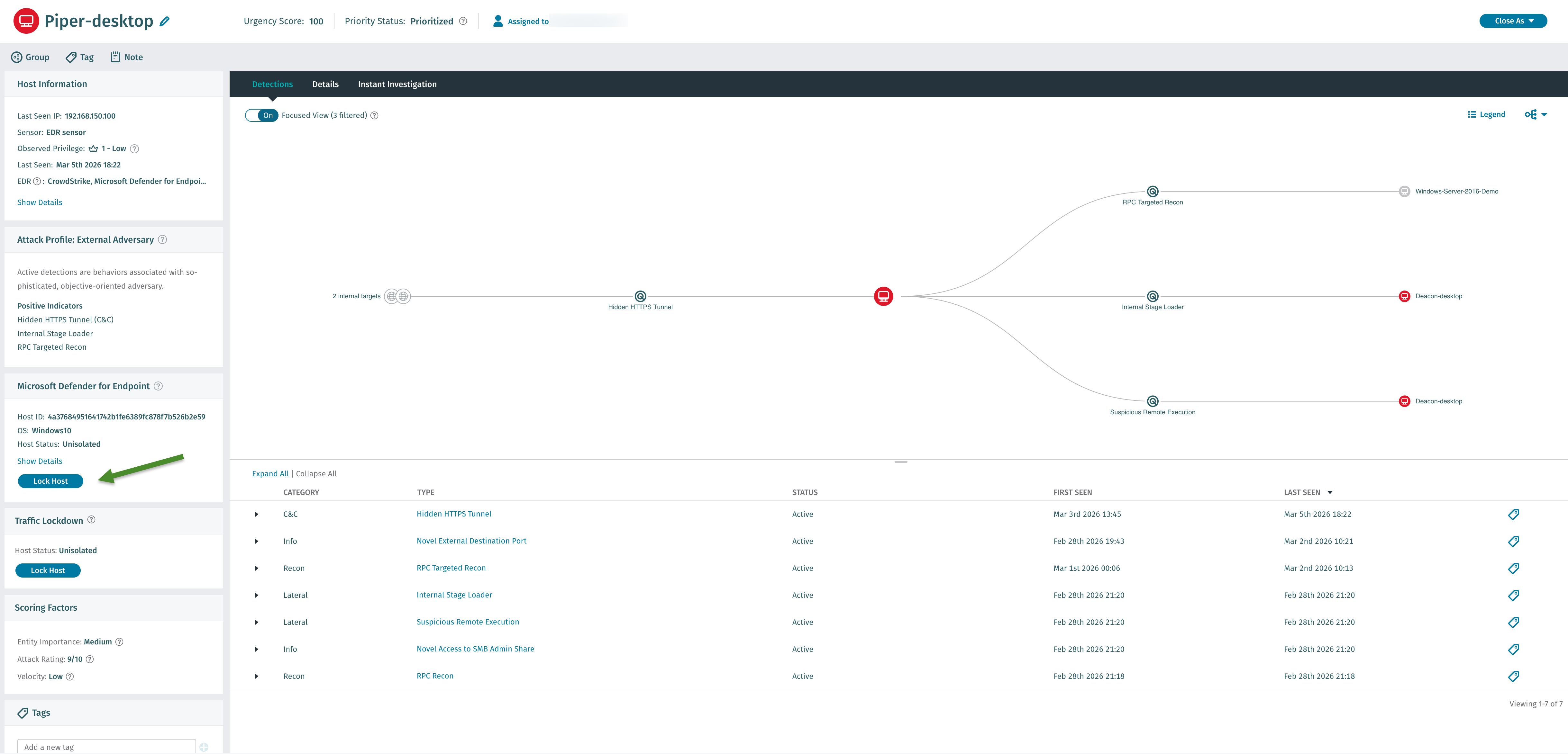
EDR enabled hosts will have a Host Lockdown widget in the sidebar of individual host pages. Please note that the EDR integration must be configured AND the host much be running the integrated EDR. It can take up to 24 hours after EDR integration for host EDR integration details to be visible on all hosts.
From the widget you can enable or disable Lockdown. Host can be manually locked from 1 hour up to 24 hours, in pre-configured time ranges. To lock a host, simply click the Disable Host button and select a pre-configured time range from the dropdown. The host will automatically be re-enabled once the selected time range has expired. Please note that enabling or disabling manual lockdown on a host will require the Detect user to have the Edit Host Lockdown RBAC permission enabled.
See the below example for a host that is running Microsoft Defender for Endpoint.
### How do I automatically lockdown a host?
In Detect, navigate to *Configuration → RESPONSE → Lockdown → Host Lockdown*. From here you can enable the Host Lockdown feature itself, along with Automatic Lockdown and its required thresholds. Once you have enabled Automatic Lockdown, you will have the option to configure the automatic lockdown period, which can range from 1 hour up to 24 hours, in pre-configured time ranges, and set the Observed Privilege, Threat and Certainty score thresholds. After automatic Lockdown has been enabled, anytime a host's scores exceed the Observed Privilege, Threat and Certainty thresholds, the host will be isolated in the corresponding EDR for the configured time range.

### Where can I check the lockdown status of a host?
All hosts will have a Host Lockdown widget in the sidebar of individual Host pages. From here you can see the host's current Lockdown status. If a host is locked down, the status will show time until the host is re-enabled and the username of the Detect user that enabled lockdown for that host. There is also an AP endpoint (/api/v2.5/lockdown/host) where you can pull a list of all current hosts that have been disabled via Lockdown. Please note that viewing Lockdown status will require the Detect user to have the View Host Lockdown RBAC permission enabled.
### If a host gets locked down, will existing/open sessions be terminated?
Yes. Once a host gets isolated via Host Lockdown, the host gets isolated from the network so existing user sessions will timeout and, or terminate.
### Once a host has been locked down, how can host isolation be removed?
Hosts may be removed from isolation via the following methods:
* A user manually re-enables the host via Detect
* Disable timer expires
* The host is removed from isolation outside of Detect (in EDR)
### If I update my automatic Lockdown thresholds, will all hosts be re-evaluated?
No, adjusting the Lockdown thresholds will not retroactively apply to existing host scores, only when new host scores are calculated.
### Is there API support for Host Lockdown?
Yes, for reporting of isolated hosts only. We may add support for enabling or disabling of hosts in a future release.
```
GET /api/v2.5/lockdown/host
[
{
"host_id": 10,
"locked_by": "admin",
"unlock_date": "2020-06-09T15:21:06Z",
"host_name": "def-1",
"lock_date": "2020-06-09T14:21:06Z"
}
]
```
### If a host is isolated outside of Detect (via EDR) how does that appear in Detect?
The host's Lockdown status will indicate "Isolated from outside Cognito." Detect will always honor the state of isolation from the EDR side. If isolation is set from the remote end, the host will need to be removed from isolation from the remote end.\

### Will the end user be notified when their host is locked down?
No, the end user is not notified whenever their host is disabled.
### Will Detect administrators be notified when a host is locked down?
Yes, Detect admins will see email and syslog notifications when lockdown is enabled or disabled. Please note that in order to receive Host Lockdown email notifications, Host alert emails notification must be enabled under Settings -> Notifications.
### Where can I see a sample syslog notification for Lockdown?
#### Host Lockdown Sample Syslog
Standard:
```
LOCKDOWN [host_lockdown@41261 category="HOST_LOCKDOWN" hostName="fireeye-lockable" action="lock" success="True" willRetry="False" edrType="fireeye" dvc="192.168.51.14" user="vadmin" URL="https://192.168.51.14/hosts/166" UTCTime="1617305653.650924"]
```
JSON:
```
{"version": "6.6", "host_id": 166, "user": "vadmin", "headend_addr": "192.168.51.14", "host_name": "fireeye-lockable", "href": "https://192.168.51.14/hosts/166", "action": "lock", "success": true, "will_retry": false, "category": "HOST_LOCKDOWN", "edr_type": "fireeye", "vectra_timestamp": "1617305993"}
```
### Can I use advanced search to pull information on isolated hosts?
As of release version 6.6, Advanced search for Host Lockdown is not supported. We will introduce Advanced search support in a future release.
---
# Agent Instructions
This documentation is published with GitBook. GitBook is the documentation platform designed so that both humans and AI agents can read, navigate, and reason over technical content effectively. Learn more at gitbook.com.
## Querying This Documentation
If you need additional information that is not directly available in this page, you can query the documentation dynamically by asking a question.
Perform an HTTP GET request on the current page URL with the `ask` query parameter, and the optional `goal` query parameter:
```
GET https://docs.vectra.ai/configuration/response/lockdown/host-lockdown-edr.md?ask=&goal=
```
`ask` is the immediate question: it should be specific, self-contained, and written in natural language.
`goal` is optional and describes the broader end goal you are ultimately trying to accomplish on behalf of the user. GitBook uses it to tailor the answer towards what is most useful for that goal.
The response will contain a direct answer to the question and relevant excerpts and sources from the documentation.
Use this mechanism when the answer is not explicitly present in the current page, you need clarification or additional context, or you want to retrieve related documentation sections.