> For the complete documentation index, see [llms.txt](https://docs.vectra.ai/llms.txt). Markdown versions of documentation pages are available by appending `.md` to page URLs; this page is available as [Markdown](https://docs.vectra.ai/configuration/coverage/network-identities-weli/windows-event-log-ingestion-weli.md).
# Windows Event Log Ingestion (WELI)
Configure WELI to send Kerberos security events to Vectra for PAA detections, Host ID enrichment, and investigation metadata.
## Introduction
Windows Event Log Ingestion (WELI) allows for Vectra to ingest Microsoft Windows security event logs to drive Privileged Access Analytics (PAA) and Kerberoasting Detections. This feature can be used to complement the coverage from network traffic and will also provide Host-ID information for IP to Host mappings observed in the event logs.
Vectra ingests two Windows security event ids:
* 4768 (Ticket Granting Ticket)
* 4769 (Ticket Granting Service)
Further, only successful events are ingested. Any other windows security event IDs sent to the Vectra Brain will be discarded.
{% hint style="info" %}
Please ensure that Security Audit Logging is enabled on every domain Controller.
Please see the [Microsoft documentation](https://docs.microsoft.com/en-us/windows/security/threat-protection/auditing/advanced-security-audit-policy-settings) for more details.
Both events are under **Account Logon**:
* Event 4768 - Audit Kerberos Authentication Service
* Event 4769 - Audit Kerberos Service Ticket Operations
{% endhint %}
## Differences between WELI and SIEM Event Forwarding
Vectra has historically had two different options that could ingest Microsoft Windows security event log data:
**SIEM Event Forwarding** - details available [here](/configuration/setup/external-connectors/siem-vectra-brain-ingesting-logs.md).
* Vectra may deprecate the Kerberos event ingestion functionality of this feature and rename it to "DHCP Log Ingestion" in a future release.
* This feature should only be used for DHCP log ingestion to provide naming artifacts to be used by Vectra's automated Host ID. It is primarily used when not all DHCP messages are being captured by Sensors in network traffic.
* With the existing implementation, Windows Security Event Log data was limited to ingesting only Kerberos event 4768 and this data was only used by this feature to provide naming artifacts used by Vectra's automated Host ID capability. The data did not help to feed Kerberos learnings that were used by Vectra's Privileged Access Analytics AI models.
**Windows Event Log Ingestion (WELI)** - details are available in the article you are currently reading.
* This feature ingests Windows security event logs only (no DHCP) and helps to provide naming artifacts to be used by Vectra's automated Host ID and also helps to feed Kerberos learnings used by Vectra's PAA Detections.
{% hint style="info" %}
**Please Note:**
* Please only use SIEM Event Forwarding to feed DHCP log data into Vectra.
* Please use WELI for any forwarding of Windows Security Event Log Kerberos messages to Vectra
* Enabling both of these integrations is considered a best practice.
{% endhint %}
## Frequently Asked Questions (FAQ)
**Is it ok to have both Windows Event Log Ingestion and capture the Kerberos traffic from the network with a Sensor?**
* Yes, this is an accepted configuration.
**Is it recommended to have both Windows Event Log Ingestion and capture the Kerberos traffic from the network with a Sensor?**
* Generally, if Vectra observes the kerberos traffic via the network there is no need to also consume the Windows Event Logs. Typically customers will enable Windows Event Log Ingestion for network segments that do not have visibility for network traffic but which they still want some measure of coverage for the Domain Controllers and user identity.
**Are there differences between detections generated by Windows Event Logs vs. Network Traffic?**
* There should not be differences in which detections will be generated
* However, depending on the Windows Environment, certain attributes may be represented in a different way depending on if the datasource was Windows Event Logs or Kerberos network traffic. For instance, sometimes, the Windows Event Logs will display the UUID object name of a service rather than the user friendly service name, which the detection will reflect.
**Is Windows Event Log Ingestion only used for detections?**
* No, Windows Event Log Ingestion is used for the following:
* Providing metadata that can feed detection models.
* Producing metadata for use in Recall, Stream, or Respond UX features such as [Investigate](broken://pages/eUJKXR0YAAHEZCM9SoAu).
* Providing data to [HostID](/reference/understanding-vectra-host-naming.md) to help with automated naming of host entities.
## Supported Transfer Types
**Kafka**
* Using SASL Plain authentication with either Plaintext or SSL as a protocol
**Raw TCP**
* With XML as a data format and listening on your Brain at port 4637
**Syslog**
* Using TCP and listening on your Brain at port 4638
* Supported formats are:
* Snare
* IETF RFC 5424
* ISC
## Additional Guidance for Specific Log Sources
**NXLog**
* [WELI via NXLog](/configuration/coverage/network-identities-weli/weli-via-nxlog.md) article link
* A community supported version is available that installs directly on Windows domain controller(s).
* This is useful for customers without a CLM (Central Log Manager) or SIEM.
**Splunk**
* The Splunk Universal Forwarder should be installed on your domain controller(s).
* Logs can be forwarded as XML or in Splunk's legacy text based format but XML is the preferred format.
* Splunk's legacy text format is multiline. Customers may be using the older format because it is legacy and they may have developed queries around it. You can't use both XML and text on the same source without some tricky configuration and we do not want Splunk to index the data twice. XML is preferred as it consumes less Splunk license and is not based on the OS language.
* See the following articles for Splunk WELI integration advice:
* [Windows Event Log Ingestion - Splunk (Raw TCP / XML) Configuration](/configuration/coverage/network-identities-weli/weli-splunk-raw-tcp-xml-configuration.md)
* This guidance is for using the XML format.
* [Windows Event Log Ingestion - Splunk (Syslog / Legacy) Configuration](/configuration/coverage/network-identities-weli/weli-splunk-syslog-legacy-configuration.md)
* This guidance is for using the Spunk legacy text based format option via Syslog.
* Please only use this format if you cannot use XML.
## Configuration
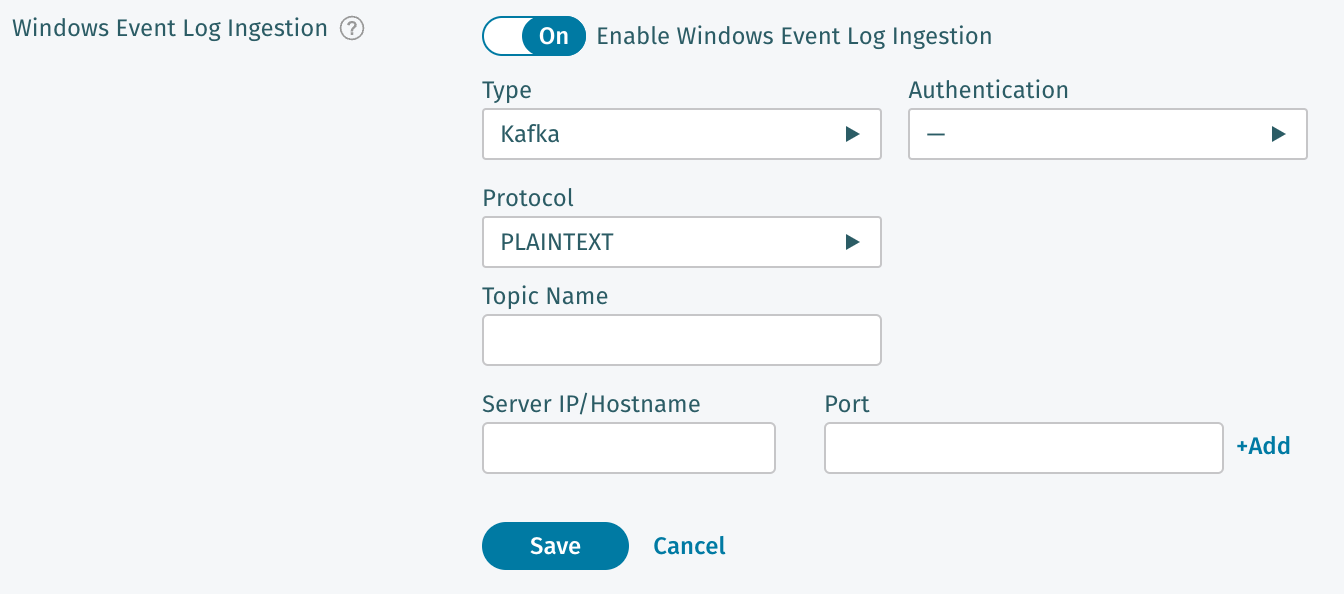
To configure WELI navigate in your Vectra UI to *Configuration → COVERAGE → Data Sources.* From there select *Network → Network Identities* and then edit the **Windows Event Log Ingestion** settings*.*
* First toggle the setting to **On**.
* Next choose a type of transport (Kafka, Raw TCP, or Syslog).
* Different transport types have different options.
* Fill in the blanks and make sure to enter the Server IP/Hostname and Port if required for your selected transport so that your Vectra platform knows where to expect communications from.
* Multiple sources can be configured if required in your environment.
* Click **Save**.
### Validation
There are several ways to validate that data is being successfully processed by WELI:
Once the system has begun to process data (this could take several minutes), statistics will be shown under the WELI setting:
**RUX Deployments:**
SQL Search could be used for RUX customers to quickly see if there are both types of sources. Kerberos traffi will have a data\_source of **log** (WELI) or **network** (observed network traffic).
An example query is below:
```
SELECT
data_source,
success,
COUNT(*) AS "event_count",
COUNT(DISTINCT id.orig_h) AS "unique_sources",
COUNT(DISTINCT client) AS "unique_clients"
FROM network.kerberos._all
WHERE timestamp BETWEEN date_add('day', -14, now()) AND now()
GROUP BY data_source, success
ORDER BY data_source, success
LIMIT 100
```
In the below screenshot, we used [AI-Assisted Search](/operations/event-search/ai-assisted-search.md) to generate this query and display the results:
Environment used did not have WELI configured so no log results are shown
**QUX Deployments:**
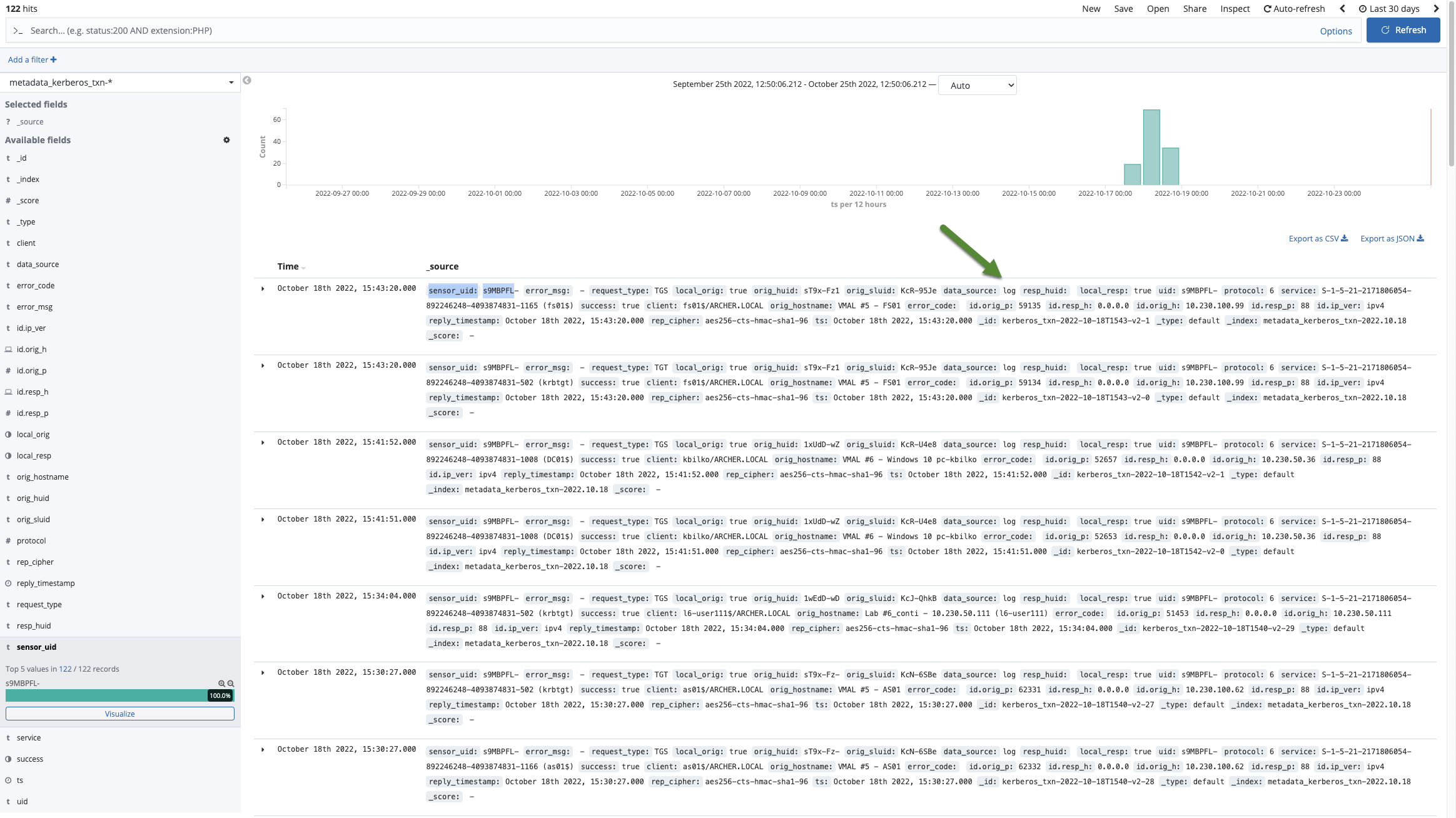
For Recall or Stream customers, the metadata\_kerberos\_txn-\* can be examined to see messages being successfully parsed shortly after ingestion. Looking for a data\_source of **log** will show successful message parsing via WELI. If you see a data\_source of **network** that indicates kerberos messages that were seen in network traffic captured by your sensors.
Vectra support personnel also have the ability via remote support to run a CLI command to see additional statistics and optionally some recent events that were captured to aid in diagnosis if you are having difficulty with the feature.
## Example Parseable Messages
This is not an exhaustive list but provides examples for several formats that parse successfully:
#### Snare
```ckeditor_codeblock
4768
<14>Jul 9 16:16:31 dc01.corp.example.com MSWinEventLog 1 Security 3 Thu Jul 09 16:16:31 2020 4768 Microsoft-Windows-Security-Auditing N/A N/A Success Audit dc01.corp.example.com Kerberos Authentication Service A Kerberos authentication ticket (TGT) was requested. Account Information: Account Name: DC01$ Supplied Realm Name: CORP.EXAMPLE.COM User ID: S-1-5-21-3014857155-217495724-178240761-1000 Service Information: Service Name: krbtgt Service ID: S-1-5-21-3014857155-217495724-178240761-502 Network Information: Client Address: ::1 Client Port: 0 Additional Information: Ticket Options: 0x40810010 Result Code: 0x0 Ticket Encryption Type: 0x12 Pre-Authentication Type: 2 Certificate Information: Certificate Issuer Name: Certificate Serial Number: Certificate Thumbprint: Certificate information is only provided if a certificate was used for pre-authentication. Pre-authentication types, ticket options, encryption types and result codes are defined in RFC 4120. 3529841
```
```ckeditor_codeblock
4769
<14>Jul 9 16:09:35 dc01.corp.example.com MSWinEventLog 1 Security 1 Thu Jul 09 16:09:35 2020 4769 Microsoft-Windows-Security-Auditing N/A N/A Success Audit dc01.corp.example.com Kerberos Service Ticket Operations A Kerberos service ticket was requested. Account Information: Account Name: johnh@CORP.EXAMPLE.COM Account Domain: CORP.EXAMPLE.COM Logon GUID: {F398AEA5-C031-B2AD-3426-FB163F319D25} Service Information: Service Name: DC01$ Service ID: S-1-5-21-3014857155-217495724-178240761-1000 Network Information: Client Address: ::ffff:192.168.54.99 Client Port: 19058 Additional Information: Ticket Options: 0x40800000 Ticket Encryption Type: 0x12 Failure Code: 0x0 Transited Services: - This event is generated every time access is requested to a resource such as a computer or a Windows service. The service name indicates the resource to which access was requested. This event can be correlated with Windows logon events by comparing the Logon GUID fields in each event. The logon event occurs on the machine that was accessed, which is often a different machine than the domain controller which issued the service ticket. Ticket options, encryption types, and failure codes are defined in RFC 4120. 3529765
```
#### IETF RFC 5424
```ckeditor_codeblock
4768
<14>1 2020-05-22T18:32:08.145269-07:00 dc01.corp.example.com Microsoft-Windows-Security-Auditing 564 - [NXLOG@14506 Keywords="-9214364837600034816" EventType="AUDIT_SUCCESS" EventID="4768" ProviderGuid="{54849625-5478-4994-A5BA-3E3B0328C30D}" Version="0" Task="14339" OpcodeValue="0" RecordNumber="2898418" ThreadID="1712" Channel="Security" Category="Kerberos Authentication Service" Opcode="Info" TargetUserName="CR_LEROY_BROWN$" TargetDomainName="CORP.EXAMPLE.COM" TargetSid="S-1-5-21-3014857155-217495724-178240761-1140" ServiceName="krbtgt" ServiceSid="S-1-5-21-3014857155-217495724-178240761-502" TicketOptions="0x40810010" Status="0x0" TicketEncryptionType="0x12" PreAuthType="2" IpAddress="::ffff:192.168.54.99" IpPort="18080" EventReceivedTime="2020-05-22 18:32:09" SourceModuleName="eventlog" SourceModuleType="im_msvistalog"] A Kerberos authentication ticket (TGT) was requested. Account Information: Account Name: CR_LEROY_BROWN$ Supplied Realm Name: CORP.EXAMPLE.COM User ID: S-1-5-21-3014857155-217495724-178240761-1140 Service Information: Service Name: krbtgt Service ID: S-1-5-21-3014857155-217495724-178240761-502 Network Information: Client Address: ::ffff:192.168.54.99 Client Port: 18080 Additional Information: Ticket Options: 0x40810010 Result Code: 0x0 Ticket Encryption Type: 0x12 Pre-Authentication Type: 2 Certificate Information: Certificate Issuer Name: Certificate Serial Number: Certificate Thumbprint: Certificate information is only provided if a certificate was used for pre-authentication. Pre-authentication types, ticket options, encryption types and result codes are defined in RFC 4120.
```
```ckeditor_codeblock
4769
<14>1 2020-05-22T09:52:01.304764-07:00 dc01.corp.example.com Microsoft-Windows-Security-Auditing 564 - [NXLOG@14506 Keywords="-9214364837600034816" EventType="AUDIT_SUCCESS" EventID="4769" ProviderGuid="{54849625-5478-4994-A5BA-3E3B0328C30D}" Version="0" Task="14337" OpcodeValue="0" RecordNumber="2893788" ThreadID="1712" Channel="Security" Category="Kerberos Service Ticket Operations" Opcode="Info" TargetUserName="JHANCOCK-PC$@CORP.EXAMPLE.COM" TargetDomainName="CORP.EXAMPLE.COM" ServiceName="DC01$" ServiceSid="S-1-5-21-3014857155-217495724-178240761-1000" TicketOptions="0x40800000" TicketEncryptionType="0x12" IpAddress="::ffff:192.168.54.99" IpPort="49882" Status="0x0" LogonGuid="{07CAAECC-C621-9B76-2921-41FCEF0BA1DD}" TransmittedServices="-" EventReceivedTime="2020-05-22 09:52:02" SourceModuleName="eventlog" SourceModuleType="im_msvistalog"] A Kerberos service ticket was requested. Account Information: Account Name: JHANCOCK-PC$@CORP.EXAMPLE.COM Account Domain: CORP.EXAMPLE.COM Logon GUID: {07CAAECC-C621-9B76-2921-41FCEF0BA1DD} Service Information: Service Name: DC01$ Service ID: S-1-5-21-3014857155-217495724-178240761-1000 Network Information: Client Address: ::ffff:192.168.54.99 Client Port: 49882 Additional Information: Ticket Options: 0x40800000 Ticket Encryption Type: 0x12 Failure Code: 0x0 Transited Services: - This event is generated every time access is requested to a resource such as a computer or a Windows service. The service name indicates the resource to which access was requested. This event can be correlated with Windows logon events by comparing the Logon GUID fields in each event. The logon event occurs on the machine that was accessed, which is often a different machine than the domain controller which issued the service ticket. Ticket options, encryption types, and failure codes are defined in RFC 4120.
```
#### ISC
```ckeditor_codeblock
4768
<13>Jun 07 13:01:46 10.48.1.50 AgentDevice=WindowsLog AgentLogFile=Security PluginVersion=1.0.14 Source=Microsoft-Windows-Security-Auditing Computer=###HOSTNAME### User= Domain= EventID=4768 EventIDCode=4768 EventType=8 EventCategory=14339 RecordNumber=2093536389 TimeGenerated=1496854905 TimeWritten=1496854905 Message=A Kerberos authentication ticket (TGT) was requested. Account Information: Account Name: ###ACCOUNTNAME### Supplied Realm Name: ###REALM### User ID: ###UID### Service Information: Service Name: ###SVCNAME### Service ID: ###SID### Network Information: Client Address: ###CLIENT IP ADDR### Client Port: ###CLIENT PORT### Additional Information: Ticket Options: 0x40810010 Result Code: 0x0 Ticket Encryption Type: 0x12 Pre-Authentication Type: 2 Certificate Information: Certificate Issuer Name: Certificate Serial Number: Certificate Thumbprint: Certificate information is only provided if a certificate was used for pre-authentication. Pre-authentication types
```
```ckeditor_codeblock
4769
<13>May 06 19:16:49 machine.local AgentDevice=WindowsLog AgentLogFile=Security PluginVersion=7.2.9.96 Source=Microsoft-Windows-Security-Auditing Computer=machine.local OriginatingComputer=10.1.1.1 User= Domain= EventID=4769 EventIDCode=4769 EventType=8 EventCategory=14337 RecordNumber=46278873 TimeGenerated=1588792601 TimeWritten=1588792601 Level=Log Always Keywords=Audit Success Task=SE_ADT_ACCOUNTLOGON_KERBEROS Opcode=Info Message=A Kerberos service ticket was requested. Account Information: Account Name: USER$@DOMAIN.COM Account Domain: DOMAIN.COM Logon GUID: {462D33AB-BCC7-4460-FEE7-A7581D864B29} Service Information: Service Name: SERVICE$ Service ID: S-1-5-21-1 Network Information: Client Address: ::1 Client Port: 0 Additional Information: Ticket Options: 0x40810000 Ticket Encryption Type: 0x12 Failure Code: 0x0 Transited Services: - This event is generated every time access is requested to a resource such as a computer or a Windows service. The service name indicates the resource to which access was requested. This event can be correlated with Windows logon events by comparing the Logon GUID fields in each event. The logon event occurs on the machine that was accessed, which is often a different machine than the domain controller which issued the service ticket. Ticket options, encryption types, and failure codes are defined in RFC 4120.
```
---
# Agent Instructions
This documentation is published with GitBook. GitBook is the documentation platform designed so that both humans and AI agents can read, navigate, and reason over technical content effectively. Learn more at gitbook.com.
## Querying This Documentation
If you need additional information that is not directly available in this page, you can query the documentation by asking a question.
Perform an HTTP GET request on the following URL with the `ask` and `goal` query parameters:
```
GET https://docs.vectra.ai/configuration/coverage/network-identities-weli/windows-event-log-ingestion-weli.md?ask=&goal=
```
`ask` is the immediate question: it should be specific, self-contained, and written in natural language.
`goal` is what the user is ultimately trying to achieve, the reason they need the answer. Sharing it helps GitBook give you a better, more relevant answer. A goal is most helpful when it describes the outcome the user wants rather than restating the question. For example, with `ask=how do I create an API token`, a goal like `automate deployments from our CI pipeline` lets GitBook tailor the answer to that use case.
The response will contain a direct answer to the question and relevant excerpts and sources from the documentation.
Use this mechanism when the answer is not explicitly present in the current page, you need clarification or additional context, or you want to retrieve related documentation sections.