> For the complete documentation index, see [llms.txt](https://docs.vectra.ai/llms.txt). Markdown versions of documentation pages are available by appending `.md` to page URLs; this page is available as [Markdown](https://docs.vectra.ai/configuration/coverage/detection-engineering-best-practices/detection-engineering-network.md).
# Detection Engineering Network
Configure, enable, and investigate custom cloud detection rules based on network metadata.
{% hint style="info" %}
**Please Note:**
Detection Engineering is currently in Private Preview. If the feature is not available in your tenant and you wish to participate in the Private Preview, please reach out to your Vectra AI account team to discuss.
{% endhint %}
## Overview
Detection Engineering is the Vectra AI Platform feature where users build, tune, and manage custom detections. These are rules that alert on activity specific to an organization's environment or policies, covering cases that Vectra AI's models do not address on their own.
This feature is only available in Respond UX (RUX deployments). If you are unsure of your deployment type, please see [Analyst UX options (RUX vs QUX)](/deployment/getting-started/analyst-ux-options-rux-vs-qux.md).
### Where to find it
Navigate in your Vectra AI UI to *Configuration→ Detection Engineering*.
### Who can use it
All users have read access to view detections. Only Admins, Restricted Admins, and Super Admins can create/enable/disable/clone/delete a detection.
This feature will be available to invited few Vectra AI Pro customers during preview.
## Walkthrough: Create a New Detection
{% stepper %}
{% step %}
#### **Navigate to Detection Engineering**
Go to *Configuration → Detection Engineering* to create a new detection rule.
{% endstep %}
{% step %}
#### **Create from scratch**
At the top right side of the screen click on **Create From Scratch** button to open the rule configuration window.
* Upon clicking, opens the below configuration window.
* Recommended to use [#id-3.-example-use-cases](#id-3.-example-use-cases "mention") to build few simple detections before "Create From Scratch"
* Refer [#id-4.-field-reference](#id-4.-field-reference "mention")to learn more about Data Streams, Attribute and other fields that need input.
{% endstep %}
{% step %}
#### Monitor Rule Hits
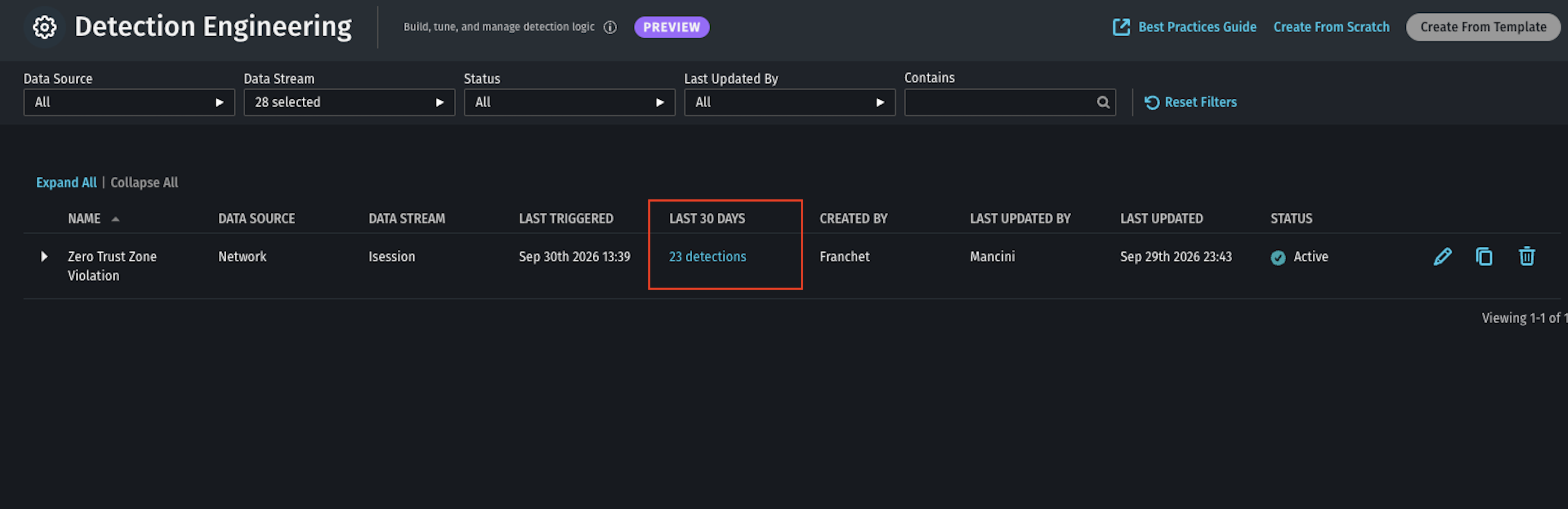
**Last Triggered** and **Triggers In Last 30 Days** columns in dashboard show any recent rule hits. Click on any recent Triggers to see more details about the Detection.
{% endstep %}
{% step %}
#### **Investigate the Detection**
Takes you to the Detection page where this detection can be investigated to see the impacted Host, Account, Status, Time Stamps, etc.
{% endstep %}
{% step %}
#### Deeper into the activity
Drill down further to see more details about this activity timeline.
{% endstep %}
{% step %}
#### Host specific detection summary
See other Detections on this host and information like host ip address, AD membership, Asset Importance etc.
{% endstep %}
{% endstepper %}
{% hint style="info" %}
**Note:** The above workflow is for the purpose of walkthrough only. In a real environment with active rules, if the behavior is continuously seen, Vectra AI automatically triages the behavior and prioritizes the impacted host in “Priorities” page for an Analyst to view and investigate further like any other detections.
{% endhint %}
## Start here: build detection using vectra authored rules available in private preview
To make it easier to get started with detection engineering rules, private preview customers will have below vectra authored rules ready to use. Just edit/duplicate the rule and update expression with your own testing network/ip address and enable it.
### Admin Protocol Leaving the Perimeter
Alert when an internal host initiates a remote administration or file transfer protocol session to an external destination.\
\
Filter expression:
```
-- Remote administration and file protocols on the wire
id.resp_p IN (
22, -- SSH / SFTP
23, -- Telnet
69, -- TFTP
139, -- NetBIOS session
161, -- SNMP
445, -- SMB
3389, -- RDP
5985, -- WinRM HTTP
5986, -- WinRM HTTPS
5900, 5901, 5902, 5903 -- VNC
)
-- Internal host reaching an external destination
AND local_orig = True
AND local_resp = False
-- Sanctioned external admin endpoints
AND id.resp_h NOT IN (
'140.82.114.4', -- github.com SSH
'198.51.100.10' -- vendor support jump host
)
-- Hosts allowed to administer external infrastructure
AND id.orig_h NOT IN ('10.254.60.5', '10.254.60.6')
```
### Zero Trust Zone Violation
Alert when hosts in two customer-defined internal network zones communicate despite a policy that prohibits communication. This example monitors bidirectional traffic between `10.254.50.0/24` and `10.254.100.0/24`.
Filter expression:
```
-- Match traffic between the 10.254.50.x and 10.254.100.x networks
(
(
-- Origin is in 10.254.50.x, responder is in 10.254.100.x
id.orig_h LIKE '10.254.50.%'
AND id.resp_h LIKE '10.254.100.%'
)
OR
(
-- Origin is in 10.254.100.x, responder is in 10.254.50.x
id.orig_h LIKE '10.254.100.%'
AND id.resp_h LIKE '10.254.50.%'
)
)
-- Require both endpoints to be local
AND local_orig = True
AND local_resp = True
```
### Unapproved DNS over TLS Usage
Alert when an internal host sends DNS queries over TLS to an external resolver that is not approved by the organization. This may indicate policy bypass, unauthorized encrypted DNS use, or attempts to evade DNS security monitoring.
Filter expression:
```
local_orig = True
AND local_resp = False
AND client_luid_proxy = False
-- Exclusions, like DNS servers or authorized hosts
AND NOT id.orig_h IN ('10.254.100.32')
AND id.resp_p = 853
```
### Connection to Tunnel Services
Alert when an internal host connects to known tunnel-service infrastructure, such as Ngrok. Exclude approved hosts and sanctioned tunnel use. The current implementation detects Ngrok. Add Cloudflare Tunnel indicators before claiming Cloudflare Tunnel coverage.
Filter expression:
```
local_orig = True
AND client_luid_proxy = False
-- excluded hosts
-- AND NOT (id.orig_h = '192.168.1.1')
AND (LOWER(resp_domain) LIKE '%.argotunnel.com' OR LOWER(resp_domain) LIKE '%.ngrok-agent.com')
```
### NTLM from a Domain Controller
Alert when a customer-defined domain controller acts as an NTLM client to another internal host. This is unusual in a healthy Active Directory (AD) environment. It can indicate coercion, NTLM relay-related activity, legacy fallback, or a misconfiguration.
Filter expression:
```
local_orig = True
AND local_resp = True
-- The list of DCs needs to be updated to include the customer's domain controllers
AND id.orig_h IN ('10.254.100.32', '192.168.1.1')
AND message_type = 1
```
## Build using "Create From Scratch"
### Before you start
Private preview comes with few limitations and work is happening to make these available during or post private preview.
1. **Vectra AI-authored rules for quick test:** To get started quickly there are few Vectra AI-authored rules available in the dashboard. Users are encouraged to click on **Duplicate** rule and edit the **Filter** with the environment details like subnet/ip address etc and activate to test out a detection. This is only available in private preview.
2. **Rule Execution:** The rule runs every \~15 mins from when it’s activated so refresh the page to see the **Trigger count**.
3. **Filter expression**: Filter expression are sql based and need to be input manually in private preview. We recognize it could be challenging to manually input and we are working to simplify this experience.
1. **Note:** The filter expression doesn’t include the full sql query that includes **SELECT**, **FROM**, **WHERE.**
2. Fields like **orig\_hostname, resp\_hostname** are not supported and shouldn’t be used. Section [#id-5.-private-preview-network-supported-filters-fields-and-sql-operators](#id-5.-private-preview-network-supported-filters-fields-and-sql-operators "mention") talks about supported metadata fields for expression.
3. **timestamp** should be used to look back at historical events as the detection happens on realtime events once the rule is activated.
4. **Building SQL query using Event Search AI (Optional):** As a Vectra AI Pro customer you could go to Event Search with some limitations and build an SQL query for your rule by talking to AI in natural language. We plan to have full parity with Event Search schema and provide simpler workflow for generating filter expression.
### Example
Generate an SQL query for bi-directional communication with hosts in subnet 10.10.10.0/24 talking to 192.168.32.0/24
Output:
```
SELECT
timestamp,
id.orig_h AS source_ip,
id.resp_h AS dest_ip,
id.orig_p AS source_port,
id.resp_p AS dest_port,
proto_name,
service,
orig_ip_bytes,
resp_ip_bytes,
duration,
conn_state
FROM network.isession._all
WHERE
(
(REGEXP_LIKE(id.orig_h, '^10.10.10.') AND REGEXP_LIKE(id.resp_h, '^192.168.32.'))
OR
(REGEXP_LIKE(id.orig_h, '^192.168.32.') AND REGEXP_LIKE(id.resp_h, '^10.10.10.'))
)
AND timestamp BETWEEN date_add('day', -14, now()) AND now()
ORDER BY timestamp DESC
LIMIT 500
```
Cleaning up the expression to use in Filter:
#### Attribute To
The host to which this detection should be attributed to. In most cases it’s Source Host. In situations where the originating client is external and traffic flows to an internal server, use Destination Host.
`Source Host`
#### **Context Field**
This is the field which should be extracted and shown in the detection details e.g
`id.orig_h, id.resp_h, id.resp_p`
Learn more about fields in [#id-5.-private-preview-network-supported-filters-fields-and-sql-operators](#id-5.-private-preview-network-supported-filters-fields-and-sql-operators "mention").
## Field Reference
The tables below explain every field on the detection creation/edit page, grouped by section, in the order they appear on screen.
### Conditions
| **Field** | **Purpose** | **Notes** |
| ------------------------------------------------------------------ | -------------------------------------------------------------------------------------------------------- | ---------------------------------------------------------------------------------------------------------------------------------------------------------------------------------------------- |
| Data Stream | The data stream type the detection evaluates (for example HTTP session, DNS, iSession etc) | Determines which fields are available in the Filter SQL and which Attribute To options appear. |
| Attribute To | The entity to attribute the detection to. | e.g. Source Host / Destination Host. Determines which entity the resulting detection appears on. |
| Filter | The SQL condition that selects which records match this detection. | Keep filters as specific as possible, an unbounded or blank filter can match a very high percentage of events. |
| Use Threshold (**Not available in private preview. Coming soon!**) | Toggles aggregation mode on. | Turn this on for detection logic that requires aggregating multiple records. |
| Group By (**Not available in private preview. Coming soon!**) | The field(s) matching records are bucketed by before the threshold is evaluated. | Only shown when Use Threshold is checked. Example: source host, so each host accumulates its own count independently. |
| Time Window (**Not available in private preview. Coming soon!**) | The rolling lookback period over which the threshold is evaluated. | Only shown when Use Threshold is checked. |
| Threshold (**Not available in private preview. Coming soon!**) | The condition (count, sum, average, etc.) that must be met within the time window for the group to fire. | Required when Use Threshold is checked the form blocks saving until this is filled in. |
| Context Fields | The fields from the matching record(s) to surface in the detection's summary. | context fields are only available when there is no threshold. For threshold detections, group by fields and aggregate functions inside the threshold expression will appear in the detections. |
### Detection Details
| **Field** | **Purpose** | **Notes** |
| --------------------- | ------------------------------------------------------------------------------------------------- | -------------------------------------------------------------------------------------------------------------------------------------------------------------------------------- |
| Detection Description | Free-text explanation of what the detection is for. | optional but strongly recommended. This is what the next person maintaining the detection, or you in six months, will rely on. |
| Threat Detection | Chooses whether matches are treated as a security detection (contributes to the attack narrative) | Threat Detection requires a MITRE ATT\&CK Tactic |
| Info Detection | Chooses whether matches are treated as purely informational. | Info Detection cannot have prioritization impact configured, and will always have no contribution. |
| MITRE ATT\&CK Tactic | Maps the detection to a MITRE tactic (e.g. Exfiltration). | Only shown for Threat Detection. Also sets the “Vectra AI Category” shown just below the field, which drives how the detection is categorized alongside AI-generated detections. |
### Prioritization Impact
| **Option** | **Effect** |
| --------------------- | ------------------------------------------------------------------------------------------------------------------------------------------------------------------------------------------------------------------------------------------------------------ |
| Use AI prioritization | Default. This allows the detection to contribute to Vectra AI’s standard prioritization logic. |
| Always prioritize | Forces the entity to be prioritized whenever this detection fires, regardless of what AI prioritization would otherwise conclude. Use it sparingly, and reserve it for conditions you always want a person to see, such as a confirmed zero trust violation. |
| No contribution | The detection does not affect entity scoring at all. No contribution is set by default when Info Detection is selected. |
## Supported Filters Fields and SQL Operators
### Filter and Threshold supported operators in Preview
| **Operators** |
| ------------- |
| **Operators** |
| -------------------- |
| > |
| >= |
| < |
| <= |
| != |
| = |
| AND |
| IS NOT NULL |
| IS NULL |
| NOT |
| OR |
| IN |
| LIKE |
| REGEXP\_LIKE |
| BETWEEN ... AND ... |
| LOWER |
| AVG |
| COUNT |
| LENGTH |
| COALESCE |
| TRY\_CAST and CAST |
| UPPER |
| ABS |
| CONCAT |
| DATE |
| TIMESTAMP |
| DATE\_ADD |
| DATE\_DIFF |
| CONTAINS(array, val) |
| **Operator not available** | **Alternative syntax to use** |
| -------------------------- | ---------------------------------------------------------- |
| ! | NOT FALSE |
| DATE\_ADD | DATE '2025-03-01' + INTERVAL '1 day' |
| DATE\_DIFF | (DATE '2025-03-02' - DATE '2025-03-01') / INTERVAL '1 day' |
### Available field names to use in Filters
Refer to [Vectra AI Platform network metadata attributes](/reference/metadata-attributes/vectra-ai-platform-network-metadata-attributes.md) to see the supported fields to use it with the SQL expression in Filters.
| **Fields not available in private preview** |
| ------------------------------------------- |
| orig\_hostname |
| resp\_hostname |
---
# Agent Instructions
This documentation is published with GitBook. GitBook is the documentation platform designed so that both humans and AI agents can read, navigate, and reason over technical content effectively. Learn more at gitbook.com.
## Querying This Documentation
If you need additional information that is not directly available in this page, you can query the documentation by asking a question.
Perform an HTTP GET request on the following URL with the `ask` and `goal` query parameters:
```
GET https://docs.vectra.ai/configuration/coverage/detection-engineering-best-practices/detection-engineering-network.md?ask=&goal=
```
`ask` is the immediate question: it should be specific, self-contained, and written in natural language.
`goal` is what the user is ultimately trying to achieve, the reason they need the answer. Sharing it helps GitBook give you a better, more relevant answer. A goal is most helpful when it describes the outcome the user wants rather than restating the question. For example, with `ask=how do I create an API token`, a goal like `automate deployments from our CI pipeline` lets GitBook tailor the answer to that use case.
The response will contain a direct answer to the question and relevant excerpts and sources from the documentation.
Use this mechanism when the answer is not explicitly present in the current page, you need clarification or additional context, or you want to retrieve related documentation sections.