> For the complete documentation index, see [llms.txt](https://docs.vectra.ai/llms.txt). Markdown versions of documentation pages are available by appending `.md` to page URLs; this page is available as [Markdown](https://docs.vectra.ai/configuration/access/external-authentication-qux/ldap-qux.md).
# LDAP (QUX)
Set up LDAP or Active Directory authentication for Vectra, including supported modes, setup steps, and user creation.
**This knowledge base article is applicable for only Quadrant UX deployments.**
Quadrant UX LDAP Authentication supports the following configurations:
* Active Directory (AD) or any LDAP server such as OpenLDAP
* STARTTLS and PLAINTEXT are supported.
**Notes:**
* LDAPS ( usually on port 636) is not supported as it's considered to be [deprecated](https://www.openldap.org/faq/data/cache/605.html)
* Authorization via LDAP is not supported. User and roles and RBAC must be defined locally in the Quadrant UX.
**Security:**
* STARTTLS is an extension to the LDAP protocol which uses the TLS protocol to encrypt communication. It works by establishing a normal - i.e. unsecured - connection with the LDAP server before a handshake negotiation between the server and Quadrant UX is carried out. The server sends its certificate to prove its identity before the secure connection is established.
* On Active directory, to support STARTTLS, the AD server must have an SSL certificate installed
### **Prerequisites:**
Obtain the required information from your LDAP/AD Administrator:
* Bind DN/Password
* Base DN
* LDAP server URI and port
* Search filter
* STARTTLS - Yes/No
* Ensure firewalls are opened for the LDAP connection, outbound LDAP port from Brain, inbound on LDAP server
### **Setup Steps:**
1. Login to Quadrant UX using an 'admin' account
2. Click on **Manage - External Authentication**
Create a new LDAP Profile
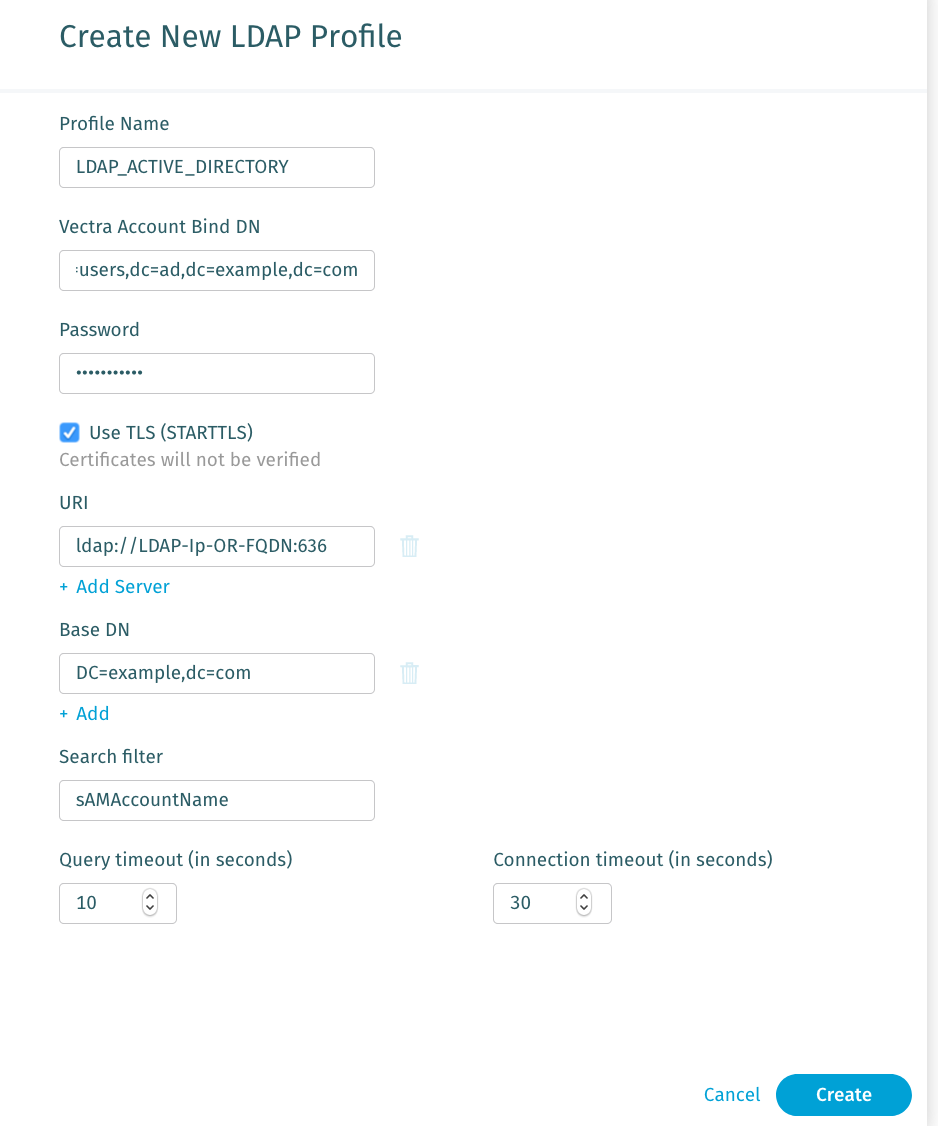
The following form will appear, please provide the following information:
* **Profile Name**: User-defined - must use only letters, numbers, dashes, periods, and colons
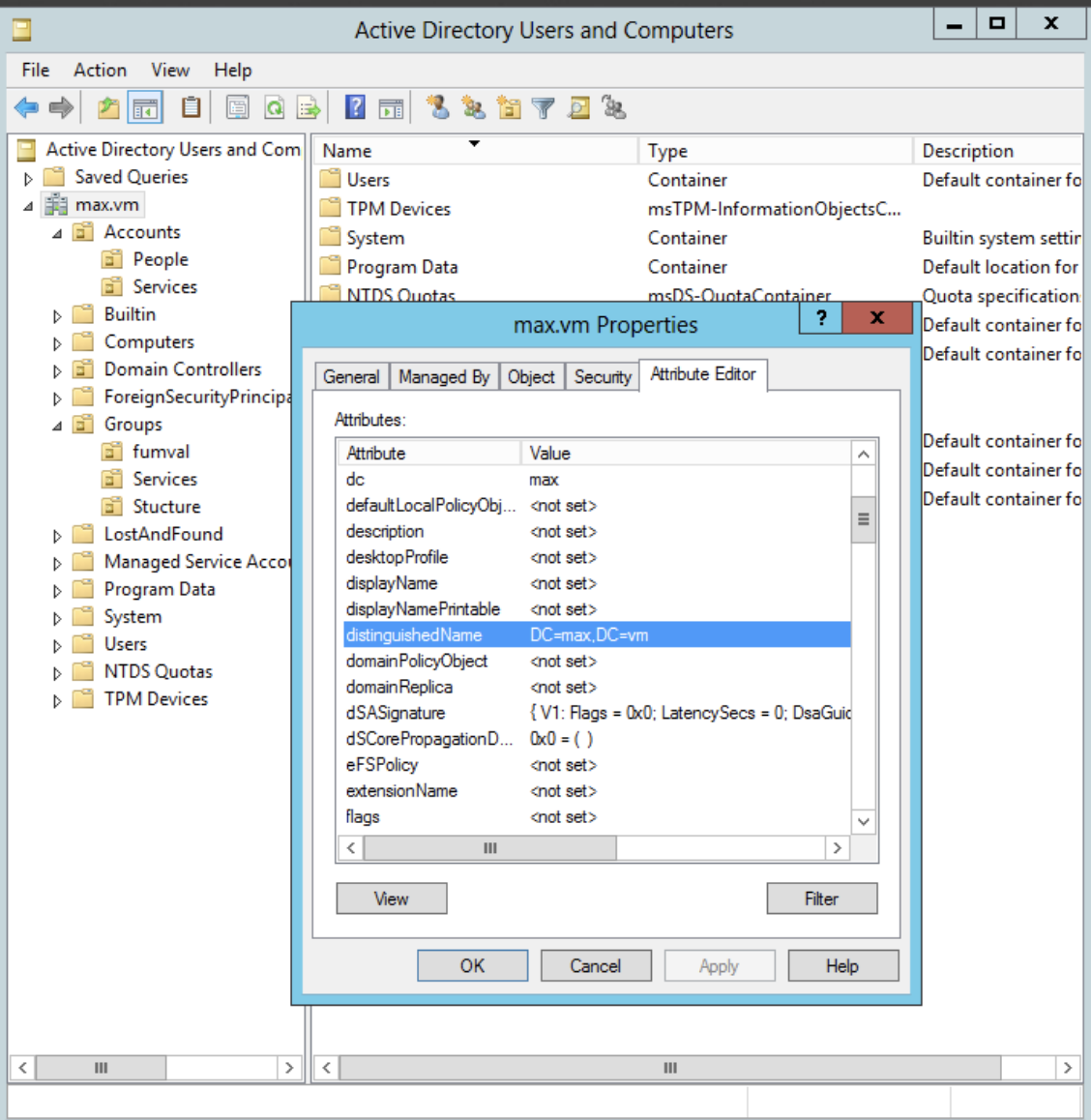
* **Vectra Account Bind DN :** Example **:** `uid=cognito,dc=vectra,dc=com` , for Active Directory the path may look like : `cn=cognito, dc=vectra,dc=com`
* To verify the path on Active directory server → Choose the Organization Unit OU
* **Password:** password for BIND DN account
* **Use TLS (STARTTLS)** - (Yes or No) use Yes only if **STARTTLS** **is supported** on your LDAP Server. Otherwise, connection will fail.
* **Base DN :** Example: ***dc=example,dc=com***
* **URI**: The URI of your AD server. You can enter FQDN or IP Address.
* Example: [`ldap.mydomain.org`](http://ldap.mydomain.org/) or `192.168.X.X`. If port is not defined, we will use default TCP 389. The prefix ldap\:// is not required anymore.
* **Search Filter:** Search filter can't be blank. Example values include: *`uid`, `cn*`*, `dc`, `sAMAccountName`.
* In Active Directory, the `sAMAccountName` is the **User Logon Name (pre-Windows 2000)** field. The User Logon Name field is referenced by `cn`.\
CN format is typically `CN=Cool\Joe`. `sAMAccountName` is used for user names such as jcool.
**Full Active Directory example:**
### **Creating New Users:**
To create new users or replace existing users:
1. Go to *Configuration → ACCESS → Users*.
2. Make sure to select **User Type - LDAP** and select the appropriate profile and role.
Up to 20 AD instances can be configured as sources to interact with for context retrieval or Account Lockdown use. This is useful for large customers who may have several sub organizations that have their own AD implementations but share a common security team. This also comes into play with many companies during acquisition of other companies where they will operate separate AD infrastructures for some period of time, or indefinitely.
Please refer this [Active Directory integration](/configuration/setup/external-connectors/active-directory.md) for more detailed guide on how to Configure Active Directory(AD) integration with Quadrant UX or Respond UX.
For further troubleshooting information refer to the companion article: [Troubleshooting LDAP Authentication](https://support.vectra.ai/vectra/article/KB-VS-1135).
---
# Agent Instructions
This documentation is published with GitBook. GitBook is the documentation platform designed so that both humans and AI agents can read, navigate, and reason over technical content effectively. Learn more at gitbook.com.
## Querying This Documentation
If you need additional information that is not directly available in this page, you can query the documentation dynamically by asking a question.
Perform an HTTP GET request on the current page URL with the `ask` query parameter, and the optional `goal` query parameter:
```
GET https://docs.vectra.ai/configuration/access/external-authentication-qux/ldap-qux.md?ask=&goal=
```
`ask` is the immediate question: it should be specific, self-contained, and written in natural language.
`goal` is optional and describes the broader end goal you are ultimately trying to accomplish on behalf of the user. GitBook uses it to tailor the answer towards what is most useful for that goal.
The response will contain a direct answer to the question and relevant excerpts and sources from the documentation.
Use this mechanism when the answer is not explicitly present in the current page, you need clarification or additional context, or you want to retrieve related documentation sections.
 ### **Creating New Users:**
To create new users or replace existing users:
1. Go to *Configuration → ACCESS → Users*.
2. Make sure to select **User Type - LDAP** and select the appropriate profile and role.
Up to 20 AD instances can be configured as sources to interact with for context retrieval or Account Lockdown use. This is useful for large customers who may have several sub organizations that have their own AD implementations but share a common security team. This also comes into play with many companies during acquisition of other companies where they will operate separate AD infrastructures for some period of time, or indefinitely.
Please refer this [Active Directory integration](/configuration/setup/external-connectors/active-directory.md) for more detailed guide on how to Configure Active Directory(AD) integration with Quadrant UX or Respond UX.
For further troubleshooting information refer to the companion article: [Troubleshooting LDAP Authentication](https://support.vectra.ai/vectra/article/KB-VS-1135).
---
# Agent Instructions
This documentation is published with GitBook. GitBook is the documentation platform designed so that both humans and AI agents can read, navigate, and reason over technical content effectively. Learn more at gitbook.com.
## Querying This Documentation
If you need additional information that is not directly available in this page, you can query the documentation dynamically by asking a question.
Perform an HTTP GET request on the current page URL with the `ask` query parameter, and the optional `goal` query parameter:
```
GET https://docs.vectra.ai/configuration/access/external-authentication-qux/ldap-qux.md?ask=
### **Creating New Users:**
To create new users or replace existing users:
1. Go to *Configuration → ACCESS → Users*.
2. Make sure to select **User Type - LDAP** and select the appropriate profile and role.
Up to 20 AD instances can be configured as sources to interact with for context retrieval or Account Lockdown use. This is useful for large customers who may have several sub organizations that have their own AD implementations but share a common security team. This also comes into play with many companies during acquisition of other companies where they will operate separate AD infrastructures for some period of time, or indefinitely.
Please refer this [Active Directory integration](/configuration/setup/external-connectors/active-directory.md) for more detailed guide on how to Configure Active Directory(AD) integration with Quadrant UX or Respond UX.
For further troubleshooting information refer to the companion article: [Troubleshooting LDAP Authentication](https://support.vectra.ai/vectra/article/KB-VS-1135).
---
# Agent Instructions
This documentation is published with GitBook. GitBook is the documentation platform designed so that both humans and AI agents can read, navigate, and reason over technical content effectively. Learn more at gitbook.com.
## Querying This Documentation
If you need additional information that is not directly available in this page, you can query the documentation dynamically by asking a question.
Perform an HTTP GET request on the current page URL with the `ask` query parameter, and the optional `goal` query parameter:
```
GET https://docs.vectra.ai/configuration/access/external-authentication-qux/ldap-qux.md?ask=